its useful to see the “actual” versus the “fcast” - and you can fine tune your system settsings in solcast web site - so that on a “perfect” day you should see a “match” … it took a bit of messing with mine (azimuth, tilt etc .. to get it close)
That solacast sounds interesting. Thanks @GregY .
I finally got my panels and battery yesterday and it’s raining today 
I spent much of the day hitting buttons in Home Assistant. The result has been that I have created some nice looking graphs. Unfortunately they don’t appear to have much of a relationship to reality. Battery configuration seemed particularly problematic.
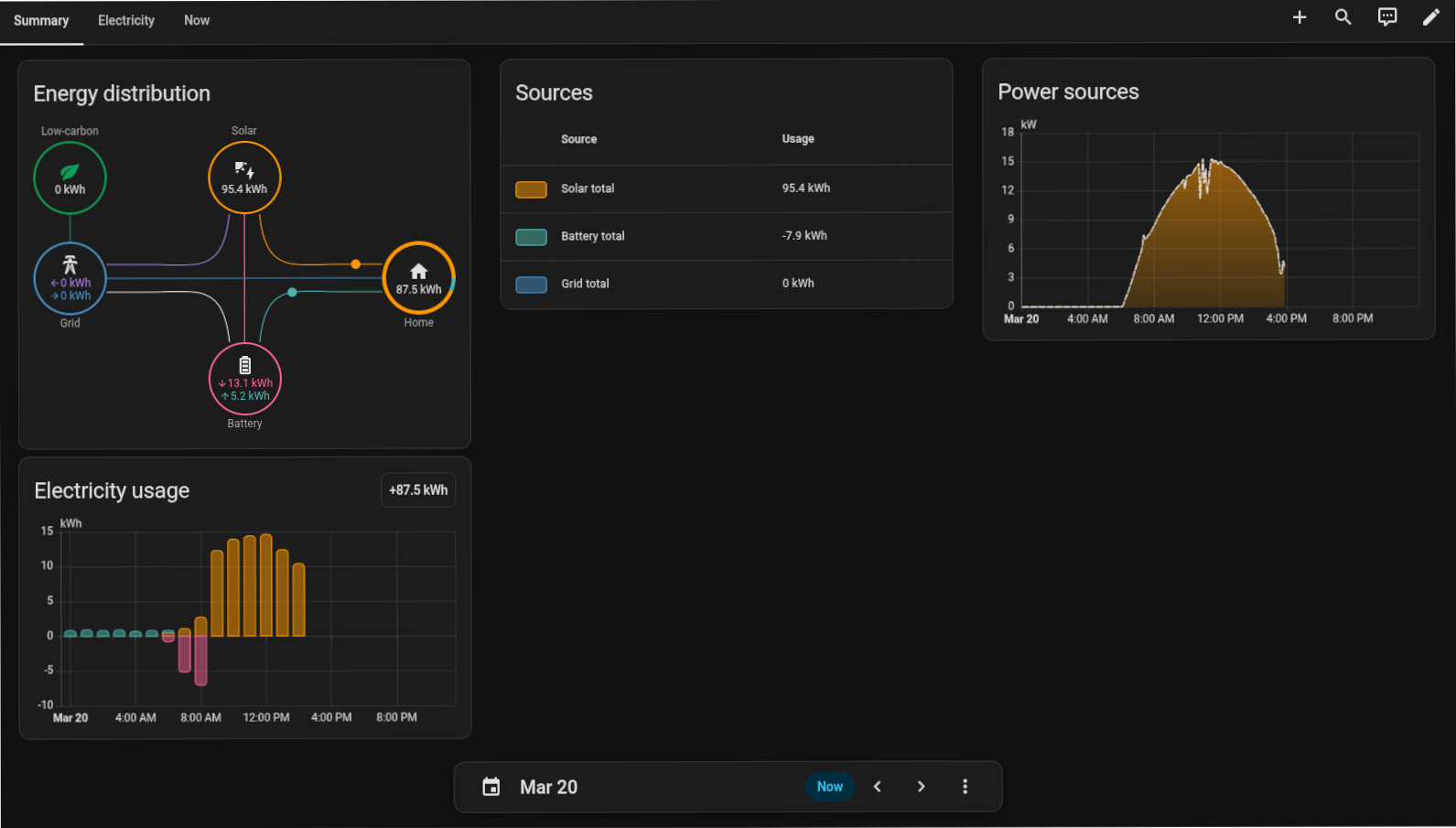
I would be grateful for any advice on fixing this at Chermside on Wednesday.
@zeeclor Phoar! 87Kwh of home usage. How many crops are you growing under the roof?? Or did you have your car on charge from almost empty?
I won’t be there at Chermside, but a lot of my button mashing with HA and battery commands I verified using the Isolar cloud data and different times of the day. (Also, getting ride of that Danger tab under EMS inverter settings)
For example, at night testing forced discharge, self consumption mode then forced charge. Isolar data (little pictograph rather than the complex graph itself) should show if the settings are working as intended. Refreshing the website to make sure 
Yay @jdownie and yet how disappointing with the rain. Today should show some good data.
Come around one evening and I’ll show you my “server farm”.
I’m interested in that. I’ve now learnt enough about Sungrow, home assistant, mkaiser and Amber to know that I don’t know much.
I got stuck on showing instantaneous power in my dashboard until I came across an excellent summary on the web on that very topic. I still have not got it going but have some more ideas about how to proceed.
A Jitsi session one night might accelerate the process.
Looks like most of the ingredients are there, but just some things aren’t mapping or accumulating correctly. Well done on getting this far - I’d argue the hard part is over. Will have a look on Wednesday night or organise an impromptu catch up to see if we can figure it out from here!
in my experience, getting the energy dashboard to “make sense” - needs (obviously) to select the correct entities … and in particular - often the trap is “single” power (or energy) flows vs “two way”.
Example : your inverter (grid meter) will report power flow at the grid interconnect point , which will be a number, but have a positive or negative sign (to indicate if its importing or exporting) … getting the “sign” correct is critical. likewise it may also provide separate entities for each, that is an entity for import & one for export …. you have to ensure you input them approporiately into the dashboard card config. when it comes to energy however (eg kWh) its important to have an entity for EACH direction … that is energy you have exported (that you hopefully get paid for:) as well as energy imported (“consumed”). This also applies for your battery system … you want to monitor EACH direction, not just the Nett
different inverter/ESS systems have different ways to express and provide these respective entities .. and in some (example my old fronius/BYD) they are not always provided by the inverter - & you need Home Assistant to “calculate” (& store them) them for you (via a “utility meter” or similar)
the other trap that often happens, power is often expressed in Watts (W) or kWatts (kW) … like wise energy in Wh or kWh … if the units are mixed or used incorrectly - you will get weird results!
before you start chasing any individual energy useage of appliances etc.. worth checking above in the first instance - to ensure your Grid, Battery & Solar are reporting correctly & make sense against what you “believe” to be the actual situation
ive accepted an invite to do a talk at late april (face to face) mtg - on my experiences with HA & Solar/energy system integration/setup …. however as you correctly state - it will be at a higher level - so that its of interest (hopefully) to broader audience.
im on the cusp of installing a Sungrow system (scheduled for this week) - to replace my 8 year old Fronius/BYD .. so within a couple weeks - im ok if you would like to “get into more detail” discussion specific to Sungrow (Im making the assumption i will have it sorted by then!! … iincluding setting it up for Globird SuperHero VPP plan)
… and of course you sound like you might be ahead of me with Sungrow - so i may have questions for you soon!
Nah, i won’t be ahead of anybody. For now this is still untouched. I made a half-arsed attempt at working out it’s IP address on my network to run a port scan, but that was one of four windows that i had open, and the other three managed to dominate my attention until the Mrs started flicking the lights on and off (that’s the signal that i’ve had enough computers for one day and i need to get my sleep  ).
).
I’ve been admiring other people’s setups whenever they have showed them, but there’s always been a lot of unfamiliar data on display so i haven’t kept up with the detail. Now that i’m looking at similar screens to the rest of you i might be able to ingest more of the information that is being demonstrated.
I’m looking forward to Wednesday night, and i do think that we have finally settled on a topic for our first “out of cycle” meetup.
Topic: ? Getting Sungrow energy flows to display in home assistant
Asking for a friend.
I have installed Power Flow Card Plus and hacked around in modbus_sungrow.yaml templates and sensors. PFCP is much more flexible than the default Energy dashboard energy distibution card which does not allow adding some of the entities I have created.
Also, having three strings and three phase complicates matters greatly for the Energy dashboard.
Despite my, and Gemini’s, best efforts “power to the grid” consistently overreads by about a kilowatt. (The parameters don’t allow for inverters internal consumption.) I have now hacked this to subtract 1100 watts from the grid_power_combined. (See below.)
Power Flow Card Plus yaml
type: custom:power-flow-card-plus
entities:
  solar:
    entity: sensor.total_dc_power
    name: Solar
  grid:
    entity:
      consumption: sensor.import_power
      production: sensor.grid_power_combined
    name: Grid
  battery:
    entity: sensor.battery_discharging_power_signed
    state_of_charge: sensor.battery_level_nominal
    color_value: true
  home:
    name: Home
    entity: null
modbus-sungrow.yaml
Below is part of the modbus-sungrow.yaml file that gets sucked into the configuration.yaml. This includes @Belfry’s modifications.
template:

  snip

  ####################
  # template: sensor
  ####################
  - sensor:
      - name: "Grid Power Combined"
        unique_id: grid_power_combined
        unit_of_measurement: "W"
        device_class: power
        state_class: measurement
        state_class: measurement
        state: >
          {% set total = (states('sensor.phase_a_power') | float(0) +
                          states('sensor.phase_b_power') | float(0) +
                          states('sensor.phase_c_power') | float(0)) %}
          {# Subtract the 1100W offset and ensure it doesn't go below 0 #}
          {{ ([0, (total - 1100)] | max) | round(0) }}

      - name: "Total Solar Power"
        unique_id: total_solar_power
        unit_of_measurement: "W"
        device_class: power
        state_class: measurement
        state: >
          {{ (states('sensor.mppt1_power') | float(0) +
              states('sensor.mppt2_power') | float(0) +
              states('sensor.mppt3_power') | float(0)) | round(0) }}

      - name: "Power Current Import"
        unique_id: "power_current_import"
        state: "{{ [states('sensor.meter_active_power') | float(0), 0] | max }}"
        unit_of_measurement: "W"
        device_class: power
        state_class: measurement

      - name: "Power Current Export"
        unique_id: "power_current_export"
        state: "{{ [(-1 * states('sensor.meter_active_power') | float(0)), 0] | max }}"
        unit_of_measurement: "W"
        device_class: power
        state_class: measurement
… and this is the final result.
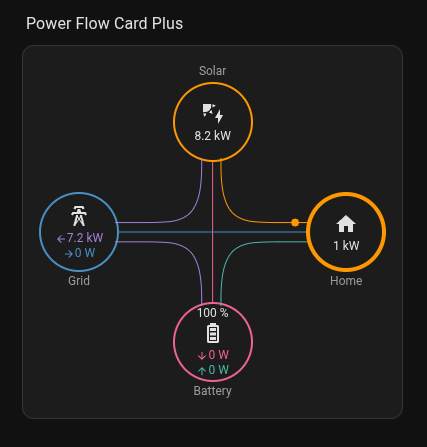
So haven’t got this far yet but I am still stuck in Amber | Devices | Final Tests … Est. Completion 2-3 days and have been for over a week.
Amber emptied my battery last Monday night but nothing has happened since.
I chatted to their bot and sent an email but got a form email back saying that they were dealing with emergencies only and would not reply back.
I s’pose I just have to wait.
@zeeclor Thanks for the introduction to Power Flow Card Plus. I’ve added that to the list of things to check out.
How are you measuring everything? The S101 tied into the inverter, or another device? That ~1100W over read is very strange.
I have a new SH15T hybrid inverter and WiNet-S2 provides almost as much information as an RS485.
Gemini said:
'The “over reading” of the grid flow occurs because the Phase Power sensors (and the export_power register) represent the raw output at the inverter’s AC terminals, but they often don’t account for the Inverter’s own internal consumption or the high-frequency overhead of the Energy Management System (EMS).
snip
Why is iSolarCloud different?
iSolarCloud uses a “Cloud Correction” algorithm. It polls data at 5-minute intervals and “smooths” the curves to make the math look perfect. Your Home Assistant setup is seeing the raw, “jittery” data every few seconds. Because the sensors for Solar (DC) and Grid (AC) update at slightly different millisecond intervals, you will often see a “shimmer” in the home load as one sensor updates before the other.
Final Tip: If the “Solar to Grid” value still feels too high compared to your utility meter, check if you have a “Power Factor” sensor available. Sometimes the inverter reports Apparent Power (VA) instead of Real Power (W), which can lead to a ~5% overread. If you see a sensor.inverter_power_factor, you can multiply your grid sum by that factor in your template.’
I couldn’t find a value for “output” kW but doing the subtraction gives a reasonably close approximation to the output. The discrepancy is not enough to make a difference to any actions one would take.
Current situation is I have access to the Sungrow data through the entities shown in the Power Flow Card Plus and access to the Amber General and Feed In prices but no SmartShift.
I understand I don’t need SmartShift to take control of my system and there are a few ways to proceed to manage it.
What do you recommend?
Hi all,
my sungrow SH20T /40kWh battery - installed yesterday.
I setup the kaaiser integration - & was pleasantly suprised . how seamlessly it was to get it replacing my old inverter/battery.
My system three phase , and 3 PV strings … but i didnt have “any isssues” getting it setup, so wasnt able to reconcile with @zeeclor experience.
quote :” Also, having three strings and three phase complicates matters greatly for the Energy dashboard”
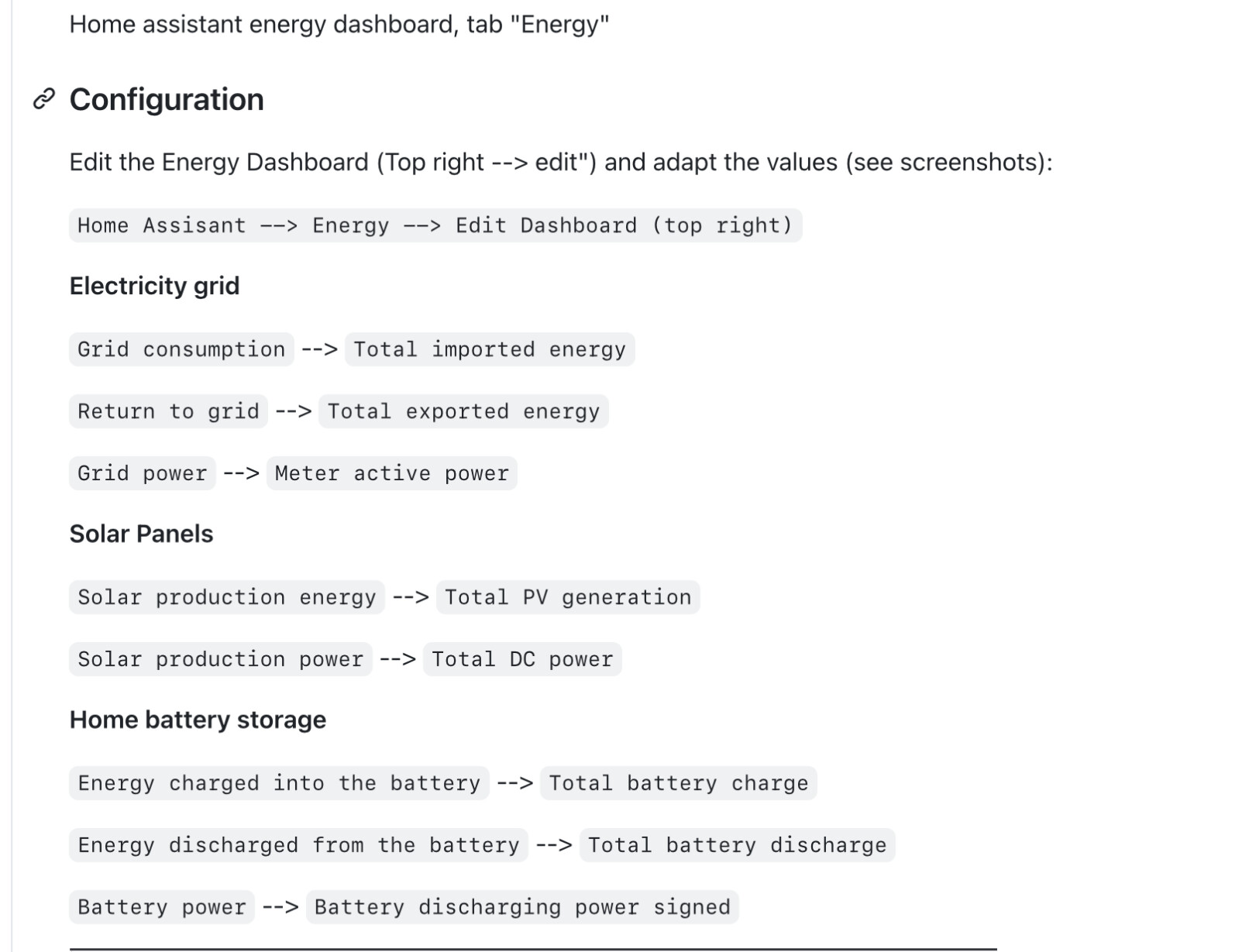
I followed the github instructions, selected teh respective entities and plugged them into default energy card (all worked as expected) .. Im also using separate power & energy flow cards . I also used the default yaml dashboard provided on the kaiser github … which instantly showed “all” the available entities .
i havent as yet looked into the “inverter internal power consumption “ (aka losses… it does get warm i realise … but 1.1kW … that sounds overly high .. is that at max power ? ( 20kW) … which would be 95% efficiency)
I would assume that “power to the grid” is coming from the GRID meter - so it measures ACTUAL …
im struggling to see how /why it would “over read” as a result of efficiency/losses?
One additional question:
anyone have experience using a modbus/RS485 to ethernet convertor fitted to com2?
my researching has identified the “limitations” when using the WiNet device (even with wlan disabled & using ethernet connected to it) … there are limitations in read/access rates via modbus even over the ethernet connection (stemming from the limited capability of the WiNet internals .. and it performing multi tasks … aka Web Server, Uploads to isolar cloud, modbus TCP, Wifi, ethernet …
so im planning to give the second com port method a try (alledgedly “no limitations on modbus read rate” .. and also circumvents the modbus proxy issue of the WiNet.
any experiences from anyone with this method &/or any specifc hardware (im planning to use “waveshare modbus/ethernet adaptor)
i used these entities (which are already summed for all phases) … so already provided for “total power” … not sure why you would sum the 3 phases? (which presumably is the same ?)
I started with the Smartshift with Amber and then I went the home assistant / mkaiser integration pathway. I haven’t tried anything else.
I just didn’t like what smartshift was doing some of the time and thought I could do better, and I’m happier having complete control of my own asset. Knowing that it’s doing exactly what I told it to do (for better or worse, and definitely worse for the first few days  )
)
So, if you’re happy sinking time and effort into planning, designing and implementing what you want your asset to be doing under different price signals / battery charge levels / weather forecasts / solar generation amounts / EV charging regimes, then go for it. Join us all at the bottom of the rabbit hole
Thanks Greg
After much stuffing around I finally understand my problem but have yet to get a fix.
The SH15T does not support the registers used for daily / total, import / export energy.
There is a fix from a month ago but the developer is leaving the project. Apart from installing a new modbus_sungrow yaml file, you have to open up modbus TCP 503 in iHomeManager with installer credentials. I haven’t had the energy to go down the installer path and am mostly hoping that things will be better in a not too distant future upgrade.
The trouble with living on the cutting edge is you bleed a lot. 