Solar Solution and Home Assistant

I have given up on getting any support from Amber. If my export to grid function is a factor in not getting on it may be that Amber has not come across the Sungrow SH15T before.

Today I have had a play with AI and Time Plan modes. However, feed in is low now and not going up much tonight so I am back in self-consumption.

I gather to take control of the battery though Home Assistant you use Forced mode. I see Sungrow settings in Automation and Scenes but have not looked into it yet. I’ll leave that for another day.

Not a rabbit hole … a warren.

@zeeclor

AH .. that explains it .. kinda weird there is that difference between the 15 & 20.

Im aware that the WiNet module has some “limitations” in the modbus details it exposes, notwithstanding that apparently your 15 gets even less than my SH20T … You might have seen my message above - im waiting my modbus converter to arrive next week - this will then expose “all” the modbus, along with allowing me to run the kaiser integration at 5sec scan interval (for the “realtime” data; and a faster rate for the “frequent” parameters) … so wondering out aloud if this method might expose the missing data for your situation? .. of course it assumes you have ethernet connectivity to your inverter .. or you can run a twisted pair for the modbus from inverter to a location you can pickup ethernet to yr router

.. yeah i hear you …. my floors in the workshop are permanently stained red …

@zeeclor

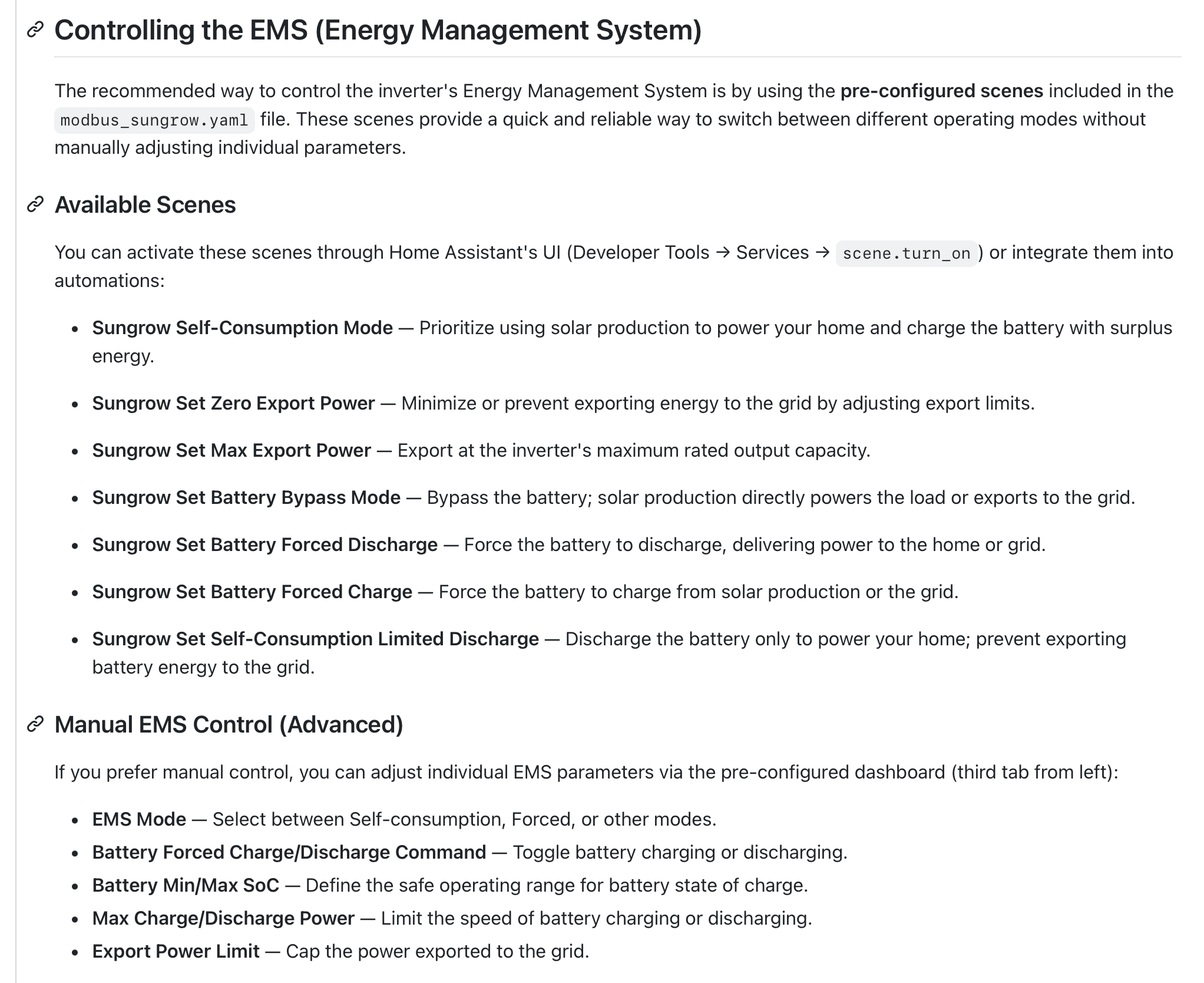
if you have the kaiser integration, then you can use “scenes” to control the modes, you will also see the manual controls … if you have “installed” the yaml card (on the githib page) .. it already has buttons/controls for the various modes.

1 Like

I haven’t had a dig into your specific inverter’s detail, but I ran into a similar issue with mine which is why I ended up synthesising the sensors myself from the registers I did have available (e.g., the YAML in the post from Dec 2025, way up in the thread). Perhaps you could something similar once you establish which ones are available?

Essentially the same response to this issue too! I was originally going to go down the route of getting a cable run, but I found that after I got the WiNet-S updated to the latest firmware I could get most of the information out of it, and it was rock solid reliable too. The missing pieces were calculated using that YAML to give me the handful of things I wanted that were only available via the wired connection.

FWIW

my system supplied this week (presumably installers updated it to latest) … so ive only ever experienced what i get from this (latest) firmwave in WiNet

Anyone on here using GloBird?

specifically with Sungrow (if possible) - im trying to setup profiles to leverage the GloBird Super hero plan (3 hrs free power 11am-2pm and FIT $0.15/kWh between 6-8pm .. capped at 10kWh ) and hence

i) forcing grid charging 11am-2pm

ii) forced battery discharge (5kW max) 6-8pm

(obviously with some caveats & logic based on battery SoC at 6pm & solar fcast for following morning)

Further to the earlier threads about “efficiency”& “Losses” in inverters .

in my SH20T ESS … (noting that you may? need access to the greater set of sensors from the inverter to be able to do the calc … )

Ive now built a couple of HA Helpers for calculating the Inverters “internal consumption/losses” (aka efficiency) (power, energy & %)
and amongst other things - ive found (& now reduced) a LOT of my “untracked consumption”..

.. and as expected the inverter exhibits some quite high % loss when operating well below its peak (in my case 20kW) rating…
.. eg typically with 10kW solar (battery full.. no charge/discharge) 350-380W of losses aka 96.7%
( now i know why my garage is nice and warm! - but it great for indoor clothesdrying!)

im graphing it overnight .. to see what happens when inverter running at v low power (from battery)
.. will post results tomorrow

if anyone want the jinja code for helper sensors lets me know

Hi Greg, I am on Amber because that was the only company I was aware of that made reasonable payments for feed in. However, from what I have read you only really make money on Amber if you can catch the price spike. This occurs rarely from what I can tell.

I am going down the home assistant track but despite becoming a “Sungrow installer” and opening up modbus 503 on my system, I am no further ahead. The port may require a wired connection or there may be some hidden ssl setting somewhere that I am missing.

I got a reply from Amber today saying that since I have iHomeManager my system is incompatible with SmartShift (viz. they are both trying to do the same thing). Those who know what they are doing get rid of iHomeManager but I will leave that for another day.

Currently I am controlling my system manually through iCloudSolar but that clearly is not a long term solution. I see iCloudSolar has an AI mode that sounds both interesting and dangerous.

About 350 watts looked like the hybrid inverter consumption on my system. I presume most of that is due to DC to AC conversion so it might be interesting to see what happens if you run the load solely from the grid.

i did some further researching … and it all gets a bit murky ..

because at the moment Im effectively calculating DC to AC losses/consumption in the inverter. which is ok given that during day (solar) and night (battery) it spends a lot of its time in a “DC” input type mode… but yes, when it is say importing AC grid power to charge battery (on a bad solar day - utilising 3 free hrs etc) … then my current calculation method will fail i suspeect … and either way if its operating with no DC input - then its getting its “power to operate” from somehwere .. even when just supplying AC power thru its backup outputs … but im assuming that its AC to AC type operation is much less lossy … and hence the “typ” 50-75W for internal operation is not as dramatic..

to test it properly - the best way would be to shutdown ALL loads, disconnect PV and battery , and hence just have the inverter “idling” from GRID power - and measure its power consumption … but that a rather dramtic forced shutodown of the house! with other issues to deal with.

looking at the graph i have running - its quite intersting - im now on battery (no grid import or export, no solar) the losses are now in the low 200’s.. and efficiency has climbed back up to ~92% (got as low as 84%)

graph coming tomorrow

@zeeclor

i did some further reading … and everything i find says that registers and sensors reported by kaiser should be “same” between Sh15T (yours?) & SH20T (mine)…

im not doubting what your saying - but im wondering if there is somethging in yoiur setup for some reason that is stopping these? additional sensors from populating?

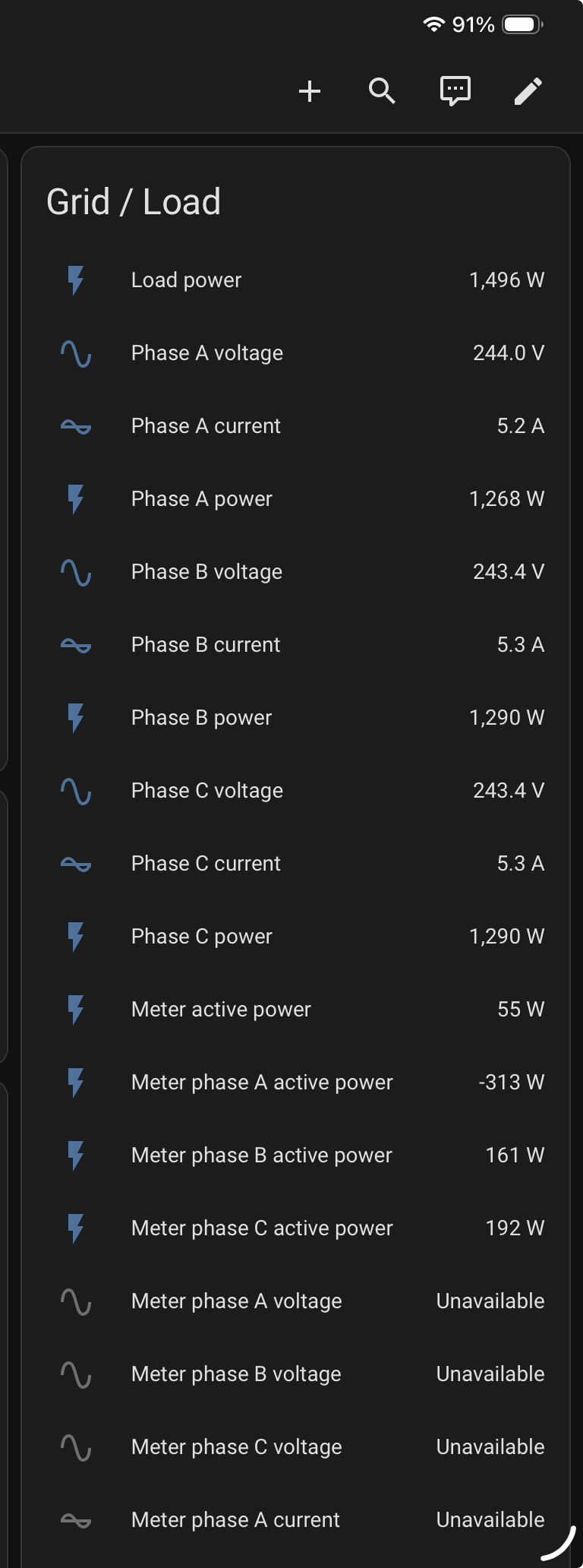
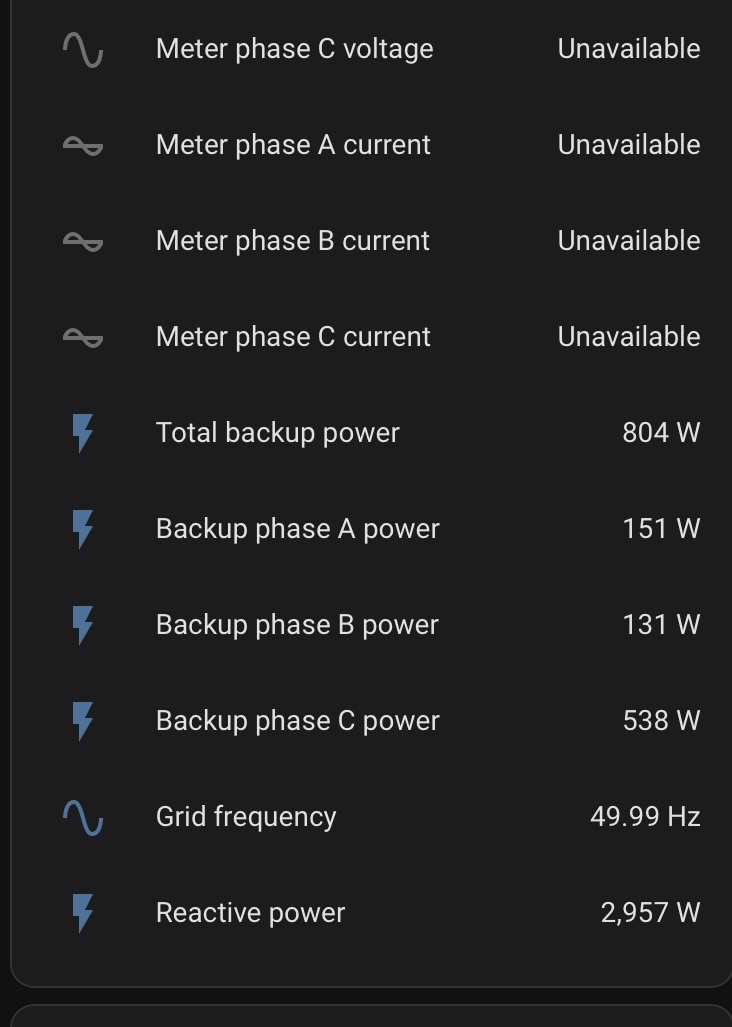
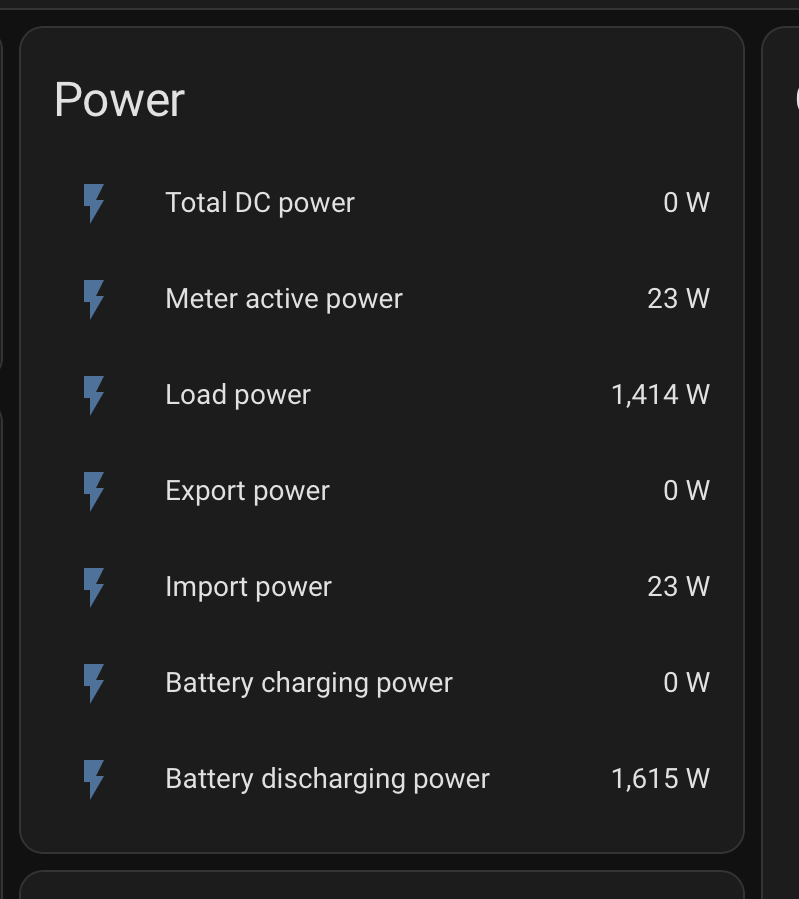
here is a snapshot of what i see - i imported the yaml for this card direct from mkaiser github - so it displays “all” the sensors - you will see in mine a few are not populated (i havent cut across to the com2 method yet - so these are all via WiNet dongle - albeit ethernet connected)

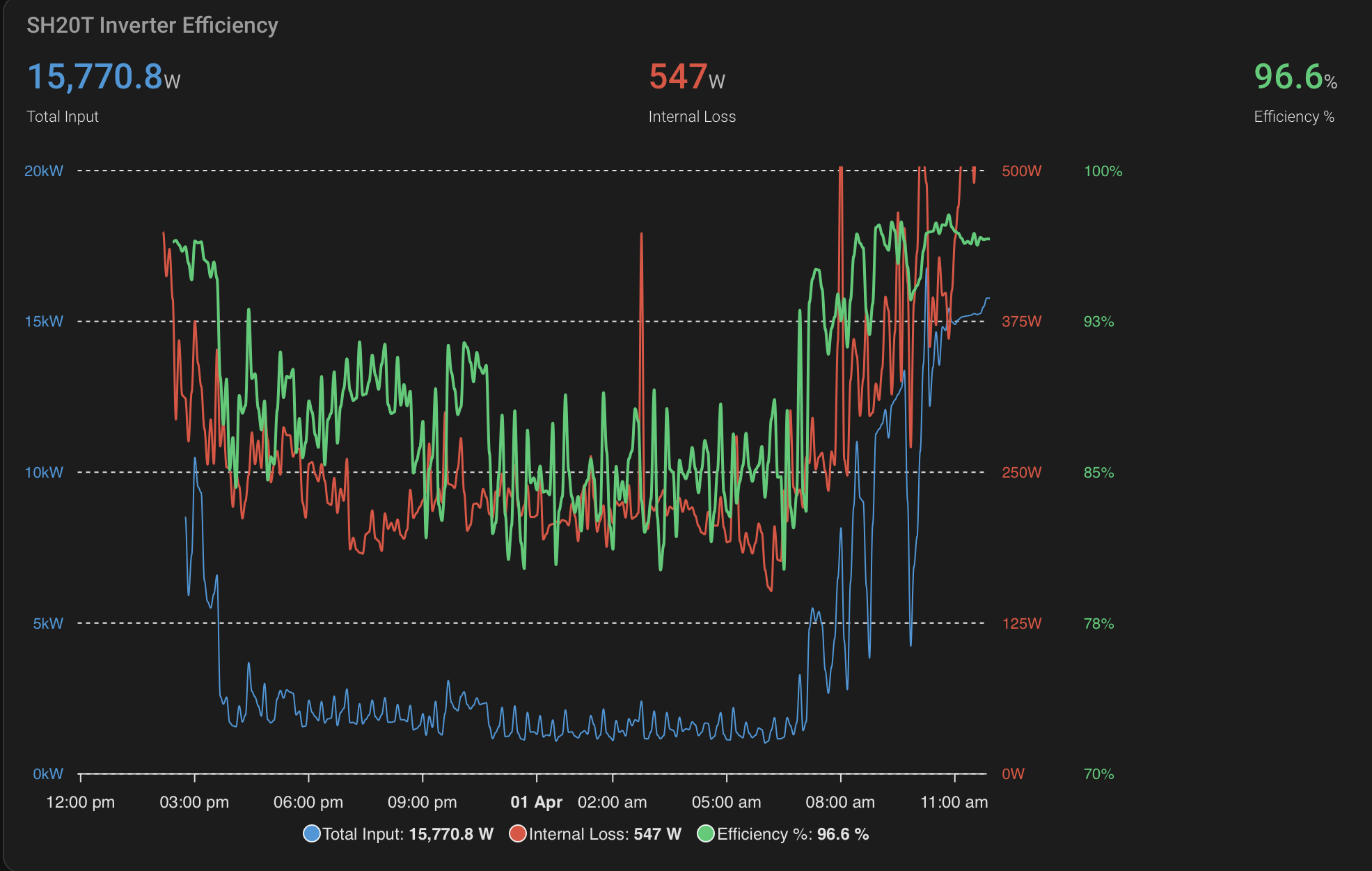
Below is graph over last 20hrs …

SH20T highest (DC to AC) Efiiciency 97.8% (pretty close the quoted “euro” method sungrow spec)

and 80.1% (over night with ~1.2kW DC input and 1kW house loads)

1 Like

Thanks @GregY for the heads up about the dashboard. It’s very cool. The scenes option is brilliant as I was dreading have to write my own scenes from scratch.

I’m now randomly hitting the various buttons in the “Danger, Danger, Will Robinson” mode. I’m sure that will be fine.

That’s correct. The registers are the same in SH15T and SH20T.

I asked perplexity about my grid import/export problems and she said there was no known fix. The issue is apparently that “When you add a Sungrow iHomeManager to your system, critical grid import/export data becomes unavailable through the inverter’s Modbus interface.” Her solution was to contact Sungrow.

In the iSolarCloud GUI there is a feedback popup in the bottom right corner. I registered my issue and received immediate acknowledgement and a work order number. I got an email the next day. They initially misunderstood my request noting that the data is clearly visible in iSolarCloud and I have replied that this is external via Home Assistant. I have yet to hear further.

I’m open to suggestions. However even without grid data, I think I can make progress.

So the inverter takes a pretty constant ~200-350 W?

I’d be interested in following this up at your talk at Carindale on 23 April.

Ok here goes - what wll be a long post i suspect.. apologies but easisest to try and reply to it all at once.

WiNet

when using the dongle, it can be conencted either via wifi or ethernet, and uses that mode for the following activities, its web UI (accessed by its ip address at port 80.. aka normal browser); it uploads selected data to iSolar cloud, it provides a TCP modbus function on port 502 (that kaiser HA modbus uses to interogate registers & populate HA sensors)

The kaiser modbus integration has a file sungrow_modbus.yaml (its huge) that lists all the registers/sensors AND for each the “scan interval” it uses .. that is how often it tries to retrive the information frommodbus connectiion.

it has 4? different “categories” of scan_interval, with default times for each. The most frequent “real time” has a default of 5sec, fast (10sec .. default?) : medium and another even slower category - that are less frequent. However even with the 5sec interval, the winet dongle “cannot” deliver these rates (from my observations ..) .. it slows them down to cope with its loading & its updates to isolar.

However - when i moved my modbus interface for HA to com2 port “logger” RS485 connections (via RS485 - ethernet modbus adaptor) I now get reliable 5Sec reporting for ALL the “real time” AND “fast” (i changeed it also to 5sec) register/sensors .. HA cannot go faster that 5sec .

After doing this - it helps with “accuracy” of calculations for power loss/efficiency .. read on… and obviously the dashboards update faster etc .

To calculate power loss (DC to AC) & efficiency - requires using a number of power sensors to effectiviely compute power IN - power OUT … and obviously you need them “all at the same time” .. to avoid obvious errors.. and even with the fast update rate - i still see some weird spikes in the calculation … so to smooth these - i use some 20sec averaging of the power loss & efficiency - before its graphed (see above) … even then - its quite spikey.

The Losses.

definitely NOT constant & it ranges from 200-700+ Watts.. its very clearly a function of the DC operating point and the AC loads.. For certain it shows its “best (~97.5%) effixciency at DC inputs of 14-18kW.. (with my 20T) … id estimnate its sweet spot to be ~75% of its peak power rating … which kind of makes sense.. but to your question, definietly NOT, I see power losses of well over 700W at times, and certainly 500+ when the solar id doing it thing (~15kW) .. remember that its a%; so even at high efficiency eg 97% .. if its runniung at 15kW .. thats 450W of losses. yes overnight at lower loads, i loose 250W ish ..

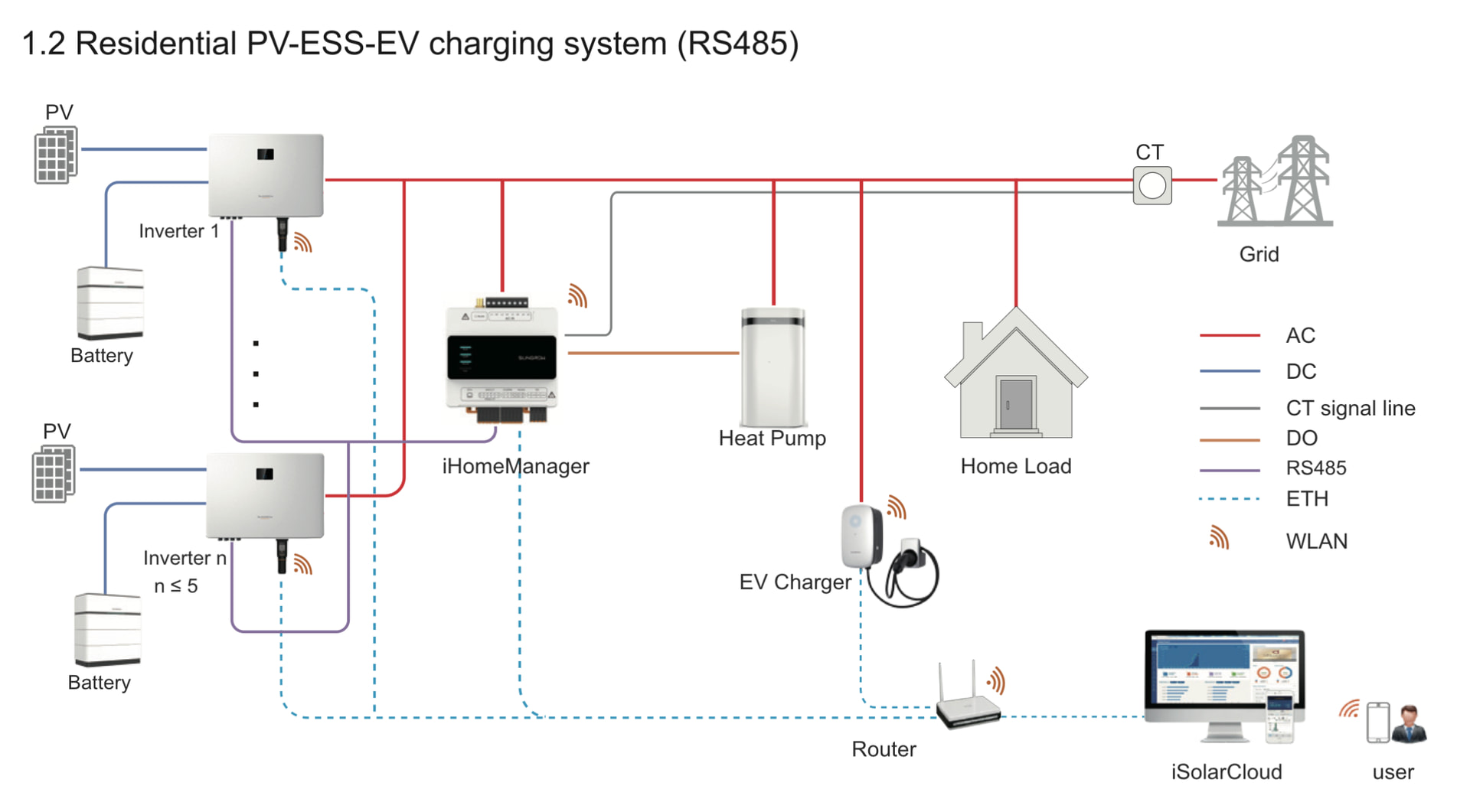
Now I see you have an IHome manager in your system & looking at the connection diagrams, it uses this same “com2 logger RS485” port (that i mention above). and it connected direct to the CT/s .. and hence it may be? the source of some? of your register/sensors.. not clear if the inverter is also connected direct to the CT/s? and if it sees the meter data directly? hence its a bit unclear (to me) if you get the data from it (only) or a combo of it & the inverter via winet? (& presumbly the different modbus port your quoting) ..so i think this is the root of your challenges .. and obvioulsy where my setup differs to yours (i have only one source of inverter/grid/battery data) .. you may have two?

the sungrow iHome manager install manual shows a few different inteconnection sceanrios … do you know how yours is wired?

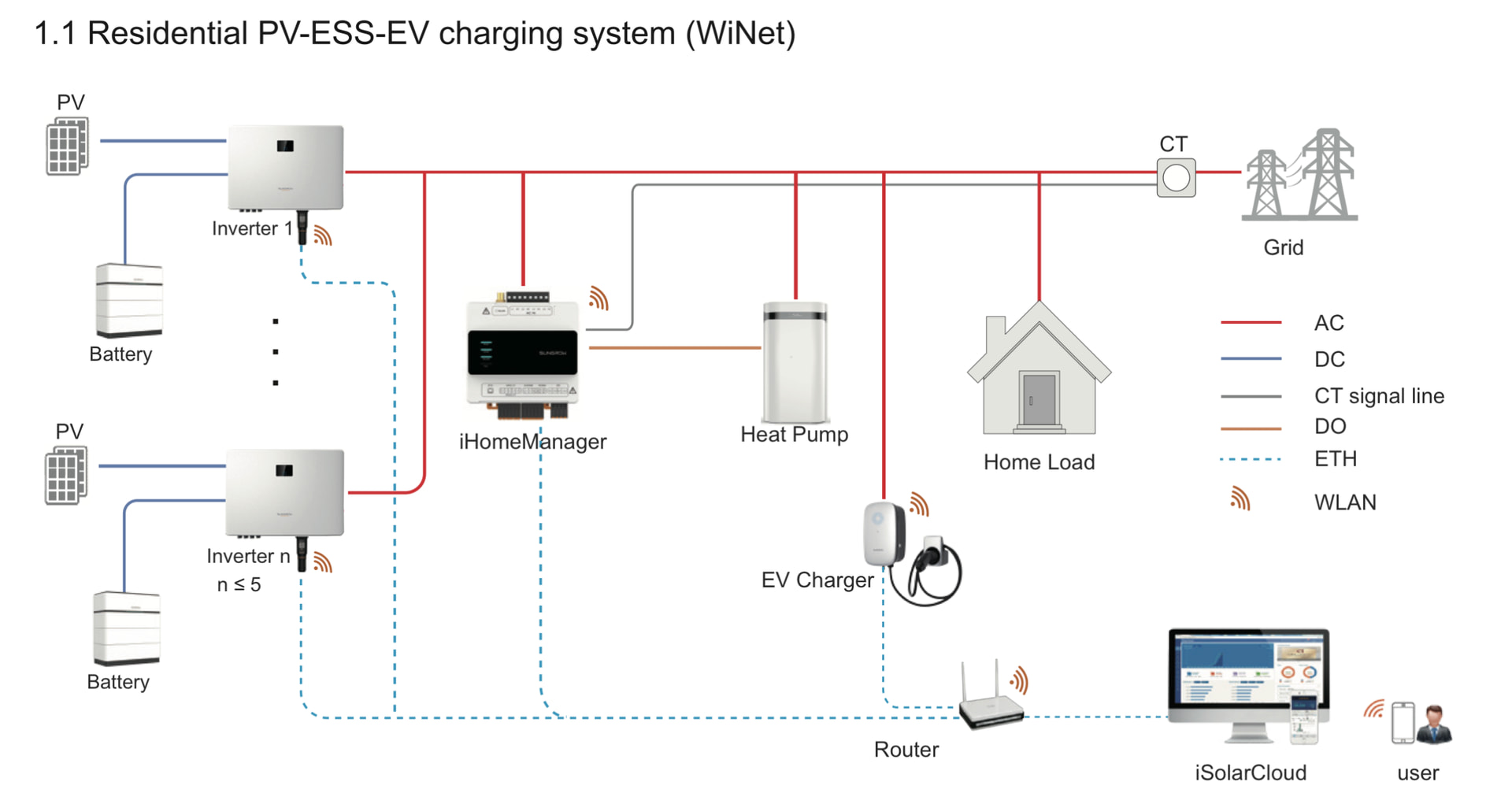
this looks to be the “typical” system diagram … is this how yours is wired?

you will see that the CT/s connect direct to iHome manager (& not the Inverter) ; and hence IT would be the source of grid power.. although presumably the inverter still needs access to this for its? decision making on import/export etc? .. but i dont understand how this occurs …

both the WiNet device and iHomemanager are shown as having their own ethernet/wlan connections, but i dont see a modbus connection between iHomManager and the Inverter …

or this one - which does have a direct RS485 connection between iHomeManager and Inverter (using com2 port i believe) … and hence presumably both devices share register data to each other … which should? then allow HA to access it all via either device (but im pure guessing here!)

Thanks Greg, I think you’re right. I don’t have a RS485 connection and hence am not getting grid information.

Adding one looks a little tricky. :anxious_face_with_sweat: