Hi all,
Updated 3 June with final results - See below post
I’m not 100% finished with the below, but I thought I’d pop it up early both to force me to document my progress so far, and in case anyone wanted to discuss it at tomorrow’s meeting.
A few weeks ago I made this comment in the Installing Deepseek-R1:14b AI Locally thread:
That’s been swimming around in my head ever since, and I’ll admit that at the time my comment was based on “the vibe” rather than any sort of hard evidence. As such, I felt it was time to put that idea to the test. I have set out to compare a couple of options around the $500 mark for running LLMs at home. This isn’t at all a scientific test, but more of an experiment to see how accessible local LLMs are without spending huge money on bleeding edge hardware.
Notably, $500 also gets you around 16 months of ChatGPT Plus after accounting for the exchange rate.
I’ve used deepseek-r1:14b in the following tests as it was the model being discussed in the thread. When evaluating “usability”, I’ve used 250 WPM as a reading benchmark (i.e., can the model generate the text faster than I can read it?), and 90 WPM as a typing benchmark (i.e., can the model interpret text faster than I can type it?). DeepSeek’s documentation states that one English character is approximately 0.3 tokens. A quick search on the internet gives me the rules of thumb that words per minute is roughly characters per minute divided by 5 (i.e., average English word length is 5 characters). Therefore the target tokens/second for “usability” are:
Reading:
- 250x5 = 1250 characters/minute
- 1250 / 60 seconds = 20.83 characters/second
- 20.83 characters/second @ 0.3 tokens/character = 6.25 tokens/second
Writing:
- 90x5 = 300 characters/minute
- 300 / 60 seconds = 5 characters/second
- 5 characters/second @ 0.3 tokens/character = 1.5 tokens/second
The target figures in Ollama using deepseek-r1:14b:
Prompt Eval Rate > 1.5 tokens/second (i.e., the model can “read” as fast as the user can type)
Eval Rate > 6.25 tokens/second (i.e., the model can “type” as fast as the user can read)
As noted in the Installing Deepseek AI Locally thread, the spare PC I’d been doing most of the playing around on is an ancient HP Z220 Workstation from mid-2012. This is the i7-3770 version, with 16GB RAM, SATA SSD, and a 4GB Nvidia GTX1050Ti (768 CUDA cores). The Z220 goes on eBay for $150-250, and the 4GB GTX1050Ti for $100-$150. Throw in an SSD upgrade and we’re not far from the $500 mark. This seems a reasonable baseline to start with.
Using Debian 12, Ollama v0.7.1, and the deepseek-r1:14b model I experienced a prompt eval rate of 5.07 tokens/s, and an eval rate of 2.45 token/s.
The second baseline option was a 2020 MacBook Air. These are on eBay at the moment for around the $550-700 mark (hence the “ish” in my $500[ish] challenge). Mine is kitted out with 16GB RAM and is the 8/8 core version so it’s probably on the upper end of that range, if not higher.
Using macOS Sequoia 15.5 and Ollama v0.7.1 and the deepseek-r1:14b model I experienced a prompt eval rate of 1.83 tokens/s, and an eval rate of 6.08 token/s.
I have no idea whether this can be optimised further to use the Apple Silicon NPU. I don’t believe Ollama currently uses the built in NPU on Apple Silicon devices, but the chip itself may be clever enough to offload those types of workloads. I’ll have to do some more reading about this.
The $500 challenge build is a Lenovo ThinkStation P330 G2 I picked up last week. This is the Xeon E-2174G version, with 64GB RAM, SSD, and no GPU (yet). This is also where I forked out the actual cash for my challenge and “ate the dogfood” now that I had a benchmark from the two existing devices.
Using Debian 12, Ollama v0.7.1, and the deepseek-r1:14b model I experienced a prompt eval rate of 8.55 tokens/s, and an eval rate of 3.24 token/s.
I’m awaiting arrival of a second hand Nvidia Tesla P4 8GB card in the coming week or two, which has 2560 CUDA cores. This is double the VRAM than the GTX1050Ti, is a similar generation card (although slightly different CPU), and 233% more CUDA cores. When researching cards, I ended up basically looking for “Nvidia card with max number of CUDA cores > version 5.0, with as much VRAM as possible for around $150” after seeing the supported GPU list. That’ll bring the total build cost for the P330 G2 + Tesla P4 option to around $520.
Summary of results
| HP Z220 + GTX 1050Ti | MacBook Air M1 | Lenovo P330 G2 (No GPU) | P330 G2 + Tesla P4 | |
|---|---|---|---|---|
| Approx. Cost (As tested) | $400 | $550-700+ | $360 | $520 |
| Prompt Eval Rate | 5.07 t/s | 1.83 t/s | 8.55 t/s | TBA |
| Eval Rate | 2.45 t/s | 6.08 t/s | 3.24 t/s | TBA |
I’ll update the table when I get the P4 card and can rerun the test. However, the MacBook M1 option can “read” and “write” almost as quickly as I can interact with it. It feels a lot more fluid than the Z220, and the P330 G2 without GPU felt pretty close to the “comfortably usable” mark as well. I was a little surprised when I saw the results of ~3.5t/s given how smooth it felt.
Hope that helps anyone wanting to look at general purpose LLMs for home. I don’t think it’s necessary to spend huge dollars unless you needed to run absolutely enormous models. I’ll leave it to you to decide whether a little over a year of a commercial LLM service is better value, or whether the privacy and usability benefits are worth it (e.g., local data, access to uncensored and specialised models). I’d also love to hear from @techman about how far $500 would go on any of the services he’s used, and his experiences with his build!
Cheers,
Belfry
 .
.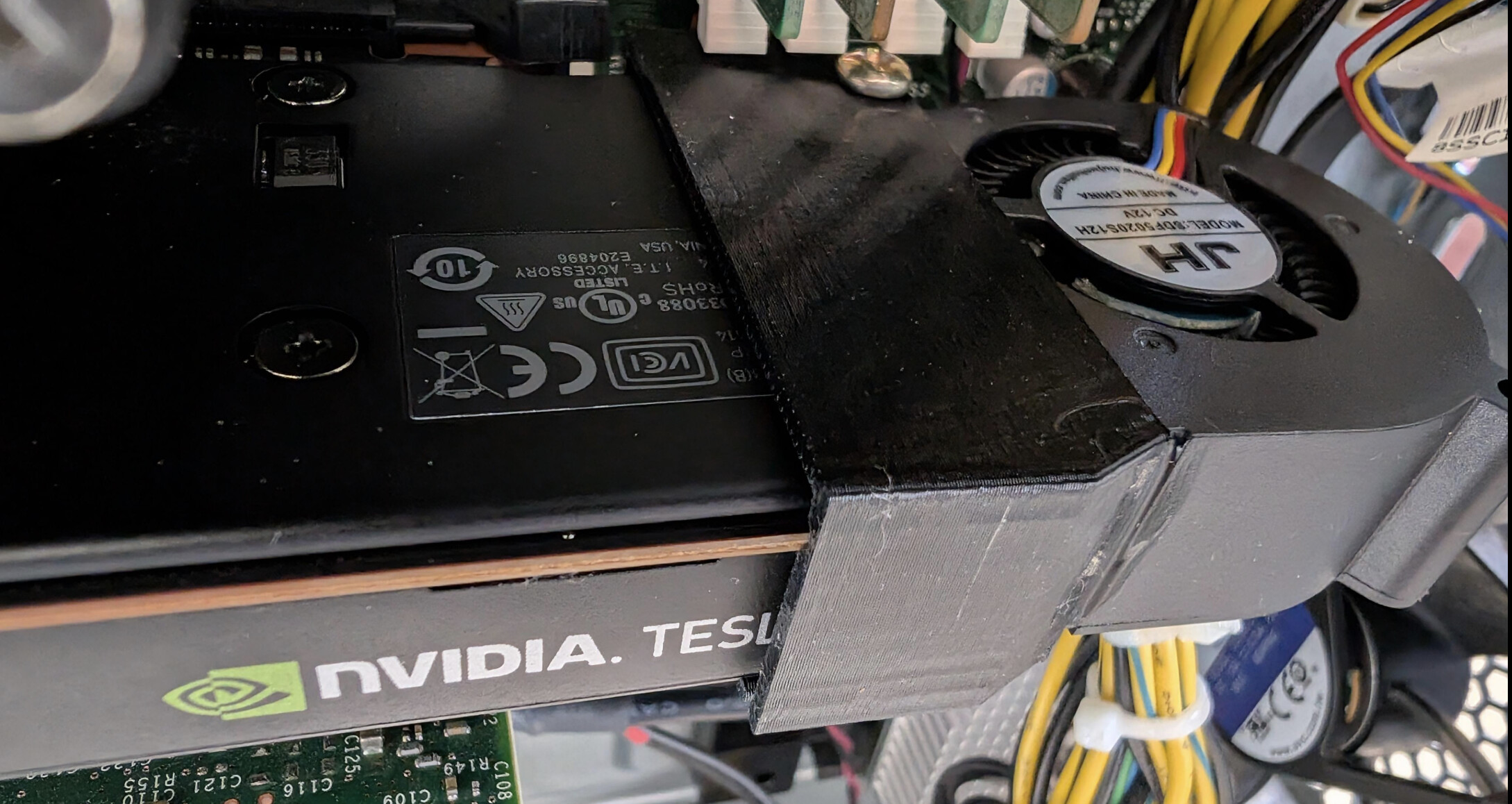



 . Lesson learned - just buy a new card
  !
!