What is NixOS ? It's a very different OS, unlike anything you've seen before!

After 3 days and 4 re-installs, I think I can now list some of the things that make NixOS very different to every other OS.

https://channels.nixos.org/nixos-25.05/latest-nixos-graphical-x86_64-linux.iso
with the very simple Calamaris Install Wizard.

  1. No more DLL Hell !. Every program has its own directory and its own libraries. Its the same with every version of a program. They don’t mix anything and claim great stability as a result of this design.
  2. The biggest REPO . I once thought FreeBSD had a huge repo with 30,000 apps. NixOS has something like 120,000 apps. check out NixOS Search?
  3. NixOS depends on a single config file that contains everything it needs. You can take this file and put it in a new machine with similar hardware and it will build itself just like the one you copied the config file from. The config file is a simple programming language itself. However it doesn’t need to be a single file, it can be many files imported into the main file for simplicity and clarity.
  4. There is no package manager One adds the wanted app to the above config file and runs a specific command, NixOS rebuilds the entire system and when its done, the wanted app is installed. This is very fast.
  5. NixOS is older than Ubuntu, it has been around for ages and has a very active community.
  6. NixOS was a Thesis project to create an exactly reproducible computer. Docker was created for a similar reason.

I don’t think there is any coming back from NixOS. Solaris I loved you well and with all my heart, but I have found another, … farewell!

[tp@nixos:~]$ df -h
Filesystem      Size  Used Avail Use% Mounted on
devtmpfs        1.6G     0  1.6G   0% /dev
tmpfs            16G   11M   16G   1% /dev/shm
tmpfs           7.9G  5.5M  7.9G   1% /run
/dev/nvme0n1p2  937G   30G  860G   4% /
efivarfs        128K   49K   75K  40% /sys/firmware/efi/efivars
tmpfs           1.0M     0  1.0M   0% /run/credentials/systemd-journald.service
tmpfs            16G  1.2M   16G   1% /run/wrappers
/dev/nvme0n1p1 1022M   46M  977M   5% /boot
tmpfs           1.0M     0  1.0M   0% /run/credentials/getty@tty1.service
tmpfs           3.2G   12K  3.2G   1% /run/user/1000
[tp@nixos:~]$ cat /etc/nixos/configuration.nix
# Edit this configuration file to define what should be installed on
# your system.  Help is available in the configuration.nix(5) man page
# and in the NixOS manual (accessible by running ‘nixos-help’).

{ config, pkgs, ... }:

{
  imports =
    [ # Include the results of the hardware scan.
      ./hardware-configuration.nix
    ];

  # Bootloader.
  boot.loader.systemd-boot.enable = true;
  boot.loader.efi.canTouchEfiVariables = true;

  networking.hostName = "nixos"; # Define your hostname.
  # networking.wireless.enable = true;  # Enables wireless support via wpa_supplicant.

  # Configure network proxy if necessary
  # networking.proxy.default = "http://user:password@proxy:port/";
  # networking.proxy.noProxy = "127.0.0.1,localhost,internal.domain";

  # Enable networking
  networking.networkmanager.enable = true;

  # Set your time zone.
  time.timeZone = "Australia/Sydney";

  # Select internationalisation properties.
  i18n.defaultLocale = "en_GB.UTF-8";

  i18n.extraLocaleSettings = {
    LC_ADDRESS = "en_AU.UTF-8";
    LC_IDENTIFICATION = "en_AU.UTF-8";
    LC_MEASUREMENT = "en_AU.UTF-8";
    LC_MONETARY = "en_AU.UTF-8";
    LC_NAME = "en_AU.UTF-8";
    LC_NUMERIC = "en_AU.UTF-8";
    LC_PAPER = "en_AU.UTF-8";
    LC_TELEPHONE = "en_AU.UTF-8";
    LC_TIME = "en_AU.UTF-8";
  };

  # Configure keymap in X11
  services.xserver.xkb = {
    layout = "au";
    variant = "";
  };

  fonts.packages = with pkgs; [
  noto-fonts
  noto-fonts-cjk-sans
  noto-fonts-emoji
  liberation_ttf
  fira-code
  fira-code-symbols
  mplus-outline-fonts.githubRelease
  dina-font
  proggyfonts
  ];


  # Define a user account. Don't forget to set a password with ‘passwd’.
  users.users.tp = {
    isNormalUser = true;
    description = "tp";
    extraGroups = [ "networkmanager" "wheel" ];
    packages = with pkgs; [];
  };

  # Enable automatic login for the user.
  services.getty.autologinUser = "tp";

  # Allow unfree packages
  nixpkgs.config.allowUnfree = true;

  # List packages installed in system profile. To search, run:
  # $ nix search wget
  environment.systemPackages = with pkgs; [
  # linuxKernel.packages.linux_zen.nvidia_x11
  vim # Do not forget to add an editor to edit configuration.nix! The Nano editor is also installed by default.
  alacritty
  mc
  wget
  fossil
  git
  kicad
  helix
  neovim
  graphviz
  calcurse
  pwsafe
  vlc
  mpv
  ollama-cuda
  undertime
  hexchat
  gkrellm
  vscode
  telegram-desktop
  brave
  sqlite
  ];

  # Some programs need SUID wrappers, can be configured further or are
  # started in user sessions.
  # programs.mtr.enable = true;
  # programs.gnupg.agent = {
  #   enable = true;
  #   enableSSHSupport = true;
  # };

  # List services that you want to enable:
  # X Windows
  services.xserver.enable = true;
  services.xserver.videoDrivers = [ "nvidia" ];
  hardware.graphics.enable = true;
  hardware.nvidia.open = true;
  services.xserver.windowManager.icewm.enable = true;
  services.xserver.autorun = false;


  # Enable the OpenSSH daemon.
  services.openssh.enable = true;

  # Open ports in the firewall.
  # networking.firewall.allowedTCPPorts = [ ... ];
  # networking.firewall.allowedUDPPorts = [ ... ];
  # Or disable the firewall altogether.
  networking.firewall.enable = false;

  # This value determines the NixOS release from which the default
  # settings for stateful data, like file locations and database versions
  # on your system were taken. It‘s perfectly fine and recommended to leave
  # this value at the release version of the first install of this system.
  # Before changing this value read the documentation for this option
  # (e.g. man configuration.nix or on https://nixos.org/nixos/options.html).
  system.stateVersion = "25.05"; # Did you read the comment?

}
2 Likes

Would like to hear more about this at the next meetup!

1 Like

That’s a big call! I’d also like to hear more about NixOS. It’s one of those things that I’ve seen pop up every now and then, and has always ended up in the too hard basket.

However, I’m acutely aware that for random projects at home all I tend to do is reach for the latest Debian Netinst ISO, install the system, and then manually type a bunch of the same commands over and over to get things going the way I need to. This is a problem that I should really be solving by throwing a bash script into Git or Fossil or using Ansible or doing literally any sort of automation at all…

Thanks for sharing your config as a starting point. The install process looks relatively straightforward overall. Is there any sort of configurator anywhere (along the lines of archinstall, make menuconfig for the kernel, etc.? I haven’t looked too deeply yet but have seen a few options to generate configs out of a current NixOS install, but nothing jumps out at me as an obvious way to get started other than to hand edit an existing config in a text editor.

Also great to see NixOS supports ARM64 and also leverages the excellent work by Asahi Linux to support Apple Silicon devices. I was tempted to try Asahi on my old MacBook, but it may end up as a NixOS machine if I can wrap my head around the concepts on X86-64 first!

I forgot to mention that part!

I just downloaded ‘latest-nixos-graphical-x86_64-linux-25.05.iso’ from the Nixos homepage and DD’d it to a flash drive. It’s a simple gui installer, basically one adds username and password, root password, language, origin, selects keyboard type, auto partition and it’s done. It’s among the easiest installs ever made.

A configuration.nix file isn’t required as it creates one to suit your pc along with a hardware.nix file unique to your machine.

Then one edits the configuration file to add the applications you want etc (my configuration file is only handy as a example, you’d never use it directly) and runs ‘nixos-rebuild switch’ and it then rebuilds everything to suit the new configuration file, done!

Sounds easy and it is. Watching all the decent utube videos on NixOS and reading all the doc will probably take a year. It took me 4 days with a fast virgin PC to get a useful install.

The learning curve is pretty steep, but we love that, right ?

Yeah, i’m keen to follow along with you. I’d also love to see you demonstrate your progress at next month’s meeting.

That config file is both the best and worst thing about the idea. Because it’s the singular way to configure every aspect of the operating system, it felt like something that couldn’t possibly be exhaustive.

I’ve gone down a Fedora Atomic path, and it’s got it’s own limitations. Everybody that i’ve listened to that has stuck with NixOS feels the same way that you do; that it’s not something that they can see themselves coming back from.

I imagine i could focus on migrating my Sway desktop environment over to NixOS, particularly now that most of my day to day terminal stuff is done in distrobox sessions anyway.

Very keen to hear more about this!

2 Likes

I guess my 4 day old noobie NixOS configuration.nix file is a poor example of ‘best practices’.

There is a much nicer one below, but if you want a more complex setup see GitHub - mitchellh/nixos-config: My NixOS configurations.

A simple example of a NixOS system configuration is as follows:

{ config, pkgs, ... }: {
  # Import other configuration modules
  # (hardware-configuration.nix is autogenerated upon installation)
  imports = [
    ./hardware-configuration.nix
    ./my-dev-tools.nix
    ./my-desktop-env.nix
    ./etc.nix
  ];

  # Name your host machine
  networking.hostName = "mymachine";

  # Set your time zone
  time.timeZone = "Europe/Utrecht";

  # Enter keyboard layout
  services.xserver.layout = "us";
  services.xserver.xkbVariant = "altgr-intl";

  # Define user accounts
  users.users.myuser = {
    extraGroups = [ "wheel" "networkmanager" ];
    isNormalUser = true;
  };

  # Install some packages
  environment.systemPackages = with pkgs; [
    ddate
    testdisk
  ];

  # Enable the OpenSSH daemon
  services.openssh.enable = true;
}

Seven Days later:

  • I’ve migrated fully to the new AI PC running NixOS 25.05
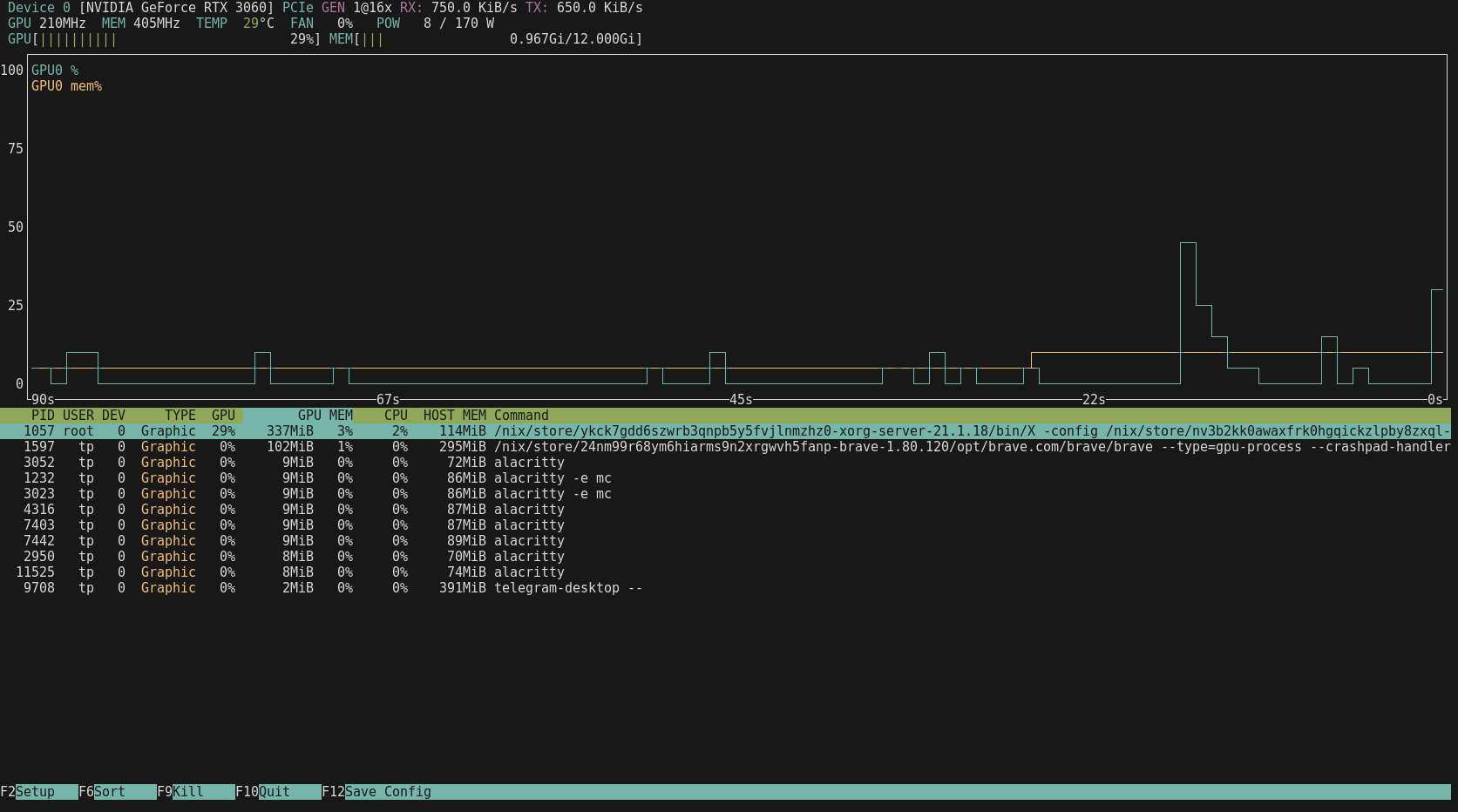
  • AI is working (on one GPU only so far. havent been able to get at the other one in the Ubuntu pc)
  • Hi Res Xwindows is working with ICEwm
  • Sound worked first time
  • I copied everything over from my old Ubuntu workstation /home/tp, now it’s all the same here
  • No issues, no odd behaviours, perfectly stable, boots in a few seconds
  • Install apps faster than any other OS I’ve seen yet.

1 Like

I must be mis-remembering my NixOS experience. I thought NixOS suffered from the same app installation problem that Fedora Atomic does… that every installation requires a reboot. Fedora Atomic is especially frustrating because the installation itself (without the reboot) is very slow.

That’s why i use distrobox for most of my command line stuff. I boot into Fedora Atomic, which has a very modest number of packages installed with rpm-ostree. One of those packages is distrobox. I then use distrobox to start a Ubuntu 24.04 container. In Sway, i can launch a terminal one of two ways. One is pressing Super+Enter, which launches kitty and starts a distrobox session. I can easily install ubuntu packages in that environment without reboots. If i ever mess it up i can destroy that ubuntu environment and start again.

The other terminal option is Super+Shift+Enter which starts kitty on the bare-metal install. There i generally install flatpaks, and very sparingly incur a reboot with a rpm-ostree installation.

Anyway, just wondering if any of that approach is useful to you.

Oh, in my starship terminal prompt, i check an environment variable and change the bash prompt to show a laptop unicode character for the bare metal session, and a cardboard box icon for my distrobox sessions (so that i can easily get my bearings)…

Here’s a bare-metal prompt example…

image

No, running “nixos-rebuild switch” to add a program or system change hasn’t required a reboot yet. In fact I have added a few programs in the last hour while entering stiff into this server and fossil and watching Youtube videos.

[tp@nixos:~]$ uptime
09:00:16 up 3:13, 2 users, load average: 0.08, 0.13, 0.14

I was starting to get worried that I’d have to switch to new and different versions of the PCB and Schematic Capture software that I’ve used for over 30 years and at my age when I only do a few designs in my retirement a year, this was a big thing!

These apps are “PCB” designed around 1994 by Thomas Nau for his Thesis and gSchem which became part of gEda and was designed by the great Ales Hvezda while he worked in AI.These apps are fully debugged, and have been for many years, they still design schematics and lay out PCB’s as they always did. The output formats haven’t changed in the industry, I doubt they ever will.

Sadly these are old guys like me and for the last 20 years, others have taken up the mantle of maintenance, but they’re gone now. The original programs needed libraries that are old and non maintained, such as Guile-1.0 and so on.

Then I noted that neither are available in Ubuntu, they’re just .. gone. There are ‘replacements’ but I don’t like them, and they’re buggy.

After I switched to NixOS, I searched NixOS Search and guess what ? The originals are there, still alive and well and living in their own isolated sandboxes!

That’s why NixOS has 120,000 applications I guess, and why all the others have 30,000. They’re still fighting DLL Hell ?

I’ll second that.

I threw NixOS into a VM yesterday and it’s dead easy to get going. The only issue I had was because my typical just gonna quickly try this out VM template in Proxmox only has 2048MB RAM and the installer crashed. Ditto for 4GB… but it worked fine on 8GB. I can’t find any published minimum system requirements, but 4GB is too small for the graphical installer without it crashing around the 50% mark. Next challenge will be to take that configuration and run the text mode installer to see if I can get it going on <8GB once I have a few premade configs.

I digress. The installer is really easy - thanks for giving me the nudge to try it out and take NixOS from being “that neat thing I keep seeing on YouTube” to something I’m actually going to give a red hot go. I’ve only made a handful of minor config changes so far in my test VM, but the config edit and nixos-rebuild switch process is pretty straightforward.

My next step is to follow @techman and move my own ollama machine over to NixOS, hopefully this week.

Very exciting, I’ll be waiting with baited breath for your updates :slight_smile:

Some of this is already documented starting at this post - $500[ish] AI Build Challenge - #18 by Belfry, but I’ll cover the NixOS specific stuff here.

I did restart that machine from scratch using NixOS rather than Debian. I had some initial issues getting the nvidia drivers to work, but I think that more about my own unfamiliarity with NixOS than anything else. My use case for this build is a machine that has no desktop environment, and runs nothing other an ollama and the associated CUDA drivers, with the ollama API to be queried by OpenWebUI on a separate host. The hardware, etc. is discussed in that thread so I won’t cover it here. I also won’t reproduce my entire configuration.nix file below, but here are the few places I’ve deviated from the default post-install configuration.nix, and why:

 # Allow unfree packages
  nixpkgs.config.allowUnfree = true;

This is a tick box during the install. It’s required for the nvidia drivers and can be added if the box wasn’t ticked during install time. Even if open drivers are being used (see below), apparently some of the related components are still non-free.

  #Nvidia stuff
  hardware.graphics.enable = true;
  hardware.nvidia.open = false;
  services.xserver.videoDrivers = [ "nvidia" ];

The top and bottom lines tripped me up initially. hardware.graphics.enable is more about graphics acceleration than graphics themselves. Similarly, it took me a while to realise that the services.xserver.videoDrivers line was necessary as it was loading the nvidia drivers themselves. I had initially omitted this as I was running the machine headless (and therefore “don’t need xserver drivers” - a reasonable but entirely incorrect assumption). Despite the reference to X, this is still necessary to load the nvidia drivers at all. The middle line hardware.nvidia.open will be card specific. Newer cards apparently have quite good open drivers, but I’m using older hardware which need the non-free drivers.

  # Compile all packages with CUDA support
  nixpkgs.config.cudaSupport = true;

I deviated from @techman’s approach here. He has installed ollama-cuda whereas I have flagged that where any package exists that has a cuda variant, the cuda variant should be used system wide. It achieves the same thing (running ollama with cuda acceleration), but if there are any other packages in the chain that also have cuda support lurking somewhere, then those will also be compiled with cuda support.

Packages added were:
ollama (see above regarding ollama vs ollama-cuda)
nvtopPackages.nvidia (nvtop is handy to keep an eye on the card - this was a straight copy and paste from @techman’s config)
btop (unrelated to nvidia or ollama stuff, but btop is my favourite top)

#Ollama cudaArches workaround
  nixpkgs.config.packageOverrides = pkgs:
    { ollama = pkgs.ollama.override {
      cudaArches = [ "61" ];
    };
  };

Discussed further in the $500[ish] AI build thread linked above. Specific to my cards I’m playing with (GTX1050Ti and Tesla P4), and is a workaround for a quirk where NixOS was only compiling CUDA support for a subset of newer nvidia cards rather than all the cards that ollama supports.

  # Ollama config
  services.ollama = {
    enable = true;
    openFirewall = true;
    host = "[::]";
  };

Set up ollama as a service, enable it, open the firewall, and have it listen on all interfaces.

Lastly, I uncommented the line near the bottom of configuration.nix to enable the SSH server (headless machine, after all).


That’s it! So, how did it go in the Z220+GTX1050Ti?

I didn’t time it, but the NixOS install took a few minutes at most, I did the initial reboot, dropped my additional lines into configuration.nix as documented above, did a sudo nixos-rebuild switch, wandered off as everything compiled…

buildPhase completed in 11 minutes 7 seconds
checkPhase completed in 3 minutes 58 seconds

… and it just worked. No reboots, no nothin’. The config I got together on machine #1 (the P330) worked perfectly on machine #2 (the Z220) - same generation of nvidia card requiring the same CUDA/ollama workaround was a bit of a stroke of luck, admittedly. I honestly spent more time digging the Z220 out from under the house and putting the GTX1050Ti back in it than I did in the rest of the process combined.


Absolutely dead easy for someone who hadn’t even picked up NixOS until two days ago, spent an hour or so on a VM going “oh, this seems neat”, and then jumping head first into it this time yesterday.

For the benefit of others, I found this excellent post on NixOS package cleanup when trying to work my way through the nvidia driver and ollama issues. I went through and deleted all my superseded builds using this process last night and it was super easy.

Give NixOS a go, if you haven’t already!

My next steps will be to complete the rest of my assigned “HLB homework” and set up Caddy for a certificate for the Ollama API, set up a NixOS VM to get Tube Archivist going, and then save the config files in a git or fossil repository…

1 Like

Well you guys certainly do your homework!

I’m giving you, David and JD an ‘A’ on your report cards this month :slight_smile:

Have you added a drive to a NixOS system yet ?

Its so easy:

  • mount the drive where you want it
  • run ‘nixos-generate-config’ (this won’t affect the configuration.nix in any way) as it only changes the hardware-configuration.nix file
  • run ‘nixos-rebuild switch’

That’s it, the drive will now be mounted automatically after a powerup.

Haven’t added a drive, but I did give nixos-generate-config a crack when I was trying to get dual cards working earlier today. Didn’t help me get the two cards running, but can confirm it didn’t impact the all important configuration.nix which was nice to see.

Which is how I imagined that your initial install would go when I recommended NixOS to you. … silly me, but you made that happen in the end :slight_smile:

1 Like

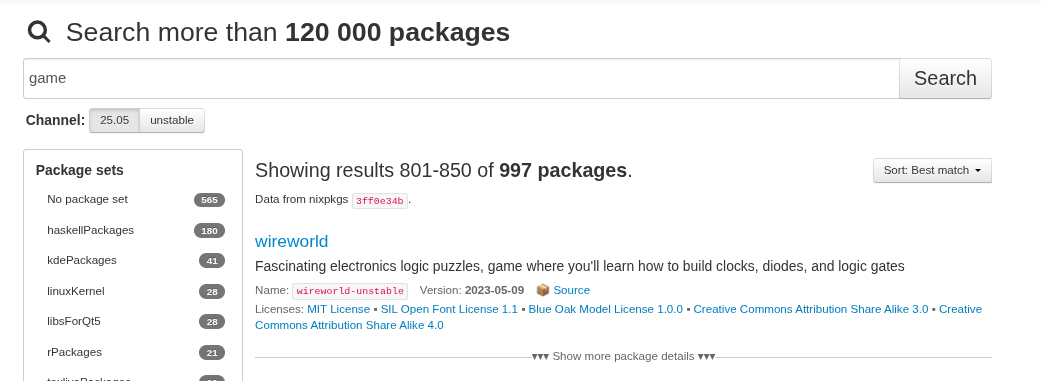
NixOS currently has almost ONE THOUSAND GAME packages!

But beware … they can seriously affect project completion!

I started with NixOS today and was impressed with Li Yang’s simple tutorial, NixOS Intro - Installation and basic usage. His associated blog post allows one to follow along to get things working. I found it surprisingly easy to get started and shortly after a minimal install upgraded to a GUI with my preferred gnome, vivaldi and thunderbird.

I note that enthusiasts like the reproducibility of a single config file and for Li it has largely replaced Ansible for his VM and server deployments.

However, he then went on to Home Manager and Nix Flakes and config was no longer in the one file. (I won’t go into the deeper rabbit holes he dives down for using Nix on other operating systems and distros, multiarch docker development and remote management.)

I am thinking for newbies you stick to configuration.nix and the nixoscenti push the boundaries with Man Flakes.

Are HLBers just on the one config file?

1 Like

I’m using a single config file. I can see there might be some value in having a few different standard config files and importing them in configuration.nix, but I’ve got no idea what the best practice is for NixOS.

I wasn’t aware of Flakes at all, but found this intro after a quick search. Fascinating but I dare say well beyond my use case!