I’m still on the one (huge) config file but I can see some reasons for ‘home manager’.
A huge list of apps inside a file with other configs is impossible to manage, and impossible to sort unless one writes a program to do it.
And I have plenty of other higher priority programs to write !
I must say, that NixOS has rekindled my fun times with Linux, I’ve done more new things in the last 3 weeks than with any other distro or OS I’ve ever used, and I’m far more productive now, while developing.
NixOS helped me discover and install ‘Marksman’, a very featurefull Markdown Language Server for Helix.
Oh, did I mention I’ve dropped Neovim for Helix … why ? Helix is 90% complete out of the box, is really well made, fast as it’s made with Rust. It impresses me more every time I use it.
I highly recommend ‘Helix’.
Neovim while super easy and has a great community uses Lua which can be a bit slow depending on the task. Plus Nvim comes bare bones (atm).
I enjoyed our chat on Tuesday night. I come to the meetings thinking I know a little about the topic and come away realising I know nothing.
Following @techman’s intro I have a rough feel for nixos and now have it running in a VM. It’s reproducibility seems to be a key feature so I thought once I was happy with the VM I could install my configuration.nix on a new machine and it would all magically rebuild itself. Is this the ideal solution servers?
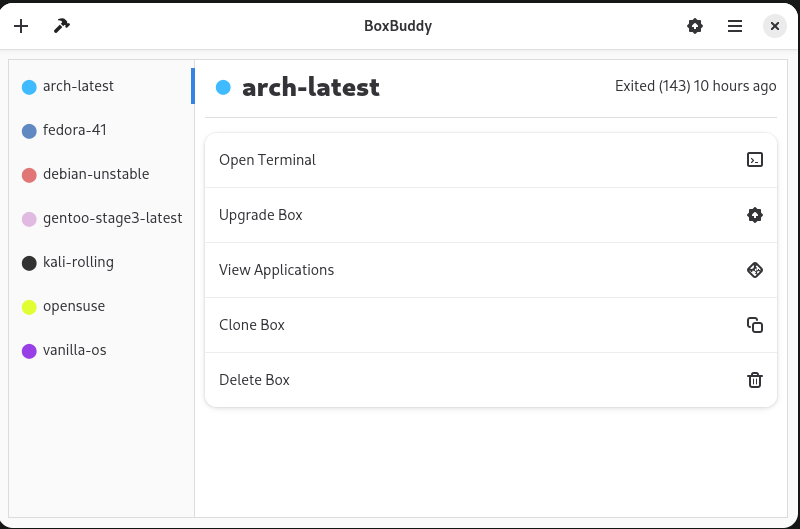
I didn’t really understand Silverblue, or flatpaks for that matter, until @jdownie’s presentation. I have now installed distrobox and to make my life simpler boxbuddy. I think I have probably gone a bit overboard.
However, I find it difficult to tell which box I am in and am constantly running cat /etc/os-release. I need his prompt hack to sort my almas from my voids.
I think I should do a ‘Nixos part 2’ in another month so I can cover some of the important stuff I neglected to mention, such as ‘nix-shell’ and perhaps build a demo Flake showing the process ?
If you have a spare slot, please put me down for it.
Another interesting talk I’d like to volunteer for would be ‘Using Aider Agentic pair programmer with a low-cost online AI’
I don’t think a Tesla would appeal to me as much as my current black Audi Quatro. It’s also permanent four wheel drive like the Tesla, but it has ‘Torsen’ diffs and is repairable and far more reliable.
And my Audi doesn’t explode in flames like Teslas just because
Flox, the Nix Foundation, and NVIDIA are teaming up to make it easier for teams working with the NVIDIA CUDA GPU compute framework to build and ship CUDA-accelerated stacks.
Teams can now easily build and deploy portable CUDA runtimes—including software like the NVIDIA CUDA Toolkit, Tensorflow, NVIDIA TensorRT, PyTorch, OpenCV, and other packages—that run anywhere, at any time. Not only that, they can easily install selected historical versions of CUDA packages—essential for supporting existing production workloads—alongside alternative CUDA package versions on the same system, at the same time.
The best part? All of this just works. Without changes to your global system state. Without containers or VMs.
This project provides automatically updated NixOS images that complement the official images from hydra.nixos.org. New images are built weekly to ensure you always have access to the latest NixOS features and security updates.
Available Image Types
We currently offer three types of NixOS images:
ISO Installer Images: Bootable USB images for installing NixOS on physical hardware
Kexec Tarballs: For booting NixOS installer from an existing Linux system
Netboot Images: For booting NixOS over the network via PXE/iPXE
I’m in the process of swapping some new gear into my AM4 based machine in order to squeeze a few more years out of it. It’s nominally my “gaming” PC, but I as I get little time to game, it’s turned into more of a “I need to do something that needs a bit of oomph” machine / “I need to use Windows for something specific” machine. I’m going to take the opportunity to reinstall the PC at the same time.
@skalyan, @techman any issues as far as running NixOS as a daily driver goes? I recall you both mentioning that you’re running it for general use. Which WM are you using? Any strange compatibility issues or quirks you’ve run into along the way while using NixOS for day to day use?
NixOS has been 100% reliable (enabled me to finish FURS) but is currently broken to the point I can’t add any new apps from the repo.
NixOS is seriously complex, under active development and has a fair bit of breakage. I like the IRC group (# libre-irc 650 members), they’re nice people, very skilled and knowledgeable.
But I’m tired of the effort maintaining Nixos and seriously considering moving back to some other Linux (Linux not having ZFS on boot is beginning to bug me) or FreeBSD where life is simple again.
There is no rush as I can always use “nix-shell -p” to run any app for a while, but the system is broken and I can’t fix it, especially on slow old Starlink Standby as NixOS needs a high speed connection for updates.
Also not being able to run apps in /user/bin is bugging me now as it’s a major PITA, and I don’t really need a ‘fully reproducible system’ as most package managers allow easy recording of existing and then install of the same apps from a list.
Yawn, searching for a new OS again. I think I’ll try ‘nixvim’ next as that looks decent, and allows nvim out of the box. I need Nvim for the database reading popup I developed for it while on Ubuntu.
I really want to get back to the reliable simplicity of Unix and just develop my Forth language electronics projects.
Thanks for the feedback. I haven’t had any issues with “fragility”, but admittedly I haven’t sat down to do any real work on this machine since it’s been running NixOS either. I’m tempted to give it a run with the odd game and keep doing productivity type tasks on my Macbook for the time being.
I think that’s the major insight. Even this afternoon I’ve been running up some stuff in nix-shell to benchmark the before and after [I swap the new CPU in tomorrow] to hopefully have some justification behind spending the money I have . It’s no issue for me to pull 40GB to casually run a few benchmarks, but that’s not at all realistic to do on something like Starlink Standby or a pay-by-the-MB LTE/5G connection. Similarly, a machine rebuild to fix a problem is less of an issue with the high speed connection.
QNX?. Last time I used that was in this era. Probably still got the boot floppy at home somewhere!
I’m not (yet) using NixOS as a daily driver, but am not far off. I’m using GNOME at the moment, but want to transition to Hyprland (like all the cool kids).
The best advice I can give is to use the nixos-hardware channel when building your config. I encountered untold frustration in getting suspend to work on a Framework laptop before I discovered this resource.
Also, don’t get too deep into theming unless you’re prepared to either (1) patch libadwaita, (2) use KDE, or (3) forswear most GUI applications. (I’ve done #1.) Theming Linux has become a much more frustrating experience than it was 20 years ago.
That is awesome, thank you! I clicked it for a look, expecting to find nothing given that it’s a machine I assembled myself, but sure enough there’s a suspend fix for my motherboard. [And for the Rock 4C+ board, Raspberry Pi, etc… I might have to try out NixOS on a few other devices].
Hardware is all together and I’m very happy with it. Haven’t got around to doing the SSD juggle and reinstalling the machine yet, but if I go down the NixOS route then I’ll definitely add the hardware channel config files too.
Theming wise, I’m not all that picky beyond “dark mode”. No, darker than that… greyscale mode. That’s been the one good thing about macOS 26 so far - a darker dark mode (Settings → Appearance → Icon and widget style. Either Clear or Tinted)!
Glad the nixos-hardware channel is useful! Open source at its best.
To be fair, most of my theming woes were caused by the fact that I wanted macOS-like auto-switching between light mode and dark mode (which isn’t officially supported except for the built-in Adwaita theme). But if you’re going dark-mode all the way, then you have plenty of choice in every WM. (You might like Catppuccin, which has three levels of darkness to choose from, and even comes with an ecosystem of Nix modules to ensure consistency across different applications.)
I ended up throwing NixOS with GNOME desktop on the machine yesterday, and will leave it set up that way for the time being. Have gamed a bit last night and again this morning and it’s running really well. A basic setup overall, but it’ll be fine for my [very rare] gaming only use case. As a next step, I might play with steam-tui at some stage when I get time, and will probably throw NixOS on another machine to experiment with productivity type use and theming.
Quoting this again as I downloaded 251.1GB last night, and 85.4GB this morning (NixOS and two games) . Absolutely impractical without a high speed connection of some sort.
For anyone following along at home, I wanted to get fractional scaling working on my 32" 4K monitor. GNOME was only giving me 100% or 200%, etc., but I normally use ~125% when running Windows, and a little under that when I’m using it with a macOS machine. Here’s a configuration.nix entry to get fractional scaling working in GNOME:
No doubt I could do things differently/better (or at least nest those entries a lot more cleanly). Feedback welcome . A hardware channel entry (thank you @skalyan!), the above two sets of entries and adding btop to pkgs were the only changes to the otherwise stock standard configuration.nix.
 Nix Shell vs Docker: Key Differences
 When to Use Which?



 . It’s no issue for me to pull 40GB to casually run a few benchmarks, but that’s not at all realistic to do on something like Starlink Standby or a pay-by-the-MB LTE/5G connection. Similarly, a machine rebuild to fix a problem is less of an issue with the high speed connection.
 . Last time I used that was in
  . A hardware channel entry (thank you