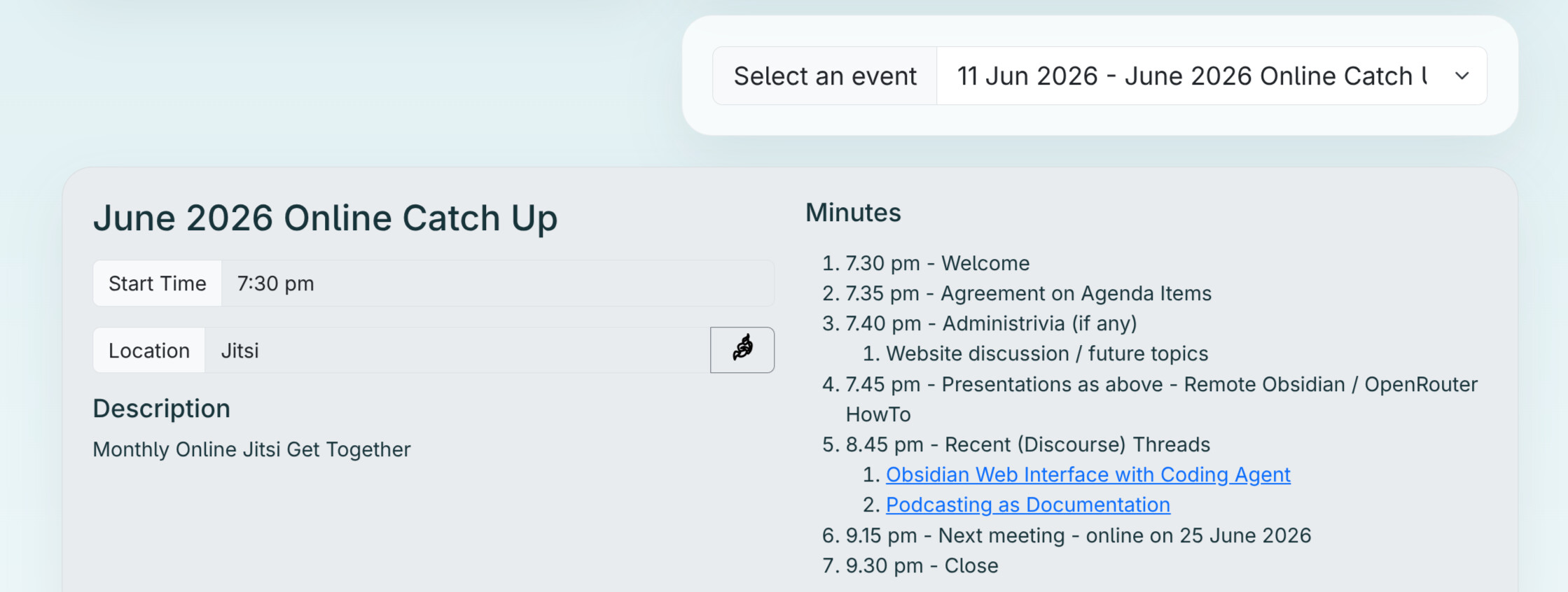
Upcoming Presentations

Hi @jiskh. Sunny skies where you are?

The @techman’s recent postings cover much of the information he presented.

@jdownie demonstrated using a docker container to pull the latest version of his obsidian from his local git repository and display (and interact with) it in via a web page on the phone.

Yeah for now @zeeclor. Turns out next month is rainy season :umbrella_with_rain_drops: so we’ll see how well I fair.

Thanks for the info! The docker container situation sounds interesting. Was the web ui an off the shelf thing or was it custom made? @jdownie

Custom. I learned that the cool kids call what I did “vibe coding”.

I wrote about two pages of instructions for GitHub copilot explaining that I wanted a flask backend and Vue js front end.

I had been syncing my obsidian vault to my phone so that I could edit those files with the obsidian app. I realised that editing markdown in a web page could be a good solution, and would shift the file management off my phone up to the server.

Anyway, I’ll publish my notes on the web site and here soon.

The presentation was more of a demo of how good the results from a coding agent can be. It helps if you could do it yourself and your explanation can be painstakingly thorough. My approach is to write what I’d want to be given as a brief. My goal is to leave no initial questions unanswered.

In my experience, these coding agents can get it ~95% complete on the first go. With a little back and forth after that you can get it 100% there, but like I say, it really helps if you could do everything yourself in the first place. It means that you can anticipate and explicitly address all of the areas of ambiguity up front.

1 Like

What are the presentations next week Thursday?

Nobody’s put their hand up yet @Bryan?
I’m sure you have some stuff in that server rack of yours we’d like to hear about!

@jiskh , i’ve put a .tar.gz on the minutes from last week’s presentation. in that is initial.md which is the conversation that got a working first draft up and running, and enhancement.md which was what i asked a coding agent in the live demo to improve the functionality. The code’s in there too, but i’d encourage anybody that’s interested to write their own initial.md and blast that into their own coding agent to make their very own solution. I’d love to see the results.

@techman has got me into using opencode with OpenRouter. I’m very happy with the results. I think i’m done with GitHub Copilot for now.

James! I’m very happy to hear it :slight_smile:

Deepseek V4 * is by far the cheapest large model out there, it’s literally cents to use and it has been solving even my most complex issues.

I’m using it with Opencode to Deepseek direct, not via Openrouter who are fantastic and I have no complaints. Just select ‘Deepseek’ as the provider in Opencode instead of Openrouter to use it.

Paying $50 to $180 USD per million tokens for the leading American models is for millionaires, not the working man imho.

Cheers
Textman

I don’t think I have anything too flashy to show yet, but I was thinking I could bring in some spare Cat6 cable and connectors, and we could make up a few Ethernet cables. It’s one of those things that seems tricky until you’ve done it once, then it’s pretty straightforward.

I could also possibly do a quick chat or presentation about some future projects I’ve had floating around in my head, but that might also work better as a group brainstorm.

My rack is mostly a collection of learning experiences at this point — a few failed attempts at trying to do things the “right” way :sweat_smile:

One project I’d love to learn more about is setting up a high-availability Proxmox cluster with Ceph storage. I haven’t done Ceph or a proper HA Proxmox setup yet, but it’s definitely something I’m interested in.

I’m also curious whether there’s a good way to balance workloads based on efficiency and demand. For example, running idle or low-load LXCs on a more power-efficient machine, then moving them over to a more powerful server as the load increases. I’m not sure how practical that is, but it’s something I’d like to understand better.

Another thing I’d really like to learn more about is proper firewall setup: layouts, best practices, and how that all ties in with VLANs. I’m especially interested in doing VLANs properly, where a new or unknown device connects into an isolated area first, then gets allocated to the correct VLAN so the network stays properly segregated.

For the next online session, if Tech Man is familiar with it, I’d be keen to learn more about UART and Modbus protocols.

I’d also be interested in learning more about PNP/NPN MOSFETs. I have a few ideas where I’d like to piggyback off existing equipment — mainly reading indicator lights and switching buttons electronically.

Another area I’d like to understand better is powering components properly, especially using buck converters. I’ve used them for small components before, but I’m now looking at powering 19V mini PCs. I’m still learning everyone’s names, but the gentleman working with the atomic clocks might also be interested in the power-supply side of things, especially if power quality can affect timing accuracy.

I’m also looking into NUT — Network UPS Tools — for managing UPS shutdown protocols. Does anyone have something like that set up with home batteries, where everything can safely soft-shutdown if the batteries get too low? I know it’s a bit of a niche scenario because we don’t get many power outages, but I was thinking about cases like a long stretch of rainy weather followed by a power outage when the batteries are already low.

Also, if anyone is bored during the week or next week and is willing to run me through VS Code with Home Assistant, I’d really appreciate it. I’ve already managed to break it once, but luckily I had backups.

GitHub is also something that still feels pretty foreign to me. I’d really like to understand how it works properly, especially how to use it for Home Assistant, config backups, version control, and collaborating or sharing projects.

At the moment I understand the rough idea, but I’d love a beginner-friendly walkthrough of the normal workflow — things like repositories, commits, branches, pull requests, cloning, pushing changes, and how to recover when I inevitably break something.

File structure is another thing I’d really like to understand better. Matt was showing me how he has some of his files set up in VS Code, but I don’t fully understand what’s inside those files yet, or what each one is actually for.

That probably comes down to me having no coding experience at all, so even the basic structure of projects, folders, config files, and how everything links together still feels pretty foreign to me.

I’d really appreciate a beginner-friendly walkthrough of how VS Code actually edits Home Assistant. I’d like to understand what files I’m looking at, what they’re for, what’s safe to change, and how to avoid breaking things while I’m learning.

From our first meeting, we were also talking about compressing movie files. There’s a tool called Tdarr that can scan your storage and compress or transcode media. I haven’t used it myself, but I’ve heard good things.

Matt was also showing me his Pi-hole setup with reverse proxies. I gave something similar a go on my UniFi router, but I’m still not really sure what I’m doing there yet.

Sorry for the brain dump. Haven’t had a lot of time recently.

Hi Bryan, sadly, I have no Modbus experience and very limited UART experience, I think I’ve written one UART test project in Forth and it was very basic and very easy as I just copied working Forth code in use on the same chip, but for a different UART peripheral.

But you know who does know tons more than me about these specific areas?

Deepseek-v4-pro the AI does.

One good way to learn is by getting the AI to create a dual-host podcast just for you, on the topic you want at the level you want, perhaps with a test at the end tailored just for you.

Then you can listen to the podcast over and over until until the knowledge has sunk in. That’s what I do.

If you’re not sure how to do all this, just ask the AI.

This is one example of one of my podcasts:

Cheers

I’m 71, and grew up on thermionic valves and bipolar junction transistors, I don’t know much about about FET’s.

I’ve never made a single BUCK converter PSU, but did purchase about 8 models of BUCK chips recently to make low voltage projects and tutorials with. That’s about a year away given their place on my project to-do list.

However making low voltage inverters of all kinds has been a life long hobby and I’d classify myself as a ‘expert’ in that area.

But to power a 19V mini PC you’ll no doubt want to use 240vac as input, and that about 200 volts above the area I work in and highly specialised.

Way too specialised for me.

As I mentioned at the May in person meeting I run a Proxmox cluster on an iSCSI / NFS back-end. I can do live migration and can rescue vms if a proxmox node goes away. I also have Proxmox Backup server running in a virtualised environment on one of my QNAPs which will allow recovery from an overnight backup.

I have used Longhorn in kubernetes but I have no experience with Ceph. If you get it going I would be interested to have a look.

I got a UPS in December but then I got solar/batteries in March so never got around to configuring NUTs.

I am no expert but can catch up one night that suits and we can go through everything I know. (It shouldn’t take long. :sob:)

Of course in this age of AI, VS code is a bit passé.

We can run through that at the same time. @Bryan are you running docker?

That would be awesome!!! Im free the whole of Sunday or after 7pm the rest of the week if your free.

Tomorrow night about 7.30 pm.

Thursday night we are at Carindale.