I'm taking note

Bending spoons owns a number of well known IT products including Evernote, Issuu, Meetup and Vimeo. I have used all of these in the past.

I have been on Evernote for over 10 years but I get the distinct feeling it is becoming more “mainstream”. This in my view is a bad thing. Whenever a company is being taken over by private equity, run. I apply that rule to all companies not just IT.

I haven’t done it yet but am planning to move to @jdownie’s obsidian. (@matthew919’sJoplin is probably a step too far for me at the moment.) I hope Obsidian will be a good move.

I note there is an official import facility. Has anybody tried it?

1 Like

Evernote was a long time ago for me mate. It was great, but they started wanting a subscription and you know my feelings on that kind of thing :grin:

Obsidian is very cool, and my permanent home for now. I had a brief fling with Notion, but ended up groveling back to Obsidian after that. Notion is cool for being cloud hosted and readily available on your phone. Making that work on Obsidian (without a subscription) took some excessive nerding on my part.

So, so answer your question, nah, i haven’t played with any Evernote to Obsidian migration utility. Does Evernote offer any markdown export service? That’s my favorite thing about Evernote Obsidian, it’s pretty open and plain. It’s easy enough to read/edit a note with vim if i’m on a terminal.

I’m also pretty hot on their latest feature; bases!

Surely you mean Obsidian?

I also used Evernote years ago, but likewise stopped after they started pushing me to subscribe. I don’t currently have a notetaking solution (other than a burgeoning bookmarks folder).

I’ve been using Org-mode for a while now to manage my to-dos (via Org-Agenda), and for some time I felt like I should set up Org-roam for notetaking. Then I realised there aren’t any good mobile apps for editing Org mode files (there are some, but they’re all very clunky), and I also learned that there’s an Emacs package for Obsidian, so I’m now very inclined to set up Obsidian (since I know I won’t be locked into their UI).

Wow @skalyan, i just looked up Org-mode on Wikipedia, and it looks like Emacs was Obsidian a very long time ago. If you get into Obsidian i think you’re about to go down a GTD rabbit hole!

1 Like

Hi @zeeclor I have used since 2008 Zim for Linux, FreeBSD and Windows notes. Also used Evernote for quite a few years and even paid an annual sub. Dropped it after the cap limit was on 100 notes for the free edition. Looking for a tool to convert the Evernote data to some other format that can be used in a *nix app. For more comprehensive notes with diagrams, images, contents, and for printing to internally hyperlinked PDF: Obsidian does the job. It’‘s amazing and in active development with huge number of plugins. However Obsidian is a bit tricky on the mobile phone screen (Samsung Galaxy), so its limited to desktop. Dropbox is used to sync the all the notes.

Thanks Russell, obsidian is my front runner for an Evernote replacement but not being able to make a quick note in the mobile app version is almost a deal breaker. The android obsidian app is a pain?

So I note that obsidian is file based as a security feature. There are supposedly some docker based solutions most of which I have never heard of.

Does HLB have any views on those apps or on remote obsidian access itself.

I used to be into GTD, but then it got to be too high-maintenance, so now I use my Org-Agenda files as a (hierarchically-organised) dumping ground for my wishlist of projects, and use a combination of my e-mail inbox and browser tabs as a de facto stack-based to-do list.

I can see why that would be a #1 deal breaker.

I discovered the git plugin very early, and went all in on that first. Unfortunately, when phone sync became my next challenge, it looked like a git problem to me at that stage. I solved it, but in a very complicated and over engineered way. @russell.davie 's post made me realise that I put the cart before the horse with my solution.

I’m getting close to rebuilding my obsidian solution using Syncthing.

I liked git for being able to roll back. I think what I really need is a backup solution like Apple’s Time Machine.

Anyway, instead of Dropbox like @russell.davie suggested, I’m just going to build on my Syncthing solution a little more.

Oh, you’ve already been down that rabbit hole? I remember a podcast called 43 Folders that was very good. There was a funny episode in which the host seemed to be frustrated with his audience. He basically told (us) to talk less about “getting things done” and to start doing stuff. :joy:

1 Like

Procrastinate now. Tomorrow may be too late.

2 Likes

Have been watching this thread over the past few days with great interest. A few weeks ago someone else mentioned Obsidian to me and it triggered some recognition and a response of “Ah, the thing that @jdownie uses - I definitely need to check it out”. As such, I’m a very new user to Obsidian.

I’ve only been using Obsidian on desktop (macOS) so far and have been impressed. I haven’t tried any syncing yet, but note that there is a premium Obsidian Sync option.

I’m curious about this - given that the data is stored in a flat file, can I just sync it via [usual sync/cloud provider of choice]? What’s the benefit of going down the paid Obsidian Sync route?

I never did any serious homework on the benefits of the paid sync method. I just set up a git repo and some keyboard shortcuts to make light work of running git commit/pull/push.

You might like my latest little home network project actually @Belfry . I recently bought a MikroTik hEXs, and i’m very very happy with it. I’m a bit angry with myself for thinking that what is available via retail channels defines what’s available. I should know that i’ll want more from a gadget than that :roll_eyes:

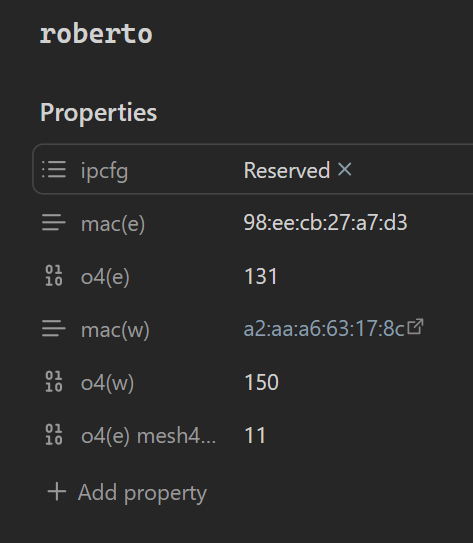
Anyway, at the same time i got into Obsidian “bases”. I’ve created one page for each of my network devices. Here’s roberto for example…

The names of those properties are a little terse, but that’s because they are being used by a script…

“Bases” lets me manage this stuff as a spreadsheet. The real benefit was that i wrote a netcfg python script for myself. For both DHCP and DNS i’m able to get a list of what’s “intended” (ie, what my obsidian notes reckon my network should look like, and a list of what’s “established” (ie, what is actually on my network.

Now that i have a grown up router, my python script can ssh onto RouterOS and get a list of DHCP reserved addresses. When i align that with my “intended” list, i can then issue a bunch of insert/update/delete statements to align my router’s configuration with my Obsidian documentation.

DNS is similar, but a) i’m using Linode’s API, and b), i’m only updating A records if the hostname is already registered in my domain.

There’s a bit more going on, but those are the highlights. I was really rapt when i flipped my network over from my crap Deco mesh managed DHCP reservations, to Mikrotik with the five Deco devices in access point mode. I snuck in a shift from a 192.168.68.0/22 to 192.168.88.0/24. I also renamed my new wireless network name to the old name with the same password and avoided re-pairing everything again.

So, i’m not sure that Obsidian is the tool for a job like this, but i think it’s kind of nifty to be driving my network config from where i keep notes on these hosts.

Anyway, i feel like this now that i have a big boy router…

Nice! You’re going to absolutely love that unit, but you’ve been spoiled now. You won’t be able to go back to an ISP router or anything on sale at Harvey Norman ever again :joy:.

That’s very clever! Is there an Obsidian API or are you modifying the .md files directly with the Python script?

My script is just parsing the .md files for those properties. I do all of my editing through Obsidian (with some sed in some for loops when there’s a whole bunch to update).