I’ve been on the net for several decades and had never come across nextDNS until @Belfry’s talk last Thursday. Since then I’ve been wandering around in the rabbit warren trying to tidy up my DNS settings without locking myself (and the wife) out of the net.
So I have fired up the pi-hole docker image once again and tweaked a few things (like the interface settings when run in a docker container). I have kept my Draytek router doing DHCP. I am very happy with my Vigor 2927 since it is a very capable device and has lots of options (only half of which I understand).
I noted in @Belfry’s talk that a lot of appliances have their own hard wired DNS resolvers and as Chris Sherwood has noted in his Youtube video on pi-hole there is no reason a savvy user could not set their own resolvers in their client. So I setup an outgoing firewall rule in the Draytek to only allow port 53 queries to NextDNS. (I understand that many devices may be using DNS resolution on other ports.)
So after creating a NextDNS account and logging in the first thing I found was that I was still using google DNS resolvers. That is I had forgotten to set the DNS ipv6 settings. After fixing that I had a functioning system. (However, I have still to get back to the router to allow ipv6 DNS access for NextDNS.)
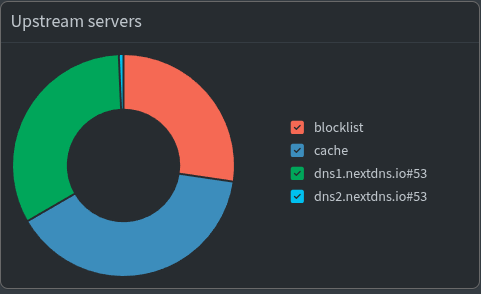
So currently in pi-hole I am averaging about 60 queries per minute and blocking about 30%. I am using some options from the DNS block lists @Belfry mentions and also the defaults at nextDNS plus the Block Newly Registered Domains (NRDs) file. At the current rate I may exceed the nextDNS free tier limit of 300,000 per month but hopefully pi-hole will cache an increasing number of queries and not send them on to nextDNS. If I go over, I am happy to pay the monthly charge of three dollars, if only to have a more responsive browsing experience.
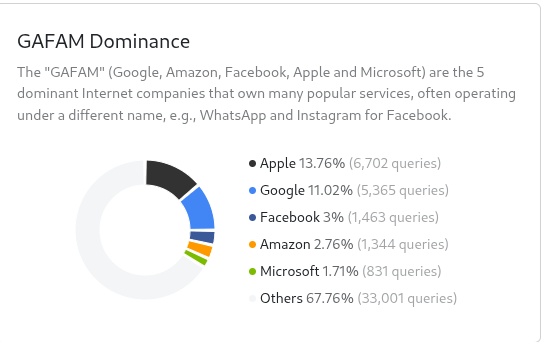
GAFAM accounts for about a third of my queries so I am going to hunt down and turn off all those extraneous devices (looking at you chromecast and firestick).
I feel I have just scratched the surface of DNS options. At the meeting @Belfry offered to do a part two on DNSSEC and I would be interested in learning more about that and about nextDNS.
Nice looking router! I haven’t seen much DrayTek gear in a long time, but that looks like a good bit of kit. I’m not suggesting you do this, but during the presentation I mentioned that it is possible to run AdGuard Home directly on certain routers, and I suspect the Vigor 2927 is one of them. There’s a MIPS build of AGH and the router looks powerful enough to handle it. It may require popping the case off and getting access to a serial interface. Brought up here for the sake of completeness only, and it’s probably something to file away for future tinkering potential. (Or bring it to a HLB meet one night and we’ll get the tamper proof screwdriver bits out and do some tampering ).
Awesome work! Sounds like you’ve essentially done what @kangie was talking about in the Cert Management thread, and what I left out of the presentation last week to try and limit the scope and presentation time. Blocking those direct requests is good, but if you haven’t done so already, you could use NAT to redirect those requests back to your Pi-Hole instead of blocking them outright. Just make sure you’re not forwarding requests from your Pi-Hole to your Pi-Hole to your Pi-Hole to your Pi-Hole to your Pi-Hole…
IPv6 can be a bit too clever for its own good in this regard. Your ISP is probably assigning a prefix to you via DHCPv6 Prefix Delegation and your own router dishing out IPv6 addresses via RAs. Those IPv6 DNS servers can come automatically from your ISP and will be subsequently pushed out to your LAN via the RAs unless you explicitly tell your router not to do that. In MikroTik land it’s use-peer-dns=no, on Ubiquiti EdgeRouters it’s no-dns, and there’ll be a setting in the DrayTek IPv6 config somewhere along those lines - essentially “Ignore the DNS servers being assigned by the ISP and DHCPv6/PD, and use the ones I put in your config”. Happy to have a dig and see if I can find it in their docs and/or chat to you about it at the next meet if it’s causing problems.
Nothing wrong with this approach, but you could save yourself the couple of bucks for a premium NextDNS plan without increasing the TTL/cache on the Pi-Hole. You’re doubling up by having your own Pi-Hole on your own network with its own blocklists which is forwarding your DNS queries to the resolvers at NextDNS to check against their blocklists (which are probably identical or very similar to the ones already in your Pi-Hole). If you see that the Pi-Hole is blocking 30% of your requests and that NextDNS is blocking substantially less than <30%, then that could be an indication that you’re “doubling up”. The blockable requests are already being filtered out by Pi-Hole, and only the legitimate/desired DNS queries are ever making to NextDNS anyway. If the stats on Pi-Hole and NextDNS stay around 30%, it could be a sign that some of your DNS queries are “leaking” around the Pi-Hole (unlikely, by the sounds of it), or that the blocklists at Pi-Hole and NextDNS are different enough to have queries making it past the Pi-Hole and being blocked by a separate blocklist at NextDNS (more likely). If it’s the latter, throw some more block lists into the Pi-Hole and give it ~24 hours before looking again. (Edit: NextDNS will give you figures on which blocklists are blocking the most domains under Analytics > Blocked Reasons. Load the top handful of blocklists into your Pi-Hole and rinse and repeat.)
Personal preference only, but I’d suggest that if you’re running a stable and well configured Pi-Hole then that’ll be suitable for your clients at home (e.g., those Chromecast and Firestick devices, as well as your devices that always or almost always stay home), and that Pi-Hole uses another upstream resolver (e.g., your ISP, or 1.1.1.2 or 9.9.9.9, etc.). Then, NextDNS only gets applied individually to devices such as your phone which will frequently be outside your local network (and therefore away from the Pi-Hole), which will give you access to blocklists/logging/etc. without the Pi-Hole and will probably keep you under the 300,000 limit at NextDNS. Use that $3 on other homelabbing ventures such as a cheap VPS .
Happy to present 2 DNS 2 Furious if there’s interest. Plenty more to cover such as DNSSEC/DoH/DoT, IPv6, RDNS, self-hosting authoritative servers, firewalls, and so on. It’s an interesting area to explore, but I’m also mindful of not having our group sit through multiple torturous multi-hour sessions on nothing but DNS .
As I mentioned last week, if you have a “proper” firewall (e.g. opnsense, etc.) you can go one step further than blocking traffic on port 53: you can use NAT to redirect all external DNS requests to your DNS server, giving you full control over what clients in your environment can resolve (obviously your resolver needs to be allowed out from the internal DNS).
Will drop this PSA here, as it’s relevant to the recent DNS discussions and I know that there are several MikroTik users in the group.
Quad9 are removing support for DoH HTTP/1.1 in about 8 weeks. Looks like MikroTik users are the ones which will be most impacted. I didn’t realise that MikroTik routers were still using HTTP/1.1 for DoH. It’ll be interesting to see if MikroTik put out a RouterOS update in the next few weeks to move over to HTTP/2, but I suspect that the timeline might be a bit tight. I can’t see anything relevant in the changelog for RouterOS 7.21beta3 at the time of writing.
/ip/dns/print to check if you have Quad9 set as a DoH upstream (the output will contain something like use-doh-server: https://dns.quad9.net/dns-query). It won’t be there unless you’ve explicitly set it up.
Possibly relevant to anyone else out there who has set Quad9 as their DoH upstream too. If you have DoH via Quad9 set up and your DNS suddenly stops working around December 15-16, then that’s possibly why - your router may still be using HTTP/1.1 too. Standard DNS and DoT will be unaffected, according to Quad9’s blog post. In the absence of an update from MikroTik, options may be to run something in a container on the router, or move to another DoH resolver that supports HTTP/1.1.
A container is MikroTik’s implementation of Linux containers, allowing users to run containerized environments within RouterOS. The container feature works in the latest MikroTik RouterOS v7.x version. Containers are compatible with images from Docker Hub, GCR, Quay, or other providers, as well as those built on other devices, using the same formats supported by these providers. While RouterOS uses different syntax compared to Docker, it still achieves similar functionality.
An additional reason for me to learn more about containers!
 ).
).
 .
.