Novus Vim: Eximius Editor in Novo Munde

(“The New Vim: The Excellent Editor in the New World.”)

It used to be said of VIM “For the first 12 months one wonders if they will ever be able to use it, but after the first 12 months, one wonders if they will ever be able to do without it”

But that was long ago, and time and tech have since moved on. My beloved VIM-GTK is looking more and more washed out because of the faded and obtuse icons of GTK3. Thanks a lot but I’m already feeling dated enough as it is!

A short history lesson
In the beginning, there was only VIM and EMACS, and the programmers were very polarized with endless arguments over which was the better editor.

Around 2007 a new type of editor was released, its name is “Sublime Text” and it entered beta on January 29, 2013, and was officially released to the public on September 13, 2017. This editor is very popular and gained many new adherents for its ‘dark mode’ gui, plugins and use of Python for easy scripting etc.

Not to be outdone, the Microsoft VS Code editor was first released in April 2015 and has gained significant popularity among developers for its extensive feature set and strong community support. VS Code integrates well with version control systems like Git, offers powerful debugging tools and a free Copilot AI integration for 80 accesses daily.

Both Sublime Text and VS Code have been in a competitive relationship since their inception, with developers often debating which is better suited for their needs.
Sublime Text is known for its lightweight nature and quick startup time, while VS Code offers a more feature-rich environment, albeit with a slightly longer startup time (because it’s a pig - ed).

But what happened to VIM and EMACS you ask ? Have they fallen behind in the race to keep up, have they finally been consigned to the dustbin of history by the new kids on the block, Sublime Text and VS Code ?

They haven’t changed much really. and are still as capable as ever, but there is a new kid on the block for VIM, and its name is “NEOVIM”.

Neovim is a fork of Vim that strives to improve the extensibility and maintainability of Vim. Some features of the fork include built-in Language Server Protocol (LSP) support, support for asynchronous I/O by using the C library libuv, and for Lua scripting by using luaJIT language interpreter, allowing both plugin scripting and running scripts in headless / batch mode. The project is free software and its source code is available on GitHub.

Neovim has the same configuration syntax as Vim prior to vim9script; thus the same configuration file can be used with both editors, although there are minor differences in details of options. If the added features of Neovim are not used, Neovim is compatible with almost all of Vim’s features.

The Neovim project was started in 2014, after a patch to Vim supporting multi-threading was rejected. Neovim had a successful fundraising in March 2014, supporting at least one full-time developer.

With the 0.5 release of Neovim on 2 July 2021, it gained built-in support for the LSP, Tree-sitter, and more complete Lua support – including the support for configuration scripts written in Lua instead of VimL.

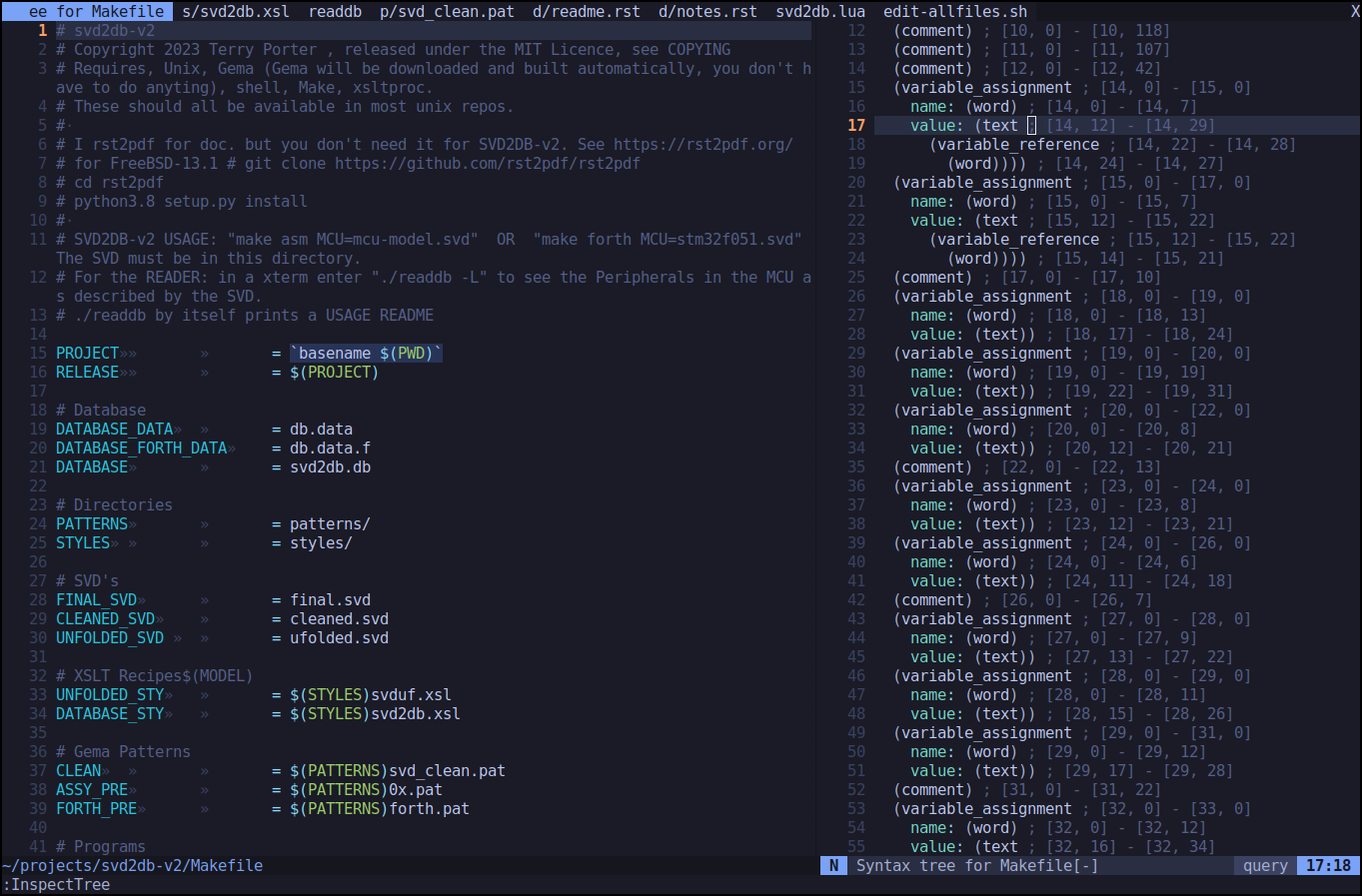
This picture shows a Makefile with syntax highlighting (automatically installed by Neovim). The right window is the syntax tree of the Makefile created by the ‘TreeSitter’ parser used by Neovim for syntax highlighting. VIM by comparison just uses GREP for the same task.

That’s right! Neovim automatically adds syntax highlighting for every new filetype you edit, uses a sophisticated Parser just for exquisite syntax highlighting, uses the LSP (Language Server Protocol) to provide syntax completion, indentation and error checking for your favorite programming language, and a ton of other stuff.

It’s next level compared to poor old VIM.

Do yourself a favor if you do try Neovim and see this video first, install the ‘kickstarter’ as default Neovim lacks most facilities. It will make all the difference!

GitHub - nvim-lua/kickstart.nvim: A launch point for your personal nvim configuration
I’ve now completely switched from VIM to Neovim for my editing, I feel refreshed and a decade younger, watch out world!

Cheers,
Terry

Thanks Terry, I’ve had a go at all those editors in the past except for emacs and I think you have explained the very essence of the perennial emacs / vim debate. If you’ve just spent 12 months learning the commands for one, you don’t feel like starting all over again for other.

I had seen neovim previously and had watched TJ’s first video on installing it but the hassle of putting a new init.lua on each machine caused me to lose interest. I feel embarrassed now in that it it can be a simple copy and paste. In case I forget about it again I have put in my personal gitea and also on HLB’s gitea server. It’s simply a mirror of the github original.

I think kickstart.nvim is only guaranteed to work on the latest stable and dev versions of neovim. The version in the Debian repositories is the previous version (v0.10). I used their Debian install script for version 0.11.1 and that was painless.

The script is on their main README.md page but I have copied it below for those interested.

sudo apt update
sudo apt install make gcc ripgrep unzip git xclip curl

# Now we install nvim
curl -LO https://github.com/neovim/neovim/releases/latest/download/nvim-linux-x86_64.tar.gz
sudo rm -rf /opt/nvim-linux-x86_64
sudo mkdir -p /opt/nvim-linux-x86_64
sudo chmod a+rX /opt/nvim-linux-x86_64
sudo tar -C /opt -xzf nvim-linux-x86_64.tar.gz

# make it available in /usr/local/bin, distro installs to /usr/bin
sudo ln -sf /opt/nvim-linux-x86_64/bin/nvim /usr/local/bin/

You can also make nvim your default editor with something like the following depending on your configuration.

sudo update-alternatives --install /usr/bin/editor editor /usr/local/bin/nvim 100
sudo update-alternatives --config editor

and even add

export EDITOR="nvim"
export VISUAL="nvim"

to .bashrc or equivalent.

Best of all Neovim with kickstart has line numbers by default. :cocktail:

Hi David. thanks for mentioning the version needed to work properly with Kickstarter because I had completely forgotten !!

I first installed the Ubuntu repo version of Neovim which is 0.9.5, for which Kickstart gave a few errors due to incompatible versions! Rather stupid of me not to mention that!

So I cloned the Neovin repo and built nvim

% nvim -v
NVIM v0.12.0-dev-207+gac8ae1596c
Build type: RelWithDebInfo
LuaJIT 2.1.1744317938

with ‘make’ without any hassles after removing the Ubuntu repo version with apt.
Doing a ‘make install’ then worked fine, but Neovim didn’t see or react to the kickstarter install !

After doing a “updatedb” then a “locate Neovim” I found older files in ~/.config and ~/.local* and deleted them. Restarting Nvim made all the kickstarter magic happen like it was supposed to and everything has been fine since.

What Magic ?
For one, opening a filetype on your system that nvim hasn’t seen before will result in it downloading and installing a ‘tree-hugger’ syntax file for it and instant colored highlighting.

Packages
Neovim has a neat package manager named “luarocks” (with a zillion packages) which I used to install a ‘luasql-sqlite3’ package locally, to avoid the dreaded package manager clash.

This is what I did:

% luarocks install luasql-sqlite3 --local

% luarocks list
Rocks installed for Lua 5.1
---------------------------
luasql-sqlite3
   2.7.0-1 (installed) - /home/tp/.luarocks/lib/luarocks/rocks-5.1

So Luarocks works nicely, auto downloads and installs easily.

Thanks for sharing your journey @techman . I became a vi guy at uni. The decision was simple that all of the uni’s machines had vi, but not all had Emacs. I also didn’t want to be one of the students that was useless until somebody installed Pico.

Anyway, I only indulged the vscode fad a little because a vim plugin was available. I tend to do everything in vim over SSH.

I am working hard to get proficient with neovim because it does seem clear that it’s going to be the last man standing in the vi world. It’s a very deep and rich ecosystem. Even before neovim I bought a book on vim, and it was already a deep rabbit hole to go down.

James, getting proficient with Neovim happily, does benefit from AI tutoring by Claude-2.5-Sonnet :slight_smile: or any other decent AI.

I’ve just finished my first ever editor plugin which is not bad as I’m not a real programmer, just a real electronics guy.

I designed an application years ago (Svd2db), that transforms an XML file into a Sqlite Database, which looks like this.

Yeah, it’s just a Text User Interface to Sqlite3. It does make use of “getopt” to nicely process user search switches efficiently.

One of the problems with the above solution is that it takes up screen realestate. An editor, the above Svd2db Tui, a Pcb design program, a Schematic editor etc really takes all the space available on a Forth device designers PC screen.

Happily with AI help, I’ve just completed my first Neovim plugin which saved workspace by incorporating Svd2db into Neovim. This popup gets it’s data from exactly the same Sqlite Database that the Tui one does giving users advanced, space saving or plain access to Svd2db data.

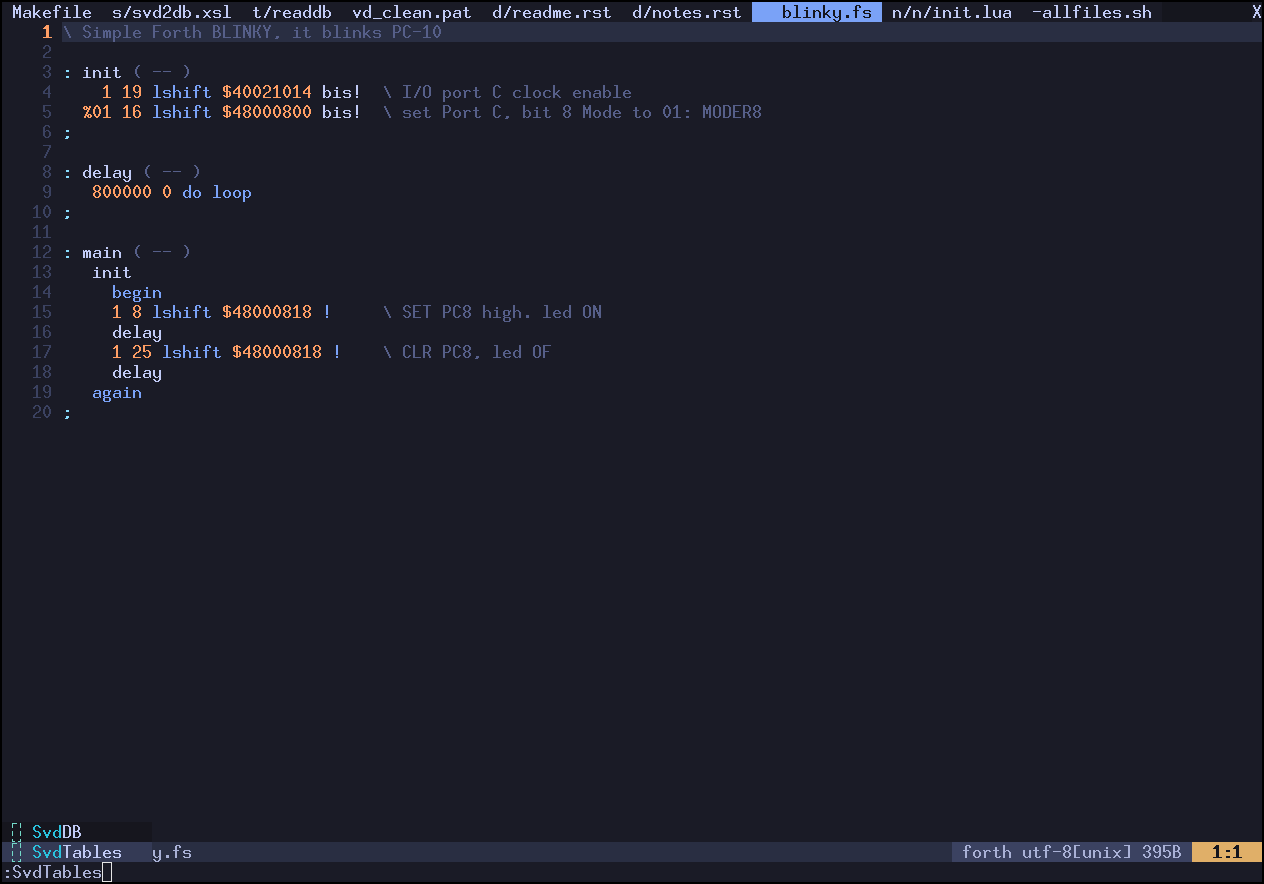
This first window shows the popup selection for Svd2db by entering the command “:svd” then hitting the TAB key. Two choices are available, the first is “SvdDB” which allows the path to another database to be entered (perhaps for a different microprocessor) or “SvdTables” which gives the pop up below in the second image.

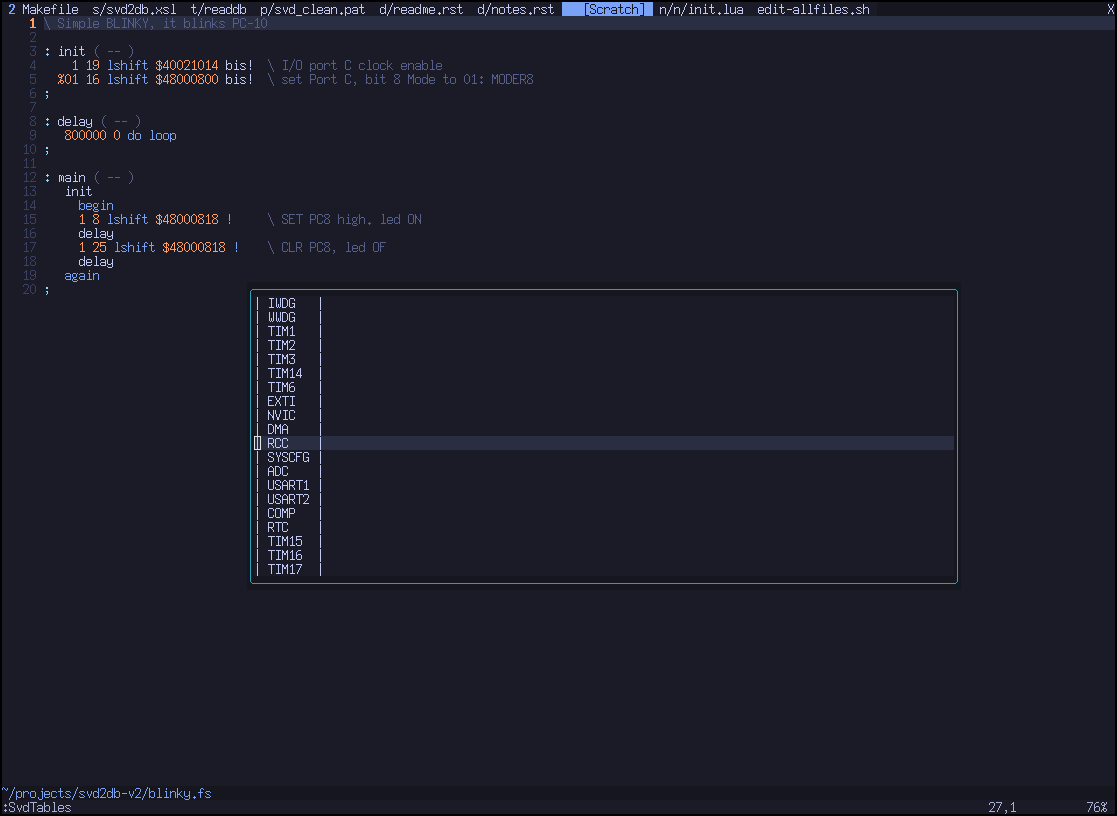
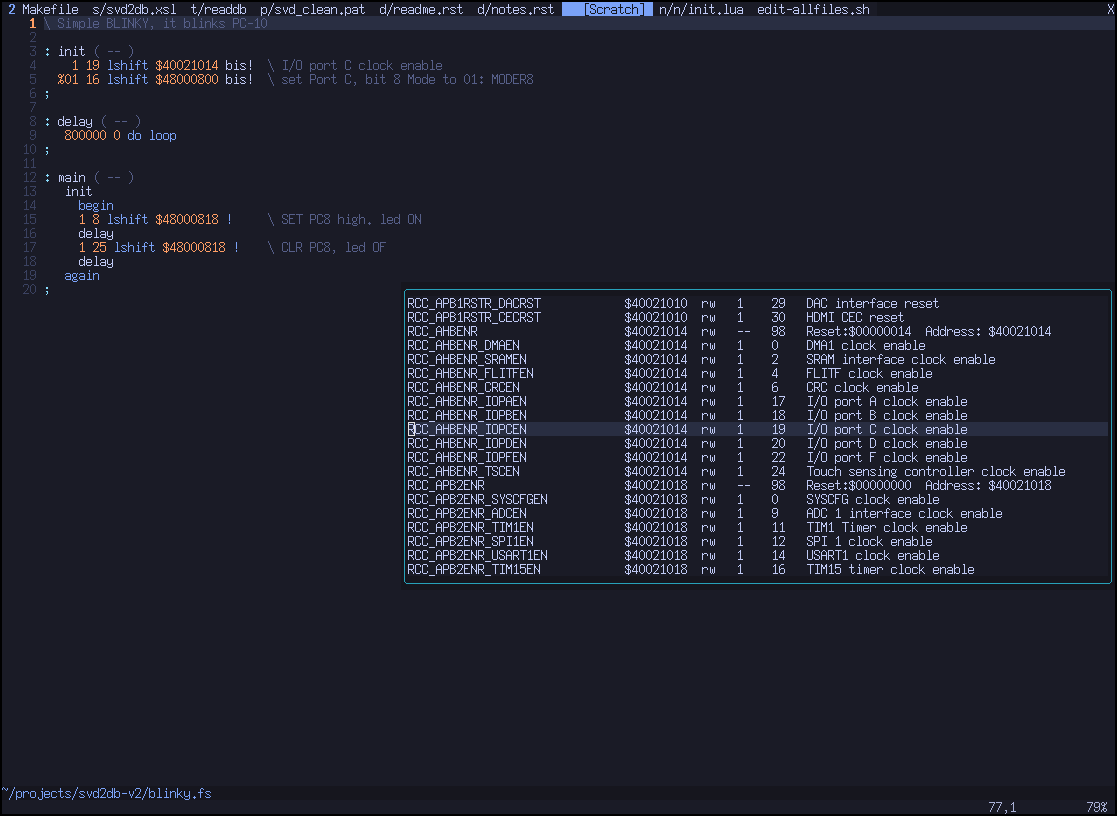
The second window displays the list of peripherals inside the Microprocessor, and a peripheral is then selected with the mouse or cursor. Once selected, Enter is hit and up pops the peripheral contents list, with all the important fields, for use in the current embedded program.

It probably took me 3 - 4 days to get this designed, debugged, running and packaged for FLOSS distribution, something I couldn’t have done alone without a good AI.

Wow, I reckon there’s about ten things in your post that’s wildly impressive.

At least half of them are over my head! :smile:

:star::star::star::star::star:

That’s pretty funny considering the last time I joined the chat with you guys discussing Docker or Kuber* or something I didn’t understand anything at all.

I sat like a mute, drooling, slack jawed Neanderthal for a fair bit of the talk, then decided to cut my losses and went back to re-reading the ‘Murderbot’ scifi series by Martha Wells.

Something I could understand at least :slight_smile:

No, no techman not kuber* something. It was k*s.

Anyway, for the next meeting we’ve lined up some Vogon poetry.

Vogon Poetry … classic !

Strangely, I did try to rewatch Hitchikers Guide to The Galaxy about a week ago. But it seemed so dated, Arthur Dent had transformed over the years from a typical Englishman into a tough ex army doctor assisting Sherlock Homes etc.
Zaphod was now a lonely clone on the Moon, maintaining a mining depot.

And Marvin, sadly is dead. Long live the great Alan Rickman!

I realized that I liked programming more than watching old comedy and so started on the new Svd2db-V3.

The HHGTTG is a radio play from Douglas Adams. It first aired in 1978 on the BBC and in Australia on the ABC the next year. It should only be consumed in its original format.

It can be obtained from Brisbane City Council Libraries using their mobile app, Libby. I am not sure what is available in the Northern Rivers.

@techman we should do lunch some time at the “Restaurant at the End of the Universe”. Apparently it’s to die for.

Finally finished the release tarball, perhaps James might be interested as he uses Nvim ?

Get it here for Unix:
https://sourceforge.net/projects/mecrisp-stellaris-folkdoc/files/svd2db-v3.zip/download

After installing the Kickstarter for Neovim a few times, breaking it and doing it again, I then tried a Neovim install from scratch, crashed and burned … it wasn’t pretty.

After a lot of Youtube viewing I stumbled across this video which is pretty very good, not too fast, perfect speech and he explains everything. I think this is the perfect next step in a users education after Kickstarter at least gives them a taste of what Neovim can do.
It’s a minimal install, (I didn’t install the harpoon stuff) and everything is simple, in fact I hand typed all my configs, except the neovim/nvim-lspconfig which is massively complex, so I just copied and pasted his one.

Neovim capabilities are utterly mind boggling to this 40 year VIM user, I had no idea the state of the art had advanced so much. There is even a Neovim Copilot plugin on Github if you want one.

How to Install and Configure Neovim (2026 Edition) | Full IDE Guide

His docs and files are here

I finally have what I want, and I even understand what is going on and can say that this is a million times better than VIM :slight_smile:

I’m an old man banging out code like a young man again!
Terry

@techman , i’ve finally got a machine that i might be able to use to try to catch up to you guys on self hosted LLMs. Improving my neovim game is one more thing that i’m playing catch up on :slight_smile:

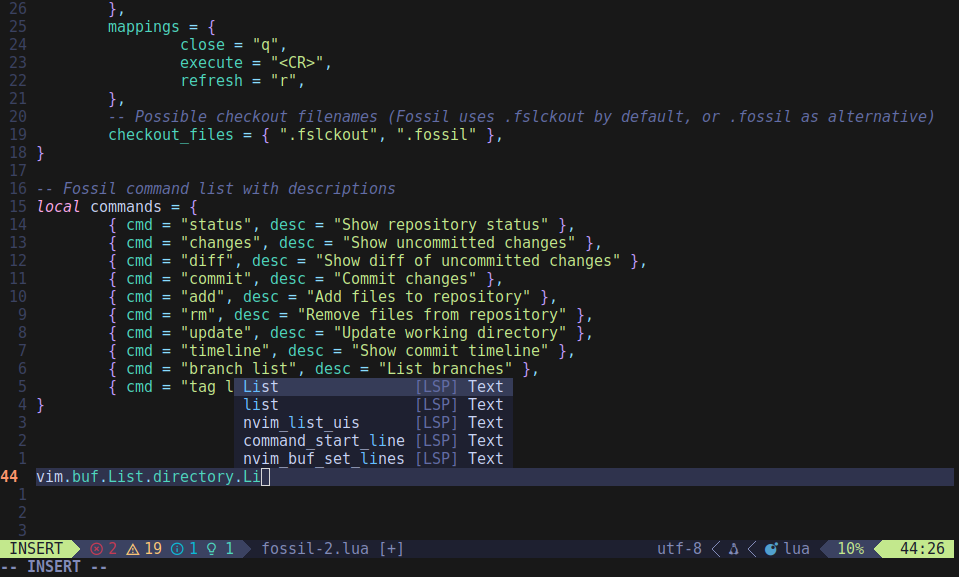
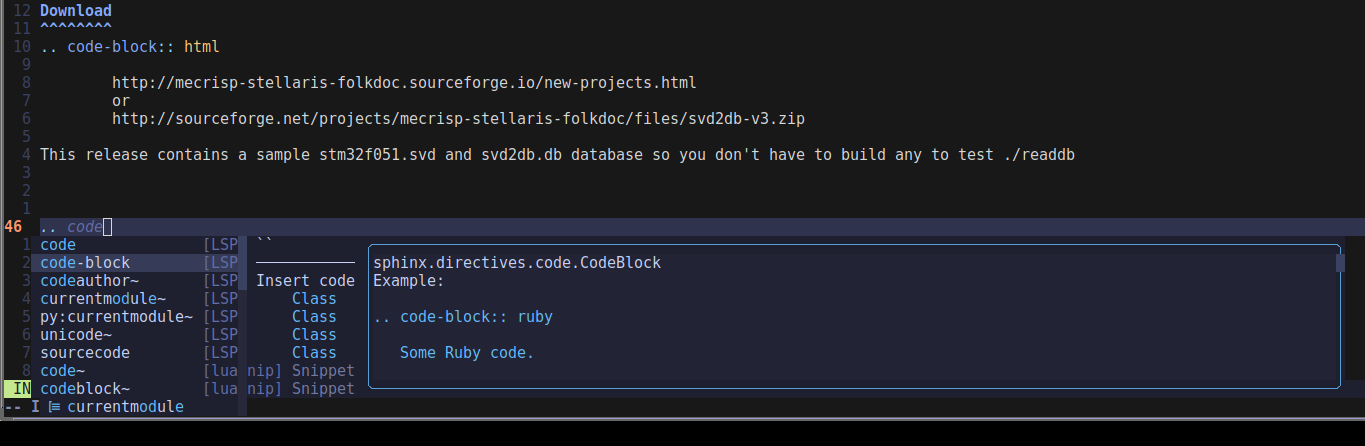
Take a good look at this Neovim picture, what features can you see ?

Did you see the:

  • awesome syntax highlighting
  • relative line numbering, which makes jumping lines so easy
  • Lua command completion popup (which also has help)
  • red fatal error icon, orange triangular warnings
  • ‘Lualine’ at the bottom of the screen showing mode, numbers of errors and warnings, the tiny penguin denoting the Linux OS, the filetype = Lua, current file position percentage etc

Vim was never like this in my experience, and these configs are very easy to organise.

Which gets to the point of my post. I forgot again about a major issue I did have installing Nvim this time around.

But the problem wasn’t with Nvim, it was with Linux FONTS !

The author of the “Neovim (2026 Edition)” above didn’t go into the font requirement, so in my case, Lualines did not render at all properly, not like the pretty picture above.

Lualines requirements

That’s the only hassle I had, but the above steps fixed it for me.

Cheers,
Terry

James, you’ll be so glad you did as AI online points get used up so damn fast (which is probably what they depend on for subs).

Terry

Oh yeah! I can live with my Nvim lua-lsp real time warnings !

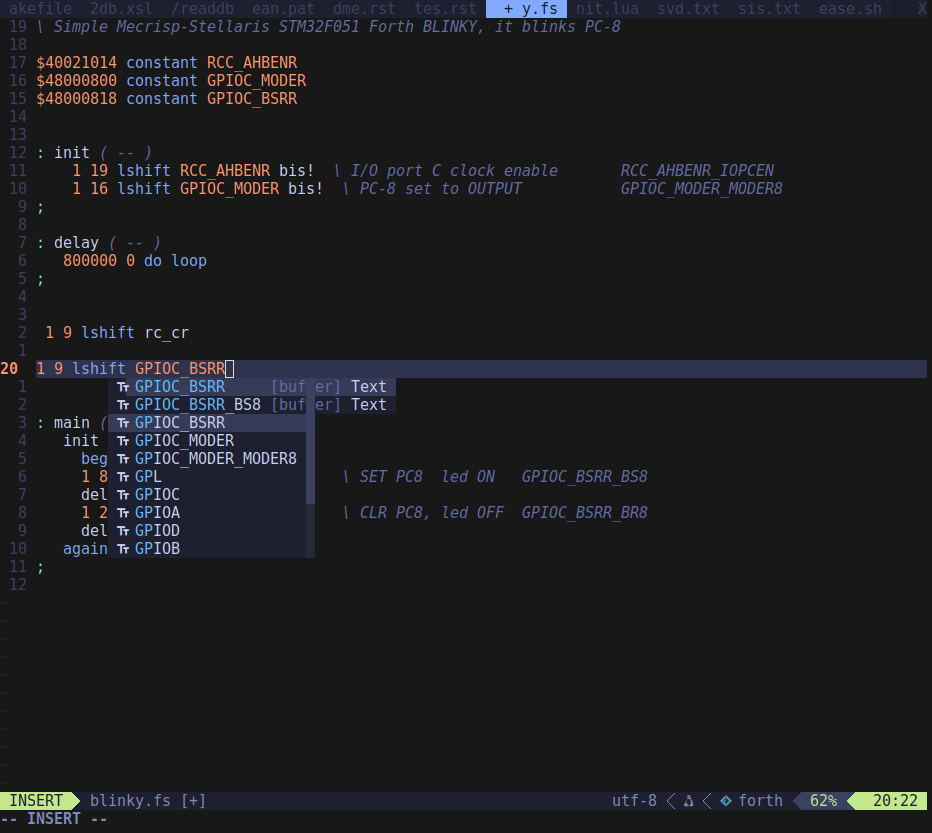
I’ve added one more plugin which I think is vital, namely the blink-cmp plugin.

Blink adds features to the older built in code completion suggestions, namely:

‘lsp’, ‘path’, ‘snippets’, ‘buffer’

Plus Claude AI tells me it’s no problem adding a Sqlite database to the list above :slight_smile:

And Blink informs where the code completion suggestion came from (as above), namely was it a Language Server, a file in your path, contents of a snippets plugin, or one of the open files in the project you’re working on ?

It does this by appending the name of the source to the autocomplete suggestion.

To me, this beats AI facilities like the ‘free’ (hahah, yeah right) Copilot plugin, but Blink is free, doesn’t hallucinate and is superfast also (not requiring Internet access to a overloaded AI server somewhere).

In this image, Blink is telling me the suggestion is from a buffer as there is no Forth LSP plugin etc.

Below you can see a couple of Luasnip suggestions among those from the Lua LSP.

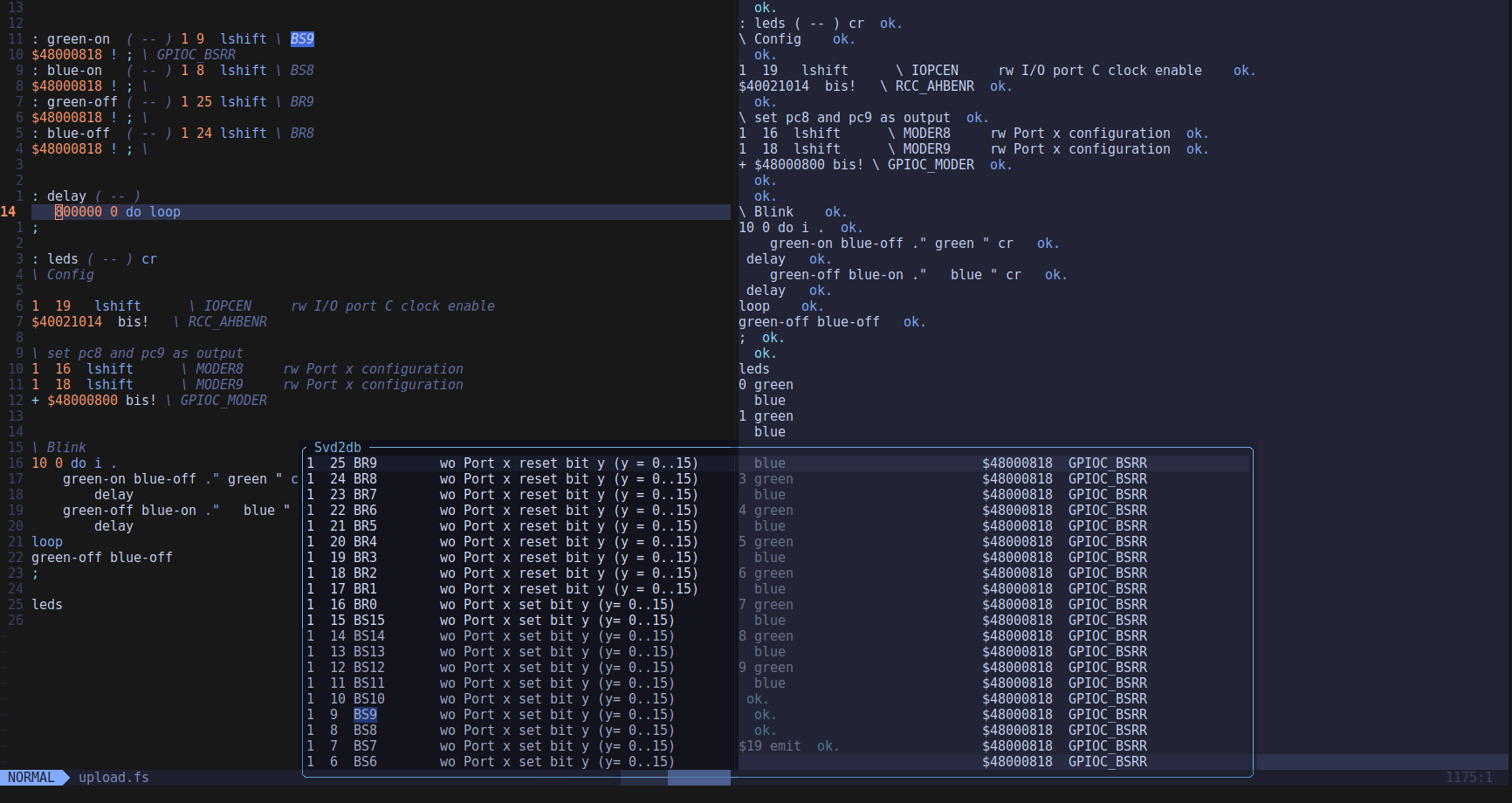
This is my just finished ARM Cortex-M Microprocessor development Integrated Design Environment IDE. Thank you AI for your help!

It develops code in the editor window on the left. uploads it to a small board on my desk via the serial terminal on the right, and uses the pop up window to copy the technical data for the chip (using a factory supplied XML file) into the code. This tells me how to make a pin drive a LED, and how to time it etc.

When run, the board, (which has two user leds) blinks them on and off and the terminal prints ‘blue’ or ‘green’ depending which led is on. Naturally things like this are called ‘Blinkies’, they’re the equivalent of “hello world” for programmers.

That’s super cool. I feel like the neovim part of what you’ve done is almost in my reach, but the microcontroller programming part just isn’t.

Actually, i’ve got another home project idea (to probably not do for another few years :smiley: ). I got talking to ChatGPT the other day about Google Assistant and Amazon Alexa. I miss the good old days when IFTTT offered the ability to use spoken instructions to trigger actions. I had a process that i LOVED! I could say “Hey Google, we need milk”, and google would recognise “we need” and pass “milk” to a workflow in IFTTT. I had another one for “Hey Google, i need to spray weeds”, which would send an email to my “Remember the Milk” email address to put a job called “spray weeds” in my job queue (for me to prioritise and schedule when i was back at a computer. I had “we need” jobs tagged as “shopping”, and “i need to” jobs tagged as “job”.

ChatGPT agreed that 2017 was indeed a golden age for voice assistants, but at around that time they all deliberately started “walling their gardens”, withdrawing that functionality. Back then I threw out all of my google stuff in protest and moved to Amazon Alexa hoping that they would have a solution, but they are no better.

That chat with ChatGPT has re-ignited my frustration with this situation. I’m now fantasising about a Raspberry Pi Zero 2W with a microphone and a button. Holding the button down would record some voice, and then there’d be a whole range of options. A .wav of that voice could be interpreted on the Pi itself, or handed off to a webservice in my k3s cluster to handle it. I’d be happy with a simple email off to RTM to restore me and my personal organisation skills to their former glory.

Anyway, i clearly need another coffee to improve my temperament on this overcast Monday morning :upside_down_face:

A friend made a complete voice command system with a RPI-3 for her friend who was paralyzed in a wheelchair, it worked perfectly for years after lots of developing. I can ask her input here if you like ?