N8n - Workflow Automation

Hi All,

In todays catchup I mentioned n8n which seemed to interest a few people. It’s a similar concept to node-red. essentially it is a visual workflow automation platform that can be self-hosted in docker (which i am a sucker for). I first saw it from youtube here, but watching another channel explain it here I started to understand what I can do with this.

I have been enjoying the interface so far which is quite intuitive. You can use drag and drop functionality, store credentials for reuse or code exactly what you want using javascript as an override on conditions/checks etc. This made it easy and fast to setup automation’s with postman.

My initial use case has been to check if videos have been released on youtube for channels my wife or myself watch and download them using Tubearchivist, then using the plex plugin refresh the library. This results in every hour having videos I want to watch from youtube free of adds and readily available in plex. Helps from scrolling endlessly through youtube!

If you have watched the videos I mentioned earlier, especially the second, I am really excited to start injecting AI into the workflows. One of the first I wish to make is pulling posts, blogs, podcasts etc into a model, summarise in a sentence what it is about and send daily to my phone so that I can quickly sift through what news that sounds interesting.

If anyone has used n8n or node-red, would love to understand what you have implemented. Or even just the ideas that come to mind after seeing it in action.

1 Like

n8n is also available as a NixOS package :slight_smile:

Free and source-available fair-code licensed workflow automation tool

I’ve only watched parts of the first video so far (from Techno Tim) and have been looking through the integrations on the n8n website this afternoon. I’m really interested in having a play with this. Having a skim through, it seems that most of the services I use don’t have an n8n integration - other than Home Assistant. I’ll have to explore a bit deeper.

The first thing that jumped into my mind was this post by @jdownie last month:

There’s an ollama interface and several email interfaces… so n8n may be a straightforward way to achieve exactly what was being proposed - an email to one or LLM model interface.

This workflow template is an email responder based on ollama and Gmail. That may be a good starting point. I’ll definitely explore n8n a bit further after I’ve had some time to ponder!

@zeeclor - re: this post (Podcast manager recommendations), I wonder whether some combination of n8n’s RSS feed trigger + HTTP Request + Write file to disk + any other ingredients might make for a clever self-hosted video podcast manager that is grabbing new episodes into a local directory based on when the twit.tv RSS feed is updated?

(I’m going slightly down the rabbit hole of the n8n documentation and all these past posts are coming back as possible workflows that n8n might be able to automate!)

Good Afternoon,
I’m glad to see other people utilising N8N for automation workflows. I find it’s great for taking information out of my self-hosted software and posting to a Matrix Server I self-host for notifications.
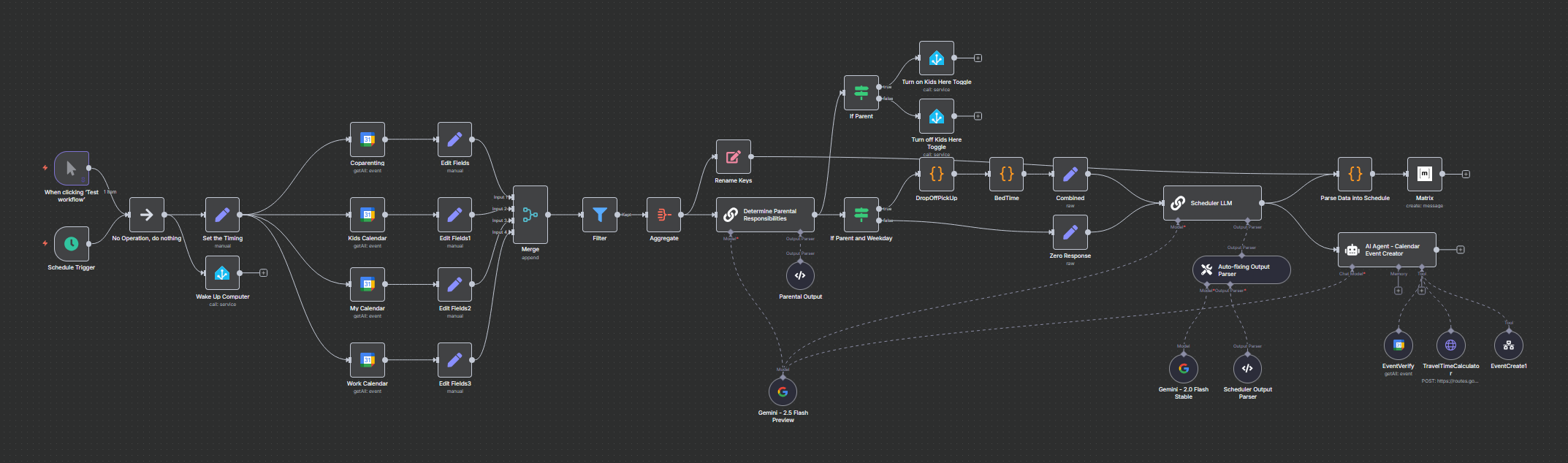
I have a Daily Agenda organiser that uses Google Gemini to work out my schedule for the day and make sure the necessary events are covered (I’m a single dad so it’s great to offload that work load).
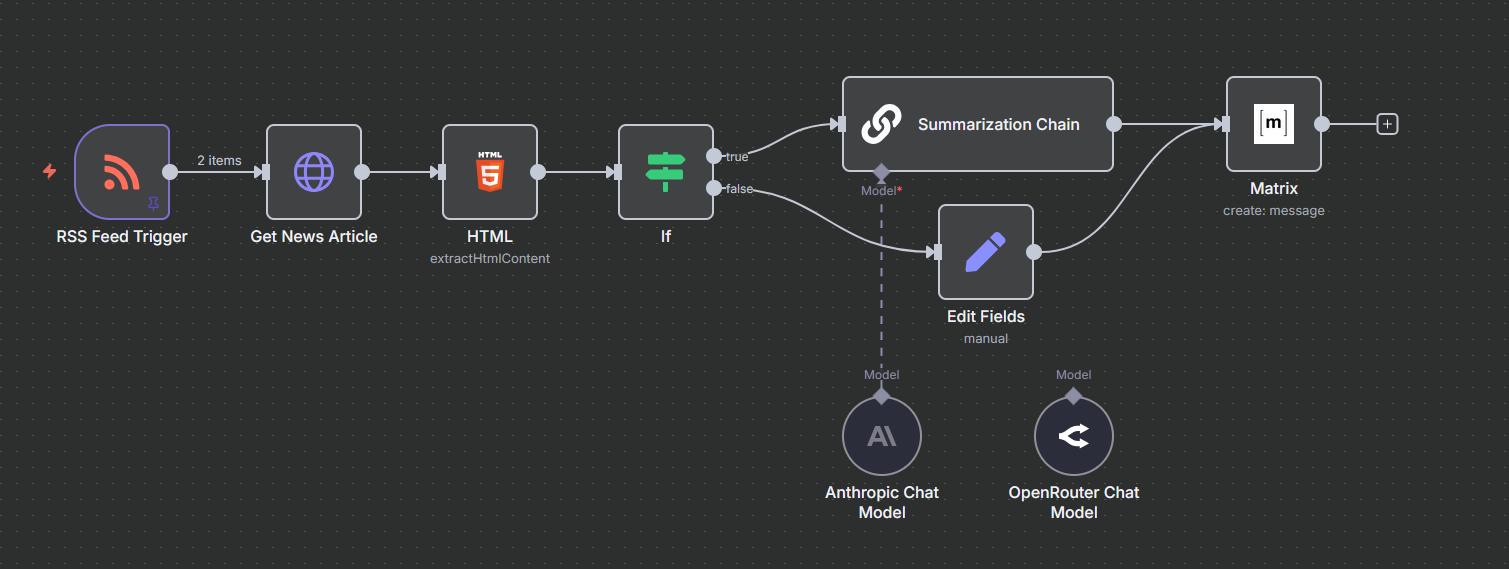
RSS Feed to Matrix is my next one. Each start node to that workflow is an RSS Feed Trigger. I then feed it to Anthropic Claude to summarise the content of the weblink and then post it to my Matrix server. Provides a nice summary of each article.
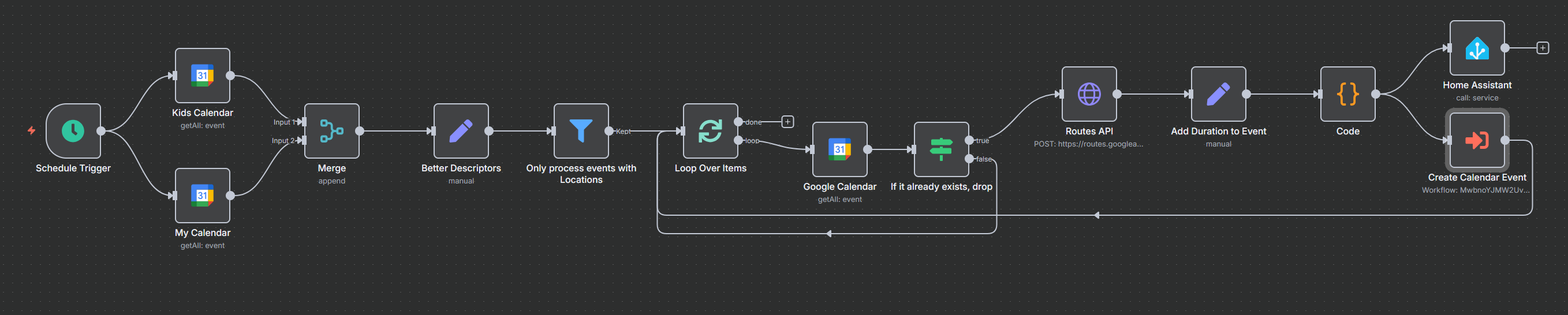
My next one uses Calendar events and calculates the travel time to any event with a location that isn’t my home. It then adds it back to a separate calendar that my Home Assistant uses to announce when I need to leave. Uses Google Calendar and Google Routes API.

I find N8N to be the right mixture of doing it all by code versus something like IFTTT which can be restrictive. The flexibility for AI usage in any workflow is a great addition too.

1 Like

Yeah, I keep hearing about ai as a useful component with n8n. I’m keen to give it a go. n8n is still on my list of things to try. Has anybody else managed to nudge it out of their “someday” queue?

I’m also keen to see how this all fits together, @shirbo!

That sounds like real quality of life improvement. I’m yet to get n8n set up at home (it’s still in my “someday queue” - I like that term) but am curious to see in detail how it’s been built out, if you don’t mind sharing.

@shirbo This is the first time I’ve heard of a Matrix Server.

That “someday queue” is getting longer and longer.

@jdownie Do you mean install it or not implement it?

@Belfry Would you like my specs for it or the workflows themselves?
As I run a K8s cluster, my implementation is based on this: n8n-hosting/kubernetes at main · n8n-io/n8n-hosting · GitHub
My workflows I’ll happily share at a later time to show examples of what I’ve implemented.

@zeeclor Matrix is ok… it had a lot of compatibility with other solutions I host, but ntfy.sh is looking to be its replacement real soon. Matrix is a complicated beast to keep secure but once it is it’s good, in my opinion.

I haven’t managed to try it out at all. It’s very cool to hear that you have it running in a k8s cluster. I have a k3s cluster, and when I take a look at it, that’ll be how I go about it.

Thats awesome!
So far i gather most of my daily updates from youtube, but i am still quite new and keen on finding other sources outside oif the platform.
What sort of feeds to you monitor?
Same goes for others if they are willing to chime in

Anything that you’re willing to share would be great! I currently do some very basic automation based on my calendar using Home Assistant, but nothing as in depth as what you’ve got going in n8n.

I’m really in the position that “I don’t know what I don’t know”. I’ve not got any experience with n8n at all and know nothing beyond having a brief look at some use cases after @matthew919 spoke about it at the meetup a couple of weeks ago, and seeing his post here.

Seeing a couple of real world setups and what it can do will definitely help me (and probably others) wrap their heads around it.

1 Like

Ok let’s give this a go.

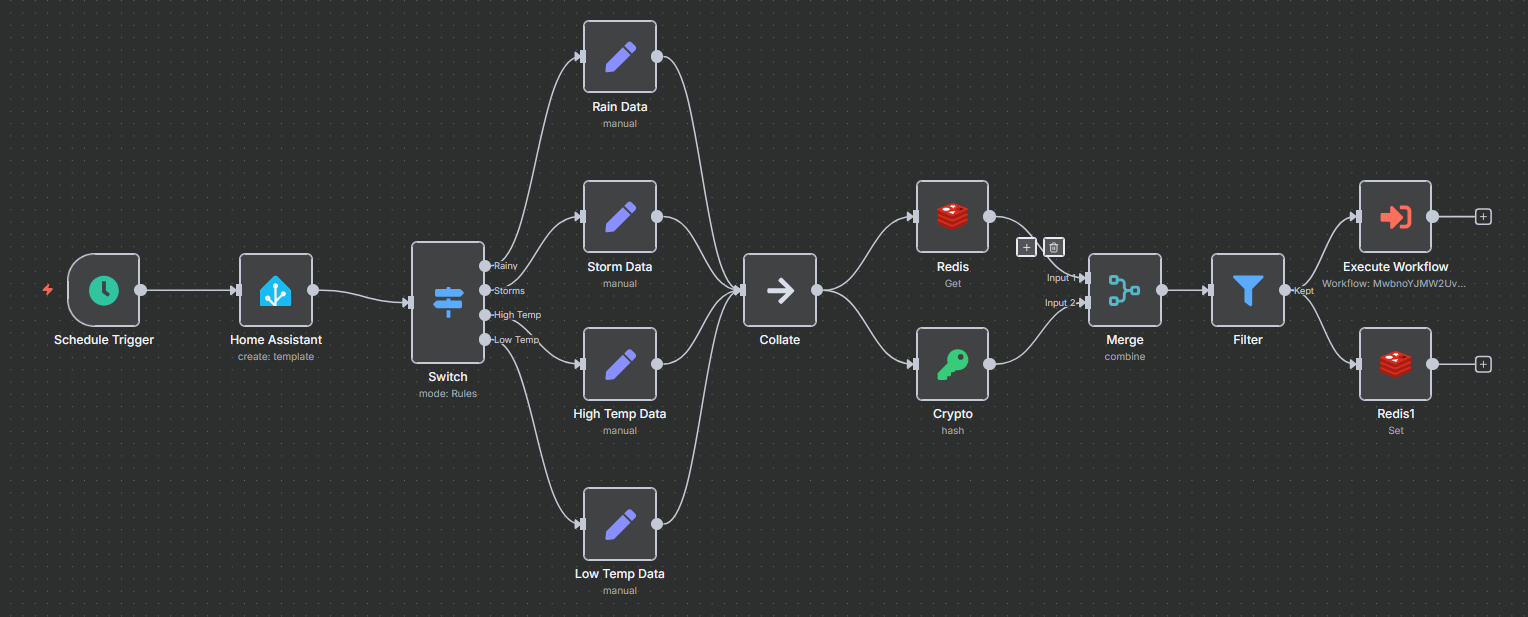
This workflow triggers every hour, gets the weather forecast from HomeAssistant (which gets it from the BOM) and then posts it too my calendar depending on what I want to know (will it be extremely hot, extremely cold, rain or storms). The Redis and Crypto is to make sure that I don’t repost to my calendar this event.

The RSS Feed Trigger. This takes itnews.com.au and extracts the relevant text HTML segment and sends it to Claude for summarisation. It then posts to my Matrix Server the result. The If Statement basically says “if you got no text from the HTML extraction, don’t waste claudes time”.

This is my travel time calendar event creator. Basically get the calendar events, get only the events associated with the calendar. If a “leave by this time” event has been created move on, if not, ask Google Routes API to work out how long it will take. The create a calendar event in Home Assistant and my Google Calendar.

Now this one is big, so I may not explain the whole thing.

The scheduler. The jist here is, get all my calendar events and ask AI to work out if I’ve got my children on this day (single dad here). If I do have the kids create events for school pick up and drop off and then ask AI to make a schedule for the day fitting those events in. Once the schedule is done ask AI to create Calendar events if they don’t already exist (also calculating the appropriate travel time).

A repeating calendar event works, except when I’ve got to pick up the kids when their mum can’t or a special occasion, etc. The AI makes sure relevant timings and other scheduled events fit around those times. It also triggers the “kids are here” flag in Home Assistant.

Why I love N8N

  1. Drag and Drop: It’s drag nodes, connect with wires and if things get too tricky put in some Python/JavaScript code.
  2. AI Usage: The nodes are so simple, want it summarise something, there is a node for that. Want to use a different LLM, change which model it’s hooked up too.
  3. You can see the data in the flows: My one big issue with Node-Red is the fact I can’t see the data I’m working with in each node. N8N does.
  4. Pin test data: One click and your data set stays there to experiment against. Got a bad workflow? Go to the failing execution and press “Debug in editor”. Every node has the data there and you can pin the previous nodes output for use in debugging.

My only caveat here is: Node-Red is great for HomeAssistant workflows, N8N is great for everything else.

Absolutely awesome, thank you for sharing, @shirbo!

Several cogs are already turning in my head after seeing your detailed use cases and workflows. Will have to try and get n8n installed at home over the coming days to actually have a go building a few workflows myself.

There is a N8N package for NixOS :slight_smile:

environment.systemPackages = [
pkgs.n8n
];

Maaaate, if I hadn’t met you in person, this is what i’d be picturing…

Apologies @shirbo , i’ve just worked out (with some help from @zeeclor ) that i’m getting my Matt’s confused. I confused you with @Kangie . I writing a post-it note crib sheet to decode Discourse handles to the correct “Matt”.

Any chance we’ll meet you at Chermside this month, or maybe online next week?

Ha ha that’s ok. still enjoyed the picture.
I’m a maybe for both at this point. More likely I’ll get to the in-person. Just need to work out if the agenda and start times are right. it says 18:30 start, but the agenda is from 19:30…
Any help?

@shirbo 18:30 start - I’d say the agenda is a typo. Would be awesome to see you there.

I couldn’t get n8n going on NixOS yesterday and spent a bit of time debugging, but I’ll put that down to me having a bit of “night shift brain” rather than anything wrong with NixOS itself.

However, I came back to n8n this morning and instead threw the Docker version on a spare Raspberry Pi 4 to mess about with for a couple of hours.

In the spirit of converting this from “screwing around” to “science” (with thanks to Adam Savage), I’m now writing it all down :joy:.

I managed to get a few random odds and ends going this morning without too much issue. I decided to focus less on the calendar side of things as @shirbo’s use cases have that covered (i.e., I already know it’ll be possible to incorporate calendars) and instead decided to cobble together a mix of other nonsense.

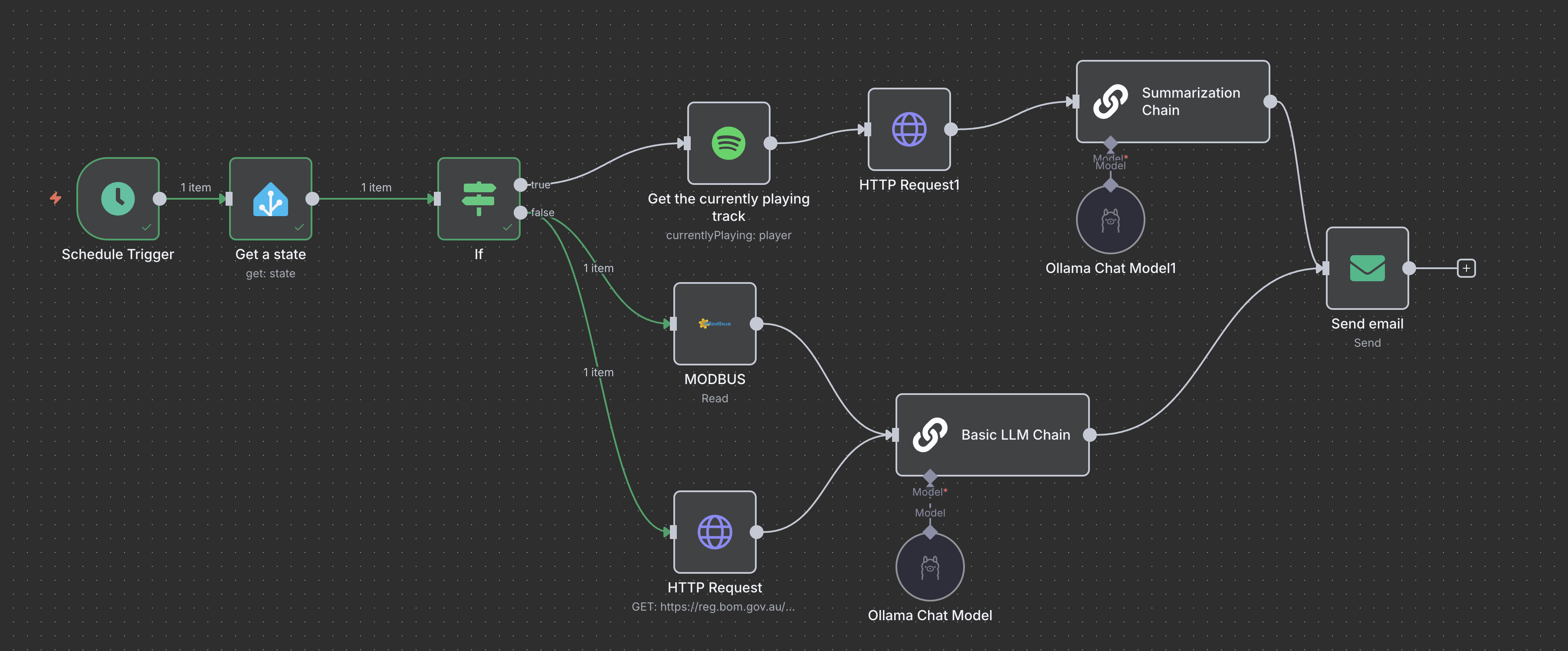
In short, this triggers every hour, and if the light in my office is on, it’ll tell my locally hosted Ollama LLM to email me a poem current wind gust words long, incorporating the number total solar energy generated today. If the light in my office is off, it’ll tell Ollama to email a summary of the Wikipedia article about the current artist of the song I’m listening to on Spotify.

Yes, that’s absolute nonsense, but it was an interesting test of:

  • Getting self-hosted n8n going
  • Sorting out the SSL side of things (n8n and Spotify are both strict about API calls over SSL)
  • Pulling data via Modbus out of my solar inverter
  • Using a n8n Community Node (the Modbus one)
  • Creating an application via Spotify developer account and querying the Spotify API in n8n
  • A few basic HTTP requests (BoM, Wikipedia), SMTP (Send email), and using LLM functions in n8n
  • Querying my local Home Assistant

Next step will be to explore some real world use cases and fold n8n into a VM for “production” use. I particularly like the travel time calculation use case of @shirbo’s, so I might start there when I have time to get n8n up and running for some non-whimsical real world uses.

With that, I leave you with a 38 word long poem (38 knot gusts), incorporating the number 9 (9kWh generated) I just received:

Nine wonders in the night,
Each one a guiding light,
The stars above shine bright,
Painting constellations white,
The ocean’s waves below,
A rhythm slow and steady,
Time stands still, I feel anew,
Life’s journey endless view,
In nine, we find our way.

3 Likes

Tell Ollama not to quit it’s day job.

3 Likes