I was away from home in yesterday’s storm and my system went down. When I got home most computers were up and functioning normally suggesting they had not rebooted.
I went into my comms room (AKA our walk in wardrobe) and noted that both POE ports to the Ubiquiti access points were out as well as one wired connection. However the rest were up. Lying on the floor was the internal cover for the skylight in that room suggesting a lightning strike of some force had hit on or near the building.
I also have an older Edgerouter 24 Lite managed switch and have in the past seen its main trunk port turn off. I have not identified the circumstances in which that happened.
I presume the cause for the Edgerouter is age and a lightning strike for yesterday’s disruption.
Did you get much hail up your way @zeeclor ? A friend of mine showed me a video with baseball sized hail stones. I’m wondering if that could have been the cause of your skylight coming down rather than lightening.
Hopefully the storm yesterday didn’t do too much damage. It was pretty wild here, but I know other parts of Brisbane copped it a lot worse. My only issue was leaving a window open and having to do a big cleanup of water and other muck that had come through and gone everywhere .
As far as lightning damage, etc. goes, I’ve never had any equipment damaged touch wood. It’s worth noting that there’ll almost certainly be damage if there’s a direct lightning strike to your house, regardless of any sort of surge protection or lightning protection. For the other transient power spikes and dips or strikes nearby, I wonder whether I’ve just been lucky or whether I’ve not had an issue because I’ve always had a UPS in front of anything critical.
If your gear came back okay after a power cycle, it’s possible that power fluctuations may have just “confused” the equipment and the physical hardware is fine.
While being the Eastern States reseller for Ubiquiti for a decade, I gained a lot of lightning experience and specialised in manufacturing lightning proof wifi gear.
Plus I heard a LOT of ad-hock lightning stories from clients.
I have learnt the following rules:
Lightning is unpredictable and lightning damaged equipment is not worth repairing, because it can’t be economically warranted.
if lightning strikes anything, you’ll have no doubt it was lightning from the damage, burns and explosion. Otherwise the damage is just hail or the sound pressure from a loud thunderclap.
Only shielded and earthed Cat5/6 can protect you from lightning caused dead ports on network equipment. Unshielded network cable is useless and should only be used up to 2m as that’s about as long an antenna as network gear will tolerate.
Unshielded Cat5 cable being located indoors offers zero protection from the ligntning EMP if over 2m in length
Terry
PS. Age under a decade shouldn’t affect an Edgerouter or any electronics. I still have a TI solar powered programmers calculator made in 1984 that works perfectly.
Ironically, there was a lightning storm here as I wrote the above post. Just after I hit send, a large area of the Northern Rivers was blacked out for 2.5 hrs, including mine.
So I got to spend 2.5 hrs watching the lightning show and the rain in the dark
… and couldn’t even use your solar power TI calculator.
In retrospect I think the lower end of the walk-in wardrobe skylight was dislodged by a good “shake” of the house. There was no water ingress in that room and the cover slipped back almost too easily.
I suspect @Belfry is right about the power surge / dip. A simple power cycling got everything back up and running. I have a power surge protector on the TV, for what that’s worth, but no current UPS on the servers. We discussed UPS a year ago but did not come to a conclusion. Perplexity suggests units like the APC BR1000MS or the CyberPower CP1600EPFCLCD or the Eaton 5S and I guess I’ll go for one of these.
@jdownie I was away at the time of the storm but today my wife noted the other skylight had shattered on the roof end of the tube and there was some water in the stairwell so I think that must have been hail.
Getting down into the weeds, but I’ll mention that these are all line-interactive UPS units rather than double-conversion units. Nothing wrong with that, and virtually everything in this price bracket is going to be line-interactive.
A line-interactive UPS monitors voltage fluctuations and switches the outputs over to the battery if necessary, usually within <10ms. AC power comes straight from the input and through to the output unless a fluctuation or outage is detected, in which case the UPS unit will switch over to batteries. However, a double-conversion UPS is essentially always “running on batteries”, as they continuously convert incoming AC power to DC (charging the batteries) while converting DC back to AC (discharging the batteries). The latter style has more isolation from the mains power and therefore will have better protection from lightning, etc. or power fluctuations for particularly fussy equipment. If the UPS type is not advertised, a way to spot the difference is to look for a Transfer Time (or similar) in the data sheet. If there is any time listed in the specifications, no matter how quick, then it’s not a double-conversion unit. Double-conversion units do not have a transfer time as they’re always running on batteries, so to speak.
Does this matter in a home (or even most commercial) context? Will you notice the difference as far as keeping a computer or router online during a power outage or storm? Almost certainly no. Neither style of unit is going to be very happy with a direct lightning strike either. However, given that the discussion started around lightning protection I thought I’d add the difference between line-interactive and double-conversion into the thread as the latter might cover some of those edge cases better.
For what it’s worth, I’d add ease/cost of replacement batteries to the wish list if and when you go UPS shopping. If you’re comfortable doing a bit of work to move over oddly shaped enclosures and non-standard connectors, the Jaycar SB2487 has been a reliable choice when I’ve replaced UPS batteries, and is certainly far cheaper and more readily available than the manufacturer branded battery packs.
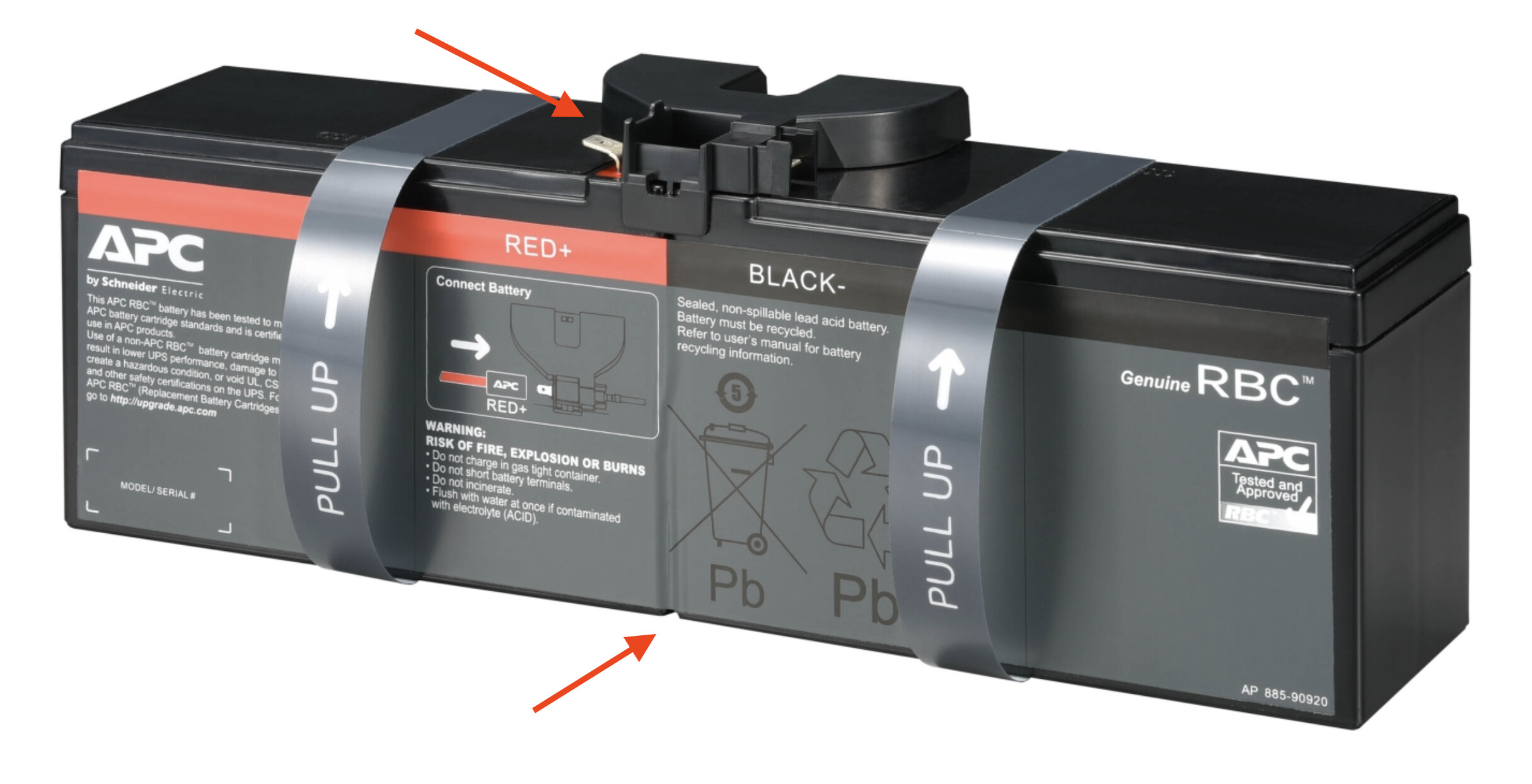
A random APC unit from the SE website takes a replacement battery which visually looks to be a distinct shape in the picture, and has lots of Google results for “Price on Application” or “Contact us for a Quote”.
A similar Eaton unit (brief look - I haven’t done a deep dive into the specs vs. the APC) takes two batteries that look like this and seem to be around the $60 mark in Eaton brand.
I haven’t done a detailed dive into the specifications, but at a glance, one of those looks to be proprietary and the other looks like the kind of thing that 2x $40 parts at Jaycar might work nicely with , and will avoid the hassle of trying to source and ship very heavy SLA batteries from somewhere online.
Batteries will last 2-3 years - my point was to consider replacement batteries as part of the total cost of UPS ownership. If it’s too much of a pain to replace the batteries it’ll be useless after ~3 years rather than something that will probably quite happily run for a decade or more. My main UPS is on its fourth set of batteries and is 10? 15? years old at this point.
(Edit: I’ve just had a second look at the APC battery and the corresponding data sheet. It looks as if it’s two 6V batteries in series or two 12V batteries in parallel. There are standard terminals visible, and a visible join under that sticker too. Depends how keen you are to do…
…but it looks like it’d be possible to shoehorn something from Jaycar into the APC unit as well. It’d definitely be a lot more work than the Eaton.)
 .
.


 , and will avoid the hassle of trying to source and ship very heavy SLA batteries from somewhere online.