Printing Press - allowed people to publish works that were instrumental in overthrowing authoritarians.
To me the printing press lowered the cost of knowledge dramatically, making it available to the common man.
I believe the printing press has just been replaced with a vastly cheaper and more accessible technology.
AI
>>> explain in german how "a light bulb works"
Natürlich! Hier ist eine Erklärung, wie eine Glühbirne funktioniert, auf Deutsch:

---

Eine Glühbirne arbeitet auf dem Prinzip der Elektrischen Wärme. Hier sind die Schritte, die dabei vorkommen:

1. **Stromversorgung**: Wenn Sie den Stecker einer Glühbirne in das Netzsteckdose stecken und den Schalter einschalten, läuft elektrischer Strom durch
die Leitung der Glühbirne.

2. **Heizfaden**: Der Strom fließt durch einen dünnen Draht, der als Heizfaden oder Glühfaden bezeichnet wird. Dieser Draht ist normalerweise aus
Edelstahl-Lamellen oder Wolfram bestehen und hat eine sehr hohe Widerstandswert.

3. **Wärmeentwicklung**: Durch die Stromfluss durch den Heizfaden entsteht Wärme aufgrund seines hohen Widerstands. Je mehr Strom durchläuft, desto
heißer wird der Heizfaden.

4. **Elektrische Entladung**: Der Heizfaden wird so heiß (ca. 2500 Grad Celsius), dass er sich selbst leuchten lässt. Die extreme Hitze bewirkt, dass
Elektronen aus dem Metall des Heizfadens entwandern und einen Leerlauf bilden.

5. **Lichtemission**: Diese entwichenen Elektronen treffen auf ein Gas (in der Regel Argon oder Neon) im Innenraum der Glühbirne. Wenn die Elektronen
mit den Atomen des Gases kollidieren, werden sie angeregt und geben ihre Energie als Licht aus.

6. **Weißes Licht**: Durch die Kollision der Elektronen mit den Gasatomen wird weißes Licht erzeugt, das durch die Glasflasche der Glühbirne emittiert
wird.

7. **Langlebigkeit**: Der Heizfaden ist in einer Inertgasumgebung enthalten, um Oxidation und Korrosion zu verhindern, was die Langlebigkeit der
Glühbirne erhöht.
>>> translate that to english
Sure! Here is the translation of the provided German text into English:

---
Certainly! Here is an explanation of how a light bulb works, in German:
---

A light bulb operates on the principle of electrical resistance heating. Here are the steps involved:

1. **Power Supply**: When you plug the plug of a light bulb into a power outlet and turn the switch on, electric current flows through
the wiring of the light bulb.

2. **Heating Element**: The current flows through a thin wire known as the heating element or filament. This wire is typically made of
stainless steel sheets or tungsten and has a very high resistance value.

3. **Heat Generation**: Due to its high resistance, heat is generated by the current flow through the heating element. The more current that
flows, the hotter the heating element becomes.

4. **Electrical Discharge**: The heating element becomes so hot (approximately 2500 degrees Celsius) that it glows on its own. The extreme
heat causes electrons to be emitted from the metal of the heating element and form a vacuum.

5. **Light Emission**: These escaping electrons collide with a gas (usually argon or neon) inside the bulb. When the electrons collide with
the atoms of the gas, they are excited and emit their energy as light.

6. **White Light**: The collision of electrons with gas atoms produces white light, which is emitted through the glass envelope of the light bulb.

7. **Longevity**: The heating element is enclosed in an inert gas environment to prevent oxidation and corrosion, thereby increasing the
longevity of the light bulb.

---

In summary: A light bulb converts electrical energy into heat and then into light by means of electric current flowing through a highly resistive
heating element.

---
My daily driver machine on the desk is an Apple M4 with 32GB RAM, which runs Ollama really well. I ultimately plan to move any AI stuff I want to keep running locally over to my older M1 machine or to another x86-84 based unit at some stage.
I did a bit of reading last night and came across LM Studio as an alternative to Ollama. I believe both Ollama and LM Studio were based on or at least have substantial chunks of llama.cpp under the hood, but LM Studio has Apple MLX support, which I understand should mean it’s using more of the M4’s capabilities (e.g., the 16 Core Neural Engine) than Ollama is. MLX support isn’t far away on Ollama, apparently (can’t find the thread on GitHub I was looking at last night, but it’s seemingly not too far from release).
To my surprise, in some quick tests this afternoon, the same prompt into the same qwq 32B model using Ollama and LM Studio gave me results of 1.35tokens/sec and 0.92tokens/sec respectively. I certainly haven’t done any extensive testing at all, but I didn’t expect LM Studio to be substantially slower.
Has anyone here played with LM Studio when running local models at all? The interface looks easy to use, and it seems like a decent alternative. I’m curious if anyone else is experiencing the same performance differential or if they’re substantially similar on non-Apple hardware.
I am not much of a gamer but am interested in LLMs. However my machines range in age from 6 months to 12 years. I was therefore interested when I recently came across eGPUs. These enable the option to upgrade to a new high end NVidia card, if and when the become “affordable”, or to other alternatives as they emerge.
No direct experience with eGPUs myself, but as I understand it you’re having to buy the GPU itself plus a Thunderbolt enclosure*, plus a Thunderbolt card if you don’t have TB capability already. For the multi-hundreds of dollars spent on an enclosure, you might get better value for money for a separate ex-government PC from one of the usual sellers + a GPU slotted in once it arrives.
I’ve always had the impression that the eGPU stuff was a bit janky and never really caught on given the requirement for a Thunderbolt capable PC*. For the cash outlay, a new (second hand/ex lease etc) PC is probably a far better starting point.
Having said all that, if you’ve got relatively modern machines (i.e., 6 months old) then experimenting with some of the smaller models without a dedicated GPU isn’t going to be an issue at all if you just wanted to tinker with them before committing the cash.
Cheers
(*or a nest of breakout boards from miniPCI-E and probably extremely limited number of lanes and heavily constrained performance as those slots were only ever meant for a wifi card etc.)
Actually fellas …
I’ve discovered there is a BIG difference between slow old ‘all back of the bus’ AI like my home setup and SERIOUS big iron like Claude-3.7-Sonnet via a free (somewhat limited) or subscription service. It’s like the difference between a sneeze and a thermonuclear bomb!
Would you rather spend a month with a free AI that was trained on data in 2021 (quencoder) designing and debugging a old design, or 15 minutes with the latest up to date code on a seriously complex application design?
I’m now on my second working Nvim plugin, coding in Lua, and I don’t have a clue about Lua, never learned it, but I’m sure learning it now as I debug the Claude designed application without Claude (no credits).
So see poe.com and sign up for a free account. You have to give a phone number but that’s all. You get free access to every AI there is at the rate of 3000 free points a day, which actually go a LONG way.
My son Sam hassled me to try poe.com as he’s been a heavy AI user for years, and I finally relented, now I realize I should have done it sooner.
P.S Sure, Quencoder or Deepseek are a million times better than Google and you don’t need to be online or share your data, and I haven’t changed my mind about that. Or used Google for at least a month now.
I’ll add to that only to say that for the money spent on an eGPU, you could buy a lot of credits with a commercial service, which will be orders of magnitude quicker than anything you could do at home. As Terry pointed out, the free services and available credits will go a long way too, so you may not even need to outlay a dime.
I’m more interested in the “technical play” element of it rather than the actual AI outputs. If you’re intending to do actual work with the AI, then free or negligible services will almost certainly generate a better outcome.
These are wise words and reflect the economics of expensive hardware to run a service that is used occasionally by an individual but which is increasingly requested by millions of people around the globe.
The only, but significant, advantage of running locally is privacy. Like @belfry I have been trying to deMicrosoft, deAmazon and to a lesser extent deGoogle my life (not to mention deNetflix, deStan and deApple) but my major fear is that I an now totally Perplexed.
Don’t despair dear David, desperate times demand dedicated developers!
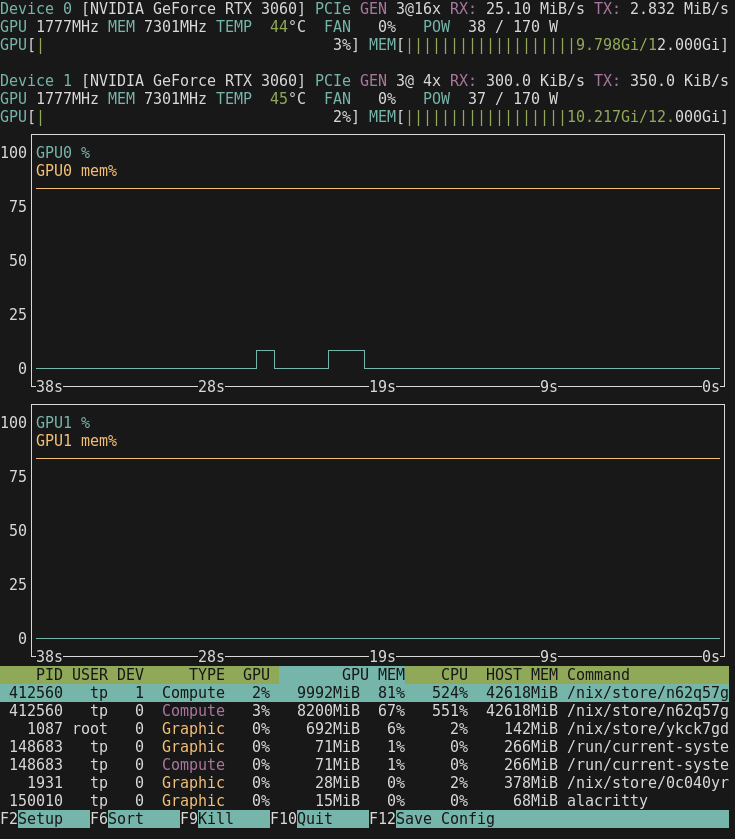
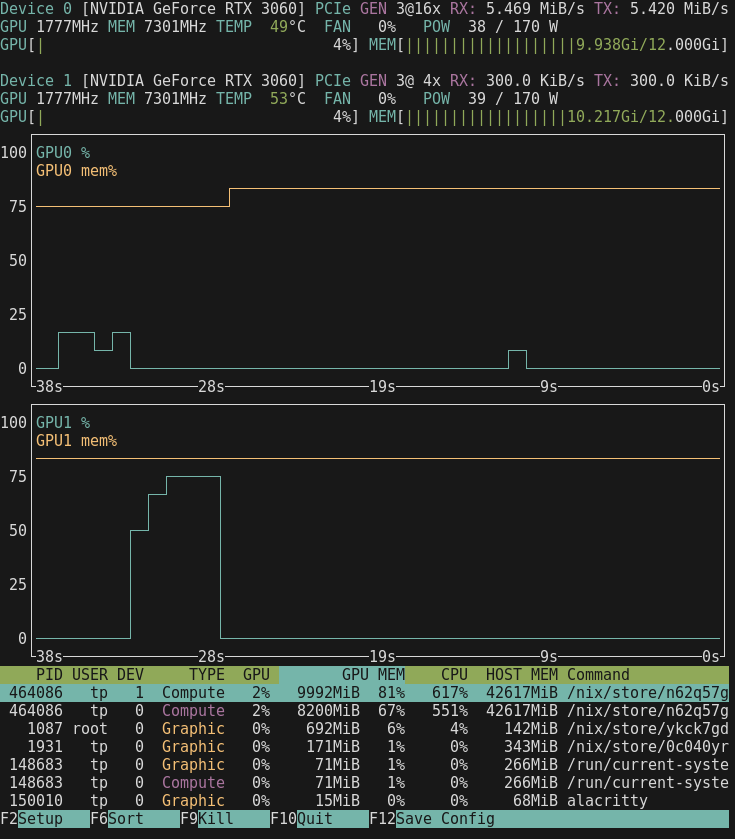
I have proven to myself, that a single Nvidia RTX3060 in the lowest end Ryzen pc with 64GB ram runs everything Ollama under Linux, the bigger models are slower and require one wait a while, but they’re 100% stable.
Just pretend you’re compiling Openoffice
And it’s the perfect Google replacement. It literrally seems to have the entire knowledge of the universe in it … up to 2022.
Without getting too off topic, and without wanting to invoke a cliché - I’ve come to accept that this is a journey and not a destination. I’ve been seriously working towards migrating to non-big tech alternatives for around 2 1/2 years now, and it will be ongoing for some time yet. It also involves compromise. For example, Organic Maps is a terrific Google Maps alternative and supports every feature I need, but doesn’t have live traffic updates. It’s inconvenient, but for my use case it merely means “if it’s peak hour, leave 10 minutes earlier”. I’ll still get excellent quality offline maps and full navigation instructions, turn by turn, while driving. I have found that overall deGoogling/deAmazoning/deMicrosofting/etc. has meant that I still get to use all the wonderful modern innovations, I just have to think a bit harder about what goal I’m actually trying to achieve.
To come back to the AI discussion, if your goal is a local LLM because you value privacy above all else, don’t be afraid to try a smaller model on an older local machine or VM. I’ve found that knowing that a response might take 10 minutes actually forces me to be more mindful about my prompts. For example, “What day has the least number of public holidays?” might become “I want to set up a regular weekly bank transfer between NSW and Queensland. Over the next 30 years, which day of the week has the fewest number of Australian national and Queensland/NSW state based public holidays, to ensure that this transfer is not delayed?”. I’ll get the latter answer in one go, whereas the former will likely involve several rounds of back and forth between the LLM and I, and probably 5+ minutes between each response.
If your goal is to tinker for a bit, an older machine or VM might suit, as would spinning up an AI optimised VPS for a day or two to play. If your goal is quick responses based on the bleeding edge models with access to public internet sources, sign up to one of the commercial services for free or a low end paid account. If your goal is offline portability, then a beefy laptop and/or eGPU might fit the bill. Better yet, a combination of a few different options might work well together depending on what you’re trying to achieve.
Second this - my 13 year old HP machine (3rd gen Intel) + GTX1050 is quite capable. Don’t be put off - if your machine can load the model into RAM, it can work with it using Linux and Ollama just fine.
I learned only yesterday that open-webui is the new ‘ollama’ and it can accept documents and supply them, so I then recalled your post and thought, 'great, I’ll just install open-webui on Nixos and it will save me a LOT of time having my local AI process documents for me.
That was wishful thinking unfortunately, because:
Nixos internals are write only, and of course open-webui just has to write something there.
A hour or 2 later, all avenues exhausted, the AI’s didn’t have anything to offer, so I thought I’ll use a Docker!
4 hours later, with some kickarse help from ‘kimi-2’ on poe.com I’ve finally got it working in a Docker, AWESOME!
Thanks for the tip, Belfry!
PS, installing open-webui docker pulled in 5GB of data !
Thank you for the tip, @techman. My Open WebUI instance is still running on a Debian VM, but if I ever move it over to NixOS I’ll know where the traps are.
open-webui is slow, on Nixos it needs Docker and 5GB of downloads, then it somehow stopped one of my RTX3060 GPUs from working with Ollama.
Then I noticed that the file reading facility required I was on line, and data was scurrying out the OpenWRT traffic graph when I used it. I disconnected and tried to read a file, ‘sorry I can’t read files’ said the LLM.
So Open-Webui is all gone now, was fun while it lasted
I wonder whether NixOS is pulling the docker containers in each build? That might explain the high download usage.
You piqued my interest, so I’ve just had a bit of a play and got the Python version of open-webui running in a NixOS VM to test it out. Be aware that the packaged version in NixOS is quite old, but still perfectly functional.
I’ve not done a full sanity check of this, but the below entries from configuration.nix worked fine for my quick and dirty test use case - open-webui running on its own machine separate from the ollama API running on another NixOS machine (see the ongoing thread about that). I cobbled it together relatively quickly using a combination of https://docs.openwebui.com/getting-started/env-configuration and NixOS Manual: Appendix A. Configuration Options. Please check my work and provide any feedback or modifications, especially if there’s something glaringly daft in there!
I made a working directory for open-webui in my home directory (.openwebui) for it to write its stuff to, and I also disabled authentication for my test. I believe this is irreversible, so definitely comment out that line if you want to keep authentication!
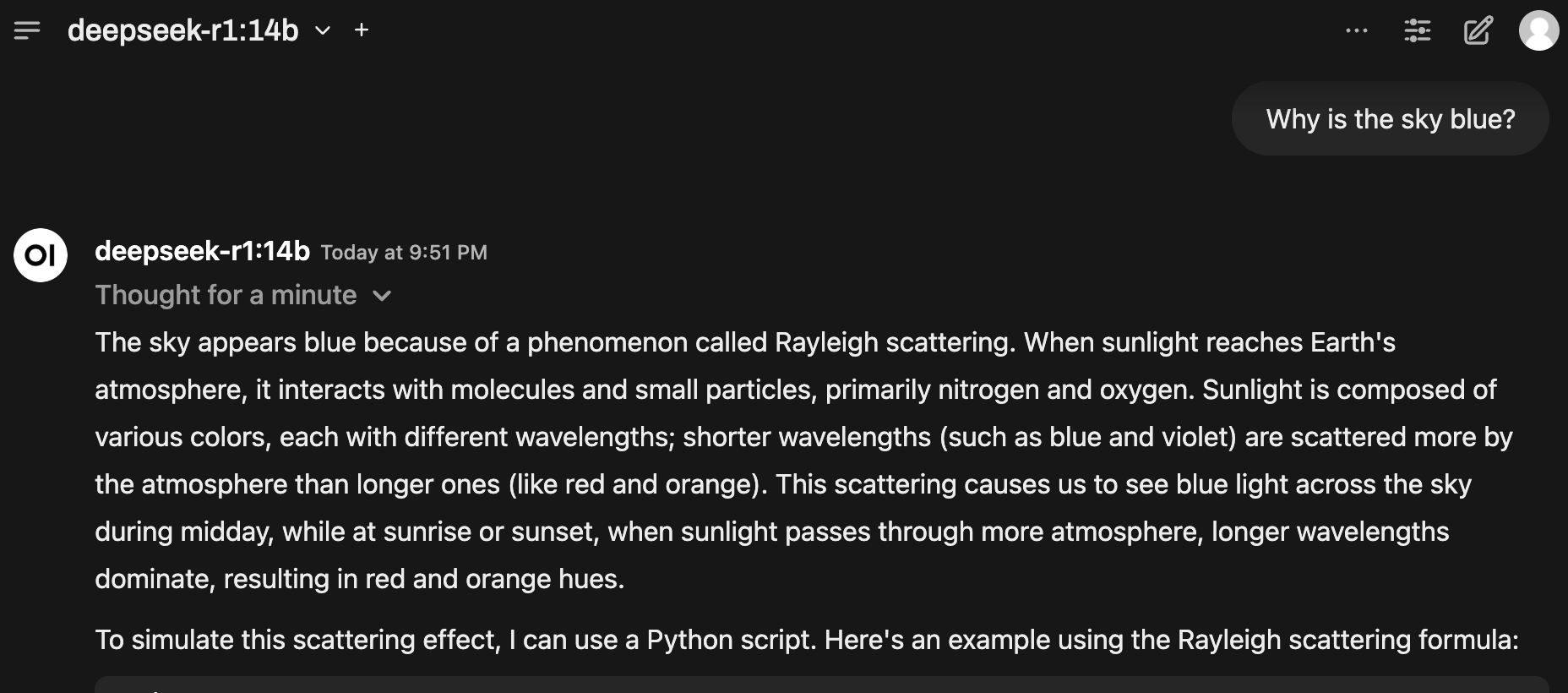
>>> why is the sky blue
The sky appears blue due to a phenomenon called **Rayleigh scattering**.

Here's what happens:

1. **Sunlight contains all colors** - White light from the sun is actually made up of all the colors of the rainbow (red, orange, yellow, green, blue, indigo, violet)

2. **Light interacts with air molecules** - When sunlight enters Earth's atmosphere, it collides with tiny gas molecules (mainly nitrogen and oxygen)

3. **Blue light scatters more** - Blue and violet light have shorter wavelengths than other colors, so they get scattered in many different directions much more than longer wavelengths like red or yellow

4. **Our eyes perceive this scattered blue light** - We see the sky as blue because our eyes are more sensitive to blue light, and that's what's being scattered toward us from all directions

This is why:
- The sky looks blue during the day
- Sunsets appear red/orange (the light travels through more atmosphere, scattering away most of the blue)
- The sky can look different colors in different conditions (cloudy, stormy, etc.)

It's the same reason why distant mountains appear bluish and why the ocean can look blue too!
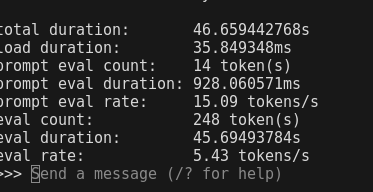
I anticipated a glacial response, but it was actually quite fast as you can see below.
ps. Belfry, thanks for that Ollama test, I was bummed that it went so poorly (even if I did everything wrong … nothing unusual there! ) so you’ve inspired me to try again using your method.
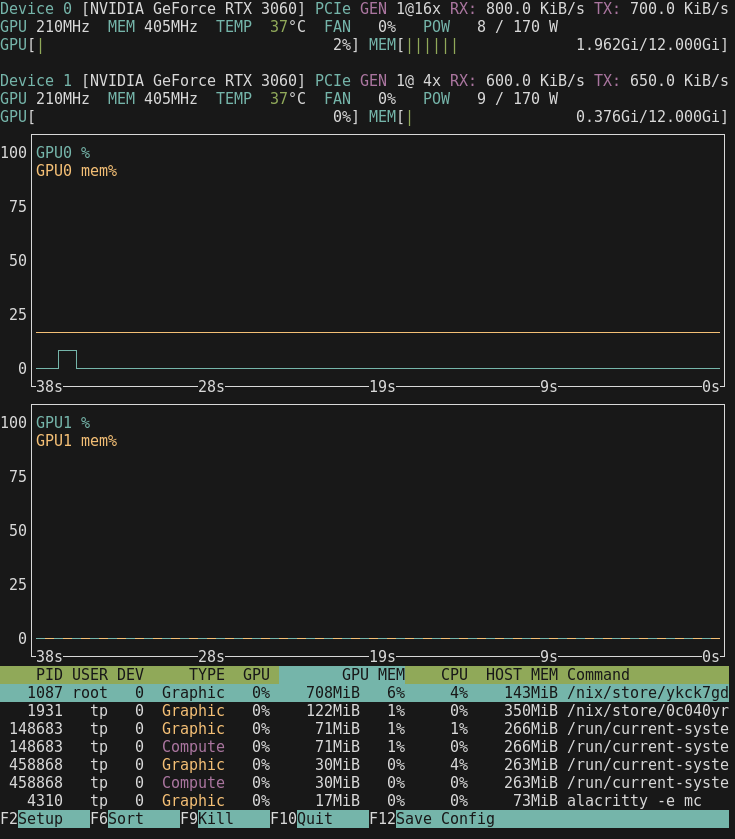
Finally a pic of the load when the AI isnt doing anything
I’m curious to see how that same test goes with Flash Attention enabled (~10% increase in performance on my build). Can be enabled on NixOS using environmentVariables, example below:
Sadly I don’t run it as ollama (just tp) and doing this resulted in it wanting to dl the whole AI image again, which takes too long, so sorry I couldn’t test it.
Interesting. 13 tokens vs. 14 tokens in the test is fascinating too. Same prompt for both? If so, I wonder whether everything is being evaluated slightly differently with Flash Attention enabled. I didn’t experience that in my tests a few weeks ago.
My limited understanding of Flash Attention is that it is ultimately a more efficient way of transferring data around the GPUs (e.g., batching transfers and ordering transfers slightly differently). Possibly explains the lower memory use.
I tried it out on my MBA M4 on the same day I was playing with it on the P330+Tesla P4 build and got similar results enabled and disabled. What I didn’t test was large amounts of tokens and long context lengths. I wonder whether there’s an immediate performance bump on older hardware, and a performance bump on newer hardware only when there are long context lengths involved.