Hey @skalyan , you inspired me the other week. I took another look at hyprland, and it’s turned out to be a big rabbit hole for me. I’m spending a lot of time on styling waybar to my liking, which involves a lot of .CSS work. I’m also trying to unlearn a lot of i3/Sway habits.
Anyway, I’ve got plenty to share with you when you’re ready. How’s your exploration going?
I’ve set up NixOS on a new laptop, and have just started to get the hang of editing the configuration file (I moved the nixos folder into /home, symlinked it into /etc, and changed the permissions so I don’t have to open the text editor in sudo mode). I haven’t set up Hyprland yet, but have been thinking about how I want it to look! I’ll probably start with Waybar, but then I’d like to be able to design my own widgets for extra awesomeness (pun intended). I’m pretty comfortable with CSS, so it looks like I should be able to pick up Waybar styling.
I’m so glad I have someone learning ahead of me! Looking forward to comparing notes when I see you next.
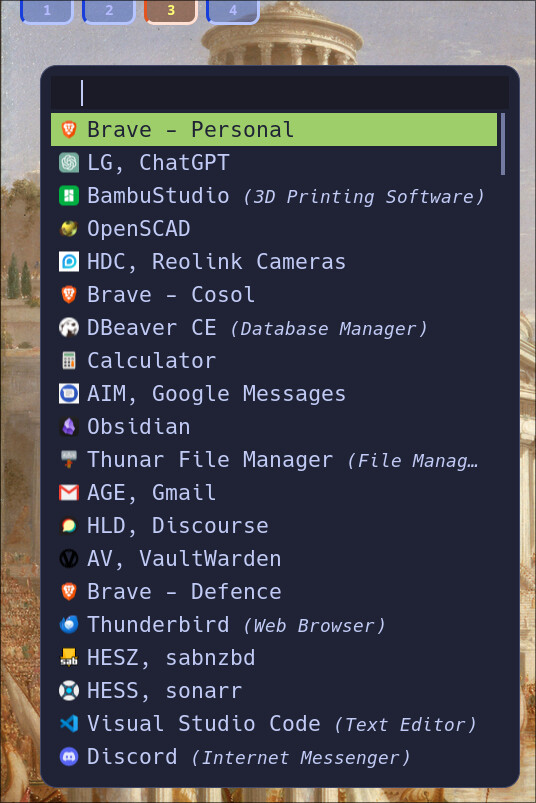
…and was again an exercise in editing .css. That rofi menu benefits from a lot of .desktop files that i’m generating from my bookmarks with a python script, and those .desktop files launch Brave without any frame (as if they are electron apps).
While i’ve been getting carried away on ricing my desktop i also made some improvements to my starship configuration…
The big trick for me at the moment is unlearning Sway.
Anyway, I think i’m ready to start doing something productive again now.
It’s been a while since i’ve played with NixOS. I’m really happy with Fedora for now (until my next tantrum). What you mentioned about moving the config into your home folder and symlinking from /etc sounds clever. Is that a popular NixOS technique? I vaguely remember a bit of sudo when making changes to my config when I played with it last.
Just beware, the lead developer is a young hotshot who has a habit of developing for ease first and security second, and hasn’t historically responded well to vulnerability reports. Here’s one we found downstream:
It’s since been fixed, and I’m not saying don’t use it, just take that into account while you’re deciding whether or not it’s for you.
Thanks for sharing, @skalyan! I’ll have to check out the configuration editors when I’m next playing with NixOS. If nothing else, they may save me from my usual “going around in circles looking for the missing curly brace or semicolon” technique which I seem to use currently…
When recently playing with NixOS, I found myself referring to Appendix A of the NixOS manual several times. Other than it being a monstrous job to build and maintain, that massive list of options probably would translate reasonably well into some sort of graphical interface.
Ooh, an emacs user. I’m a vim die hard, but i’m always curious to learn what i’m missing out on. Is emacs something you’re already experienced with, or on your list of things to master?
I’ve been using Emacs for several years now, but have never properly learned Elisp. I like to write in Org-mode (with LaTeX export) and organise my to-dos with Org-Agenda.
At one point I wanted to set up Org-roam for knowledge management, but now I’m leaning towards Obsidian because of its availability on mobile devices.
In another thread today (that @matthew919 kicked off) i briefly mentioned that i’m using Obsidian. I settled on it because of the Android app. The only trouble was that i couldn’t work out how to use the git plugin on my phone. I keep my obsidian notes in a git repo, and use keyboard shortcuts on all of my desktops to routinely git commit, git pull and git push, but needed a solution for my phone, so…
I set up a container that, when it launches clones my repo into it’s filesystem. It then starts an sshd service so that my phone can connect to it over ssh. On my phone i’m using FolderSync to do a two way sync between the cloned repo inside the container and a folder on my phone. Finally, i have a loop running in that container that is routinely running git pulls inside the container (in case there have been changes from any of my workstations). It also checks to see if any files have been modified (because of changes that have come in from my phone), and if there are, git adds, git commits and git pushes.
I’m a little embarrassed to explain in full how much time i burned creating a solution when the sync service that they offer isn’t that expensive. But just paying for another subscription wouldn’t have been very challenging



 .
.