Hi techman,
I coincidently went down a similar path for the first time last week, on a significantly slower i7-3770 + 16GB RAM + 4GB GTX 1050Ti. I used Debian 12 (bookworm). I had a bit of mucking around to get the Nvidia CUDA drivers running so am glad to hear that Mint does a better job of that out of the box. I don’t recall exactly what I did in the end, but I think I ended up enabling the non-free and contrib repositories rather than trying to install the packages from the Nvidia site.
If you haven’t already, check out Open WebUI GitHub - open-webui/open-webui: User-friendly AI Interface (Supports Ollama, OpenAI API, ...) · GitHub as a frontend for ollama. It’s utterly brilliant and provides a “ChatGPT-like” web interface to ollama. I loaded several models to test out (chosen entirely on available RAM in that machine) and queries can be run in parallel against two models at once and/or selected via a drop down in the Open WebUI interface:
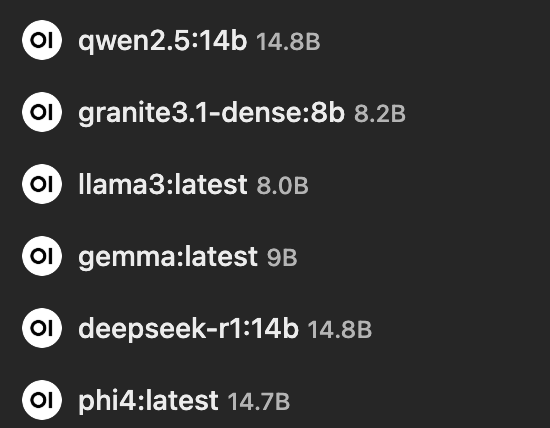
The models I tried out (and their parent organisations) were:
[Alibaba] qwen2.5 (14b parameters)
[IBM] granite3.1-dense (8b paramaters)
[Meta] llama3 (8b paramaters)
[Google] gemma (7b parameters)
[Deepseek] deepseek-r1 (14b parameters)
[Microsoft] phi4 (14b parameters)
I found that although there’s an option to load models from Open WebUI, it was more reliable to do them via the command line through ollama pull [name]. It was absolutely fascinating to see the different responses to the same question from the different models, albeit very slowly on my hardware!
It hasn’t been any more than a toy for me yet, but I’m curious to hear what real world uses you have for ollama and what your thoughts are on the different models.
Cheers,
Belfry